Migrated WordPress and can’t upgrade WP or plugins (cannot create directory)
-
I moved my WP page from a very old virtual machine (Fedora 16) to a new CentOS7. Migrated files/database, so far so good. The site works as-is on WP4.8.6
I try to upgrade and got prompted for FTP. So, I added “define(‘FS_METHOD’, ‘direct’);” to wp-config and then I got the following:
Downloading update from https://downloads.wp.xz.cn/release/wordpress-4.9.5-no-content.zip…

Unpacking the update…

Could not create directory.

Installation Failed
Plugin upgrades fail similarly. HTTPD is running as “apache” and the directory is recursively owned by apache:apache.
The wp-content directories are writable. Head-scratch.
I manually install the plugin “health check” and it tells me a bunch of files aren’t writable.
It also complained about old PHP, so I upgraded to 7.1.8 with the centos-release-scl repo https://arrfab.net/posts/2018/Feb/20/using-newer-php-stack-built-and-distributed-by-centos-on-centos-7/ (which now gives me mcrypt errors, but that’s another issue). WP recognizes the new version of PHP.
Same problem.
I checked the
www.conffile and php7 is indeed set to run as user:group apache.What else can cause this? It’s all on a single VM I have full control over. Could SElinux be the issue? I saw some mention of PHP7 needing an open port, but this is all localhost so IDK.
sudo -u apache touch wordpress/wp-content/upgrade/test.txtworks.Well, that’s how I spent my evening. Any thoughts?
-
This topic was modified 8 years, 2 months ago by
luminarycrush.
-
This topic was modified 8 years, 2 months ago by

-
Hello, luminarycrush, & welcome. My thoughts are that your file ownership, permissions, or both are incorrect. If I were a betting woman (I’m not, I hate losing money, & I don’t have any to lose), my bet is that it’s your ownership. All files in your WordPress & subfolders need to be running under the webserver user/group. You should likely have your user join the webserver group, unless the user is the only one who will be running a site on your machine, in which case the site can run under the webserver user & group. Change the ownership of all files in all WordPress folders to reflect that.
Please let us know if that isn’t clear.
As I mentioned above, this is not the case.
$ ps -ef | grep httpd
apache 9490 30232 0 15:30 ? 00:00:00 /usr/sbin/httpd -DFOREGROUND
apache 9491 30232 0 15:30 ? 00:00:00 /usr/sbin/httpd -DFOREGROUND
apache 9496 30232 0 15:30 ? 00:00:00 /usr/sbin/httpd -DFOREGROUND
apache 9498 30232 0 15:30 ? 00:00:00 /usr/sbin/httpd -DFOREGROUND
apache 9500 30232 0 15:30 ? 00:00:00 /usr/sbin/httpd -DFOREGROUND$ find . -ls|more
1236130 4 drwxr-xr-x 9 apache apache 4096 Apr 5 17:29 .
1236132 4 -rw-r–r– 1 apache apache 3286 Jun 11 2016 ./wp-cron.php
4247615 4 drw——x 2 apache apache 4096 Jun 11 2016 ./jail
8637147 4 drwxr-xr-x 8 apache apache 4096 Apr 5 00:29 ./wp-content
1236133 0 drwxr-xr-x 10 apache apache 96 Apr 4 21:57 ./wp-content/uploads
4247625 4 drwxr-xr-x 14 apache apache 4096 Dec 1 2015 ./wp-content/uploads/2015
8637149 0 drwxr-xr-x 2 apache apache 6 Dec 1 2015 ./wp-content/uploads/2015/12
13579754 0 drwxr-xr-x 2 apache apache 6 May 1 2015 ./wp-content/uploads/2015/05
1236134 0 drwxr-xr-x 2 apache apache 6 Jun 11 2016 ./wp-content/uploads/2015/09
4247626 0 drwxr-xr-x 2 apache apache 6 Jun 1 2015 ./wp-content/uploads/2015/06
8637150 0 drwxr-xr-x 2 apache apache 6 Feb 1 2015 ./wp-content/uploads/2015/02
13579755 0 drwxr-xr-x 2 apache apache 6 Mar 1 2015 ./wp-content/uploads/2015/03
1236135 0 drwxr-xr-x 2 apache apache 6 Jan 1 2015 ./wp-content/uploads/2015/01
4247627 0 drwxr-xr-x 2 apache apache 6 Apr 1 2015 ./wp-content/uploads/2015/04
8637151 0 drwxr-xr-x 2 apache apache 6 Jul 1 2015 ./wp-content/uploads/2015/07
13579756 0 drwxr-xr-x 2 apache apache 6 Nov 1 2015 ./wp-content/uploads/2015/11
1236136 0 drwxr-xr-x 2 apache apache 6 Oct 6 2015 ./wp-content/uploads/2015/10
4247628 0 drwxr-xr-x 2 apache apache 6 Aug 1 2015 ./wp-content/uploads/2015/08
8637152 0 drwxr-xr-x 6 apache apache 42 Apr 1 03:22 ./wp-content/uploads/2018
13579757 0 drwxr-xr-x 2 apache apache 6 Feb 1 03:25 ./wp-content/uploads/2018/02
1236138 0 drwxr-xr-x 2 apache apache 6 Mar 1 03:02 ./wp-content/uploads/2018/03
4247629 0 drwxr-xr-x 2 apache apache 6 Jan 1 03:24 ./wp-content/uploads/2018/01
8637153 0 drwxr-xr-x 2 apache apache 6 Apr 1 03:22 ./wp-content/uploads/2018/04
13579758 4 drwxr-xr-x 14 apache apache 4096 Dec 1 2014 ./wp-content/uploads/2014
1236139 0 drwxr-xr-x 2 apache apache 6 Dec 1 2014 ./wp-content/uploads/2014/12
4247630 0 drwxr-xr-x 2 apache apache 6 May 2 2014 ./wp-content/uploads/2014/05
8637154 0 drwxr-xr-x 2 apache apache 6 Sep 1 2014 ./wp-content/uploads/2014/09
13579759 0 drwxr-xr-x 2 apache apache 6 Jun 1 2014 ./wp-content/uploads/2014/06etc etc. All files owned/grouped as “apache”.
This was moved from another, old webserver using tar, preserving all owner/permissions. I have executed chown -R apache:apache <wordpress dir> multiple times after running into this just to be sure.
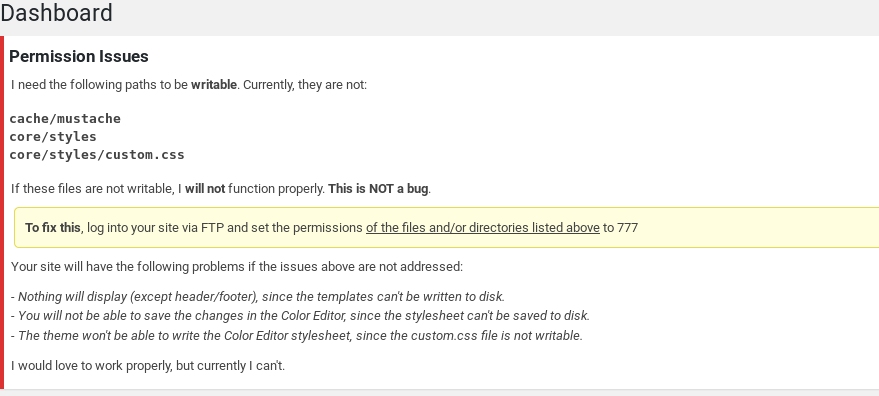
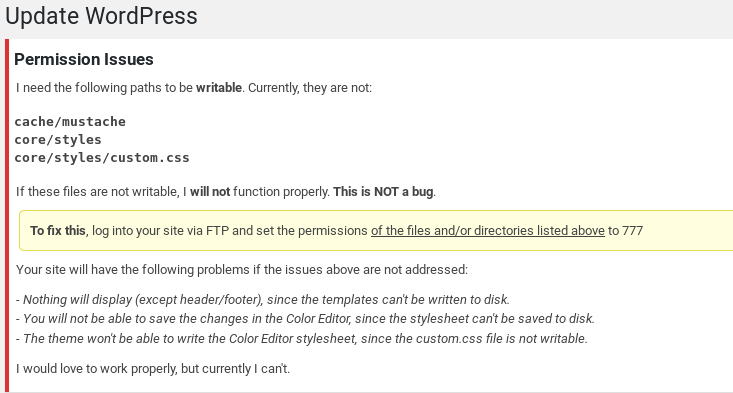
I see this in the WordPress Dashboard:
Permission Issues
I need the following paths to be writable. Currently, they are not:
cache/mustache
core/styles
core/styles/custom.cssIf these files are not writable, I will not function properly. This is NOT a bug.
and yet:
$ ls -la cache
total 4
drwxrwxrwx. 3 apache apache 19 Apr 4 23:41 .
drwxr-xr-x. 9 apache apache 4096 Apr 5 17:29 ..
drwxrwxrwx. 2 apache apache 6 Apr 4 23:41 styles$ ls -la core
total 4
drwxrwxrwx. 3 apache apache 19 Apr 4 22:03 .
drwxr-xr-x. 9 apache apache 4096 Apr 5 17:29 ..
drwxrwxrwx. 2 apache apache 23 Apr 4 23:42 styles$ ls -la core/styles
total 0
drwxrwxrwx. 2 apache apache 23 Apr 4 23:42 .
drwxrwxrwx. 3 apache apache 19 Apr 4 22:03 ..
-rwxrwxrwx. 1 apache apache 0 Apr 4 23:42 custom.csssomewhere else it was mentioned that PHP might be running under the wrong ID. But…
$ ps -ef |grep php-fpm
root 9833 9792 0 20:36 pts/0 00:00:00 grep –color=auto php-fpm
root 27421 1 0 Apr05 ? 00:01:33 php-fpm: master process (/etc/opt/rh/rh-php71/php-fpm.conf)
apache 27422 27421 0 Apr05 ? 00:03:36 php-fpm: pool www
apache 27423 27421 0 Apr05 ? 00:03:25 php-fpm: pool www
apache 27424 27421 0 Apr05 ? 00:03:35 php-fpm: pool www
apache 27425 27421 0 Apr05 ? 00:03:22 php-fpm: pool www
apache 27426 27421 0 Apr05 ? 00:03:19 php-fpm: pool www
apache 27579 27421 0 Apr05 ? 00:03:16 php-fpm: pool www
apache 27583 27421 0 Apr05 ? 00:03:27 php-fpm: pool wwwThe disk is also not full. As I showed in the command above, the user “apache” can clearly write to those folders!!
sudo -u apache touch wordpress/wp-content/upgrade/test.txt
Head, meet wall.
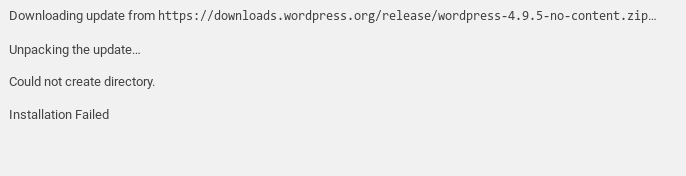
I try to update WordPress via the GUI and get the following:
Downloading update from https://downloads.wp.xz.cn/release/wordpress-4.9.5-no-content.zip…
Unpacking the update…
Could not create directory.
Installation Failed
Any thoughts? This is really has me perplexed.
Hello, luminarycrush. I didn’t mean to bail on you–however, right around the time we were doing this, our newest (& only) grandaughter arrived. Things got pretty hectic, as you might well imagine, & not hearing anything, I thought you’d resolved this. Evidently not. Apologies.
Ok, so let’s start again. Your permissions should be 0755 for files & 0644 for directories, generally speaking.
Your Apache user may not actually be an FTP user, & you should check for that.
You might wish to check this:
https://codex.ww.wp.xz.cn/Changing_File_PermissionsHow are you running PHP, ie, fast_cgi, as an Apache module, etc?
Can we please see your Apache conf file? & what, if anything, are your error logs saying?
Dashboard error message:
https://pangea-systems.com/jas/pub/share/misc/Screenshot%20from%202018-04-30%2020-26-48.pngUpgrade attempt error message:
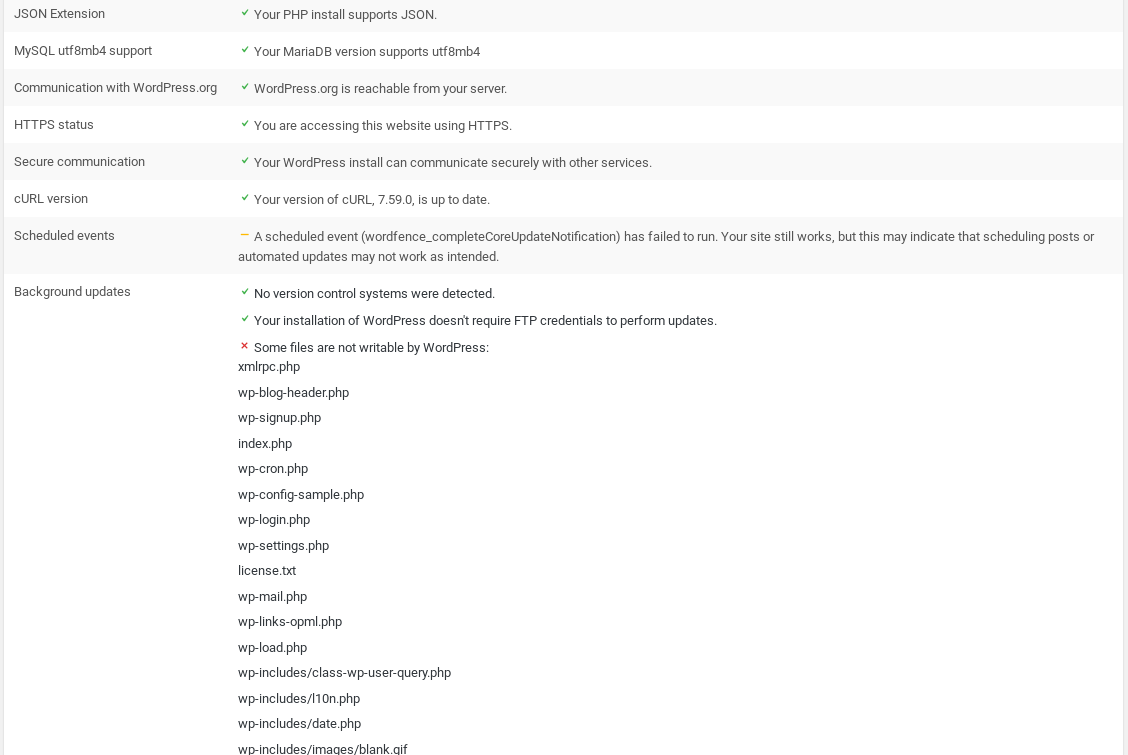
https://pangea-systems.com/jas/pub/share/misc/Screenshot%20from%202018-04-30%2020-27-28.pngIn installed the “Healthcheck” plugin which yields the warnings:
PHP Version 	7.1.8 - For performance and security reasons, we strongly recommend running PHP version 7.2 or higher.

cURL version 	Your version of cURL, 7.29.0, is lower than the recommended minimum version of 7.38. Your site may experience connection problems with other services and ww.wp.xz.cn

Scheduled events 	A scheduled event (tribe_aggregator_process_insert_records) has failed to run. Your site still works, but this may indicate that scheduling posts or automated updates may not work as intended.

Your installation of WordPress doesn't require FTP credentials to perform updates.
    Some files are not writable by WordPress:
        xmlrpc.php
        wp-blog-header.php
        wp-signup.php
        index.php
        wp-cron.php
        wp-config-sample.php
        wp-login.php
        wp-settings.php
        license.txt
        wp-mail.php
        wp-links-opml.php
        wp-load.php
        wp-includes/class-wp-user-query.php
        wp-includes/l10n.php
        wp-includes/date.php
        wp-includes/images/blank.gif
        wp-includes/images/down_arrow.gif
        wp-includes/images/spinner.gif
        wp-includes/images/media/interactive.png
        wp-includes/images/media/default.png
        ...
Those files above are absolutely writable by the apache user. As shown above, httpd and php are running as apache.
I’ve done the below during troubleshooting thus far:
PERMISSIONS
The ‘wordpress’ directory was tar’d from the old server which didn’t have any permission problems and thus the perms were brought forward exactly as-was. The owner (apache) most certainly has recursive write access to everything as I’ve re-applied that just in case. I could check for user/group permissions though it would be a bit tedious, I’m not sure how it could have been changed and is it necessary?
The directories where plugins and WP itself are written to during the upgrade process are writable by the apache user (I showed the test result for that above). I have verified that those directories which it complains it can’t write to are 0777 and it still fails to write to them (see above). So, I am very dubious about there being a filesystem permission issue.
FTP USER
I have full access to the VM, so I didn’t need FTP and, since FTP is highly insecure, I don’t use it. To avoid configuring FTP I followed a few people’s suggestion to change wp-config.php:
/** direct access method **/
define('FS_METHOD', 'direct');
define('FTP_BASE', '/export/htdocs/wordpress/');
define('FTP_CONTENT_DIR', '/export/htdocs/wordpress/wp-content/');
define('FTP_PLUGIN_DIR ', '/export/htdocs/wordpress/wp-content/plugins/');
PHP
WP was complaining that the version of PHP I was running was old. I doubted this was the permission issue, but thought I’d investigate. Sure enough, the standard build for CentOS/RHEL is dated but stable and a lot of plugins want newer. I found a method to install PHP7 on CentOS7 here so I did this: https://linuxconfig.org/how-to-install-or-upgrade-to-php-7-on-centos-linux-server
This didn’t change anything.
APACHE
The only line I changed in the httpd.conf was the Servername directive – otherwise it’s stock CentOS7. I don’t know if you want me to copy/paste that here.
In /etc/httpd/conf.d I have a wordpress.conf directive, which is super simple:
# cat wordpress.conf
#Alias / /export/htdocs/wordpress
NameVirtualHost *:443

<VirtualHost *:80>

ServerName sailtracker.net
ServerAlias www.sailtracker.net
Redirect / https://www.sailtracker.net

</VirtualHost>
There also exist wordpress-le-ssl.conf for Let’s Encrypt SSL config which has:
# cat  wordpress-le-ssl.conf
<IfModule mod_ssl.c>
<VirtualHost *:443>
SSLEngine On
ServerName sailtracker.net
ServerAlias www.sailtracker.net
DocumentRoot "/export/htdocs/wordpress"

<Directory /export/htdocs/wordpress>
  AllowOverride Options
  <IfModule mod_authz_core.c>
    # Apache 2.4
    Require all granted
  </IfModule>
  <IfModule !mod_authz_core.c>
    # Apache 2.2
    Order Deny,Allow
    Deny from All
    Allow from 127.0.0.1
    Allow from ::1
 </IfModule>
</Directory>

<Directory /export/htdocs/wordpress/wp-content/uploads>
  # Deny access to any php file in the uploads directory
  <FilesMatch "\.(php)$">
    Order Deny,Allow
    Deny from all
  </FilesMatch>
</Directory>

<Directory /export/htdocs/wordpress/wp-content/plugins/akismet>
  # Deny access to any php file in the akismet directory
  <FilesMatch "\.(php|txt)$">
    Order Deny,Allow
    Deny from all
  </FilesMatch>
</Directory>

Include /etc/letsencrypt/options-ssl-apache.conf
SSLCertificateFile /etc/letsencrypt/live/sailtracker.net/cert.pem
SSLCertificateKeyFile /etc/letsencrypt/live/sailtracker.net/privkey.pem
SSLCertificateChainFile /etc/letsencrypt/live/sailtracker.net/chain.pem
</VirtualHost>
</IfModule>
and the PHP-FPM conf:
# cat php-fpm.conf
AddType text/html .php
DirectoryIndex index.php
<FilesMatch \.php$>
      SetHandler "proxy:fcgi://127.0.0.1:9000"
</FilesMatch>
…along with some other default conf files I didn’t modify from standard install package.
I re-run the upgrade attempt and there are no error messages in error_log, or ssl_error_log.
I do have some security-oriented plugins running (Wordfence, Sucuri Security) – could these have somehow caused a write issue? I have not tried to delete them yet as they have helped isolate malware in the past.
Hi again, luminarycrush.
As I look at the content of your screenshot, it says:
“Downloading update from https:/’downloads.wp.xz.cn/release/wordpress-4.9.5-no-content.zip„.”
That would indicate nothing was found to download.As I look at your warnings, I see:
“cURL version Your version of cURL, 7.29.0, is lower than the recommended minimum version of 7.38. Your site may experience connection problems with other services and ww.wp.xz.cn”So the first thing I’d suggest is upgrading curl & let’s see where we are.
That is what the file is named – you can d/l it yourself:
https://downloads.wp.xz.cn/release/wordpress-4.9.5-no-content.zip
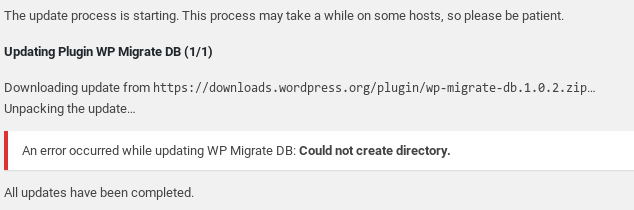
Also, I attempt to upgrade a plugin and it doesn’t work:
https://pangea-systems.com/jas/pub/share/misc/Screenshot%20from%202018-05-01%2011-44-12.png
That’s the latest curl available in CentOS. I found a third-party repo which has a newer version. Now:
$ curl --version
curl 7.59.0 (x86_64-redhat-linux-gnu) libcurl/7.59.0 NSS/3.28.4 zlib/1.2.7 libpsl/0.7.0 (+libicu/50.1.2) libssh2/1.8.0 nghttp2/1.31.1
Release-Date: 2018-03-14
Protocols: dict file ftp ftps gopher http https imap imaps ldap ldaps pop3 pop3s rtsp scp sftp smb smbs smtp smtps telnet tftp
Features: AsynchDNS IPv6 Largefile GSS-API Kerberos SPNEGO NTLM NTLM_WB SSL libz HTTP2 UnixSockets HTTPS-proxy PSL Metalink
and
https://pangea-systems.com/jas/pub/share/misc/Screenshot%20from%202018-05-01%2011-46-48.png
Yet, same result.
The issue is why is this happening:
https://pangea-systems.com/jas/pub/share/misc/Screenshot%20from%202018-05-01%2011-50-55.png
luminarycrush, let’s try disabling SELinux & then updating to see if that has any effect. When I try to download WordPress it gives me a filename of 4.95.zip, but for now let’s just try disabling SELinux & see where we are w/that.
In case you’re unsure,
https://www.tecmint.com/disable-selinux-temporarily-permanently-in-centos-rhel-fedora/
shows you how.Oh, shoot, it was SELINUX. I didn’t think of that; pretty annoying. I can just set it to permissive when doing an update and back to enforcing later.
Thanks for your help! It’s working great now.
-
This reply was modified 8 years, 1 month ago by
The truth is, luminarycrush, if you can figure out what SELinux policy is firing, you can fix stuff & won’t have to mess w/it again. I’m more of a Debian/Ubuntu gal myself, so my knowledge of the Centos/Redhat/Fidora branch likely isn’t what it should be in terms of the way things are structured, ie, our Apache user is www-data, etc, but I still think this really does boil down to a permission/ownership issue, ie, SELinux has defaults for these & your choices did not adhere to them. But they can be changed. I still suggest you cd to your web root folder & do a chown -R apache:apache. I know you said you did that, but I’m thinking that the parent of the wordpress folder also needs to have that ownership as well.
Anyway, I am glad my thoughts were of some value, & I really did not mean to bail on you.
I did some Google work and a few selinux commands later solved it. I have run into weird problems caused by SELinux before and I should have known to check for that. Thank you for jogging my brain.
There were some threads about this problem in light of SElinux and the need to change the security context on the folders the system was complaining about.
All good, all upgraded and working better than ever. Thanks again.
SELinux is a great addition to Linux, but it does require some recognition of its requirements, defaults, etc, doesn’t it? Otherwise, it can definitively cause some “gotchas”. Glad everything’s better now, luminarycrush.
If you could please just reply to the thread & mark it resolved if everything is to your satisfaction, that’d let the other forum volunteers know you no longer require assistance.
-
This reply was modified 8 years, 1 month ago by

The topic ‘Migrated WordPress and can’t upgrade WP or plugins (cannot create directory)’ is closed to new replies.