• doorjacobus

    (@doorjacobus)


    Hi,

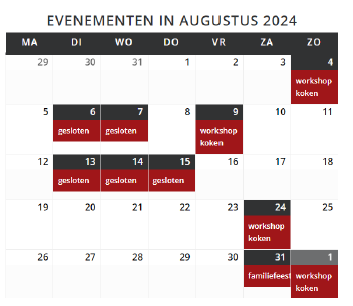
    Since the last update, the display of the mini calendar has changed. Instead of the title of the event per day being immediately visible, you now have to click first after which a pop-up appears. Is there any way to get the previous view back? So that you immediately see the event title without having to click?

    A warm greeting,

    Jacobus

    The page I need help with: [log in to see the link]

Viewing 5 replies - 1 through 5 (of 5 total)
  • Plugin Author Joe Dolson

    (@joedolson)

    Hmm. The mini calendar has never shown the titles of events. Do you have a screenshot of what you had before? Did you have custom work done on the calendar to change what was displayed?

    Thread Starter doorjacobus

    (@doorjacobus)

    There is no custom CSS used, I have a screenshot.

    https://www.luciaz.nl/wp-content/uploads/2025/05/screenshot-1.png

    Plugin Author Joe Dolson

    (@joedolson)

    That’s a screenshot of the regular calendar view, not the mini calendar. I don’t have enough context to tell anything more about it, though.

    Where is this being displayed, and how is it added? Is it a shortcode? A widget?

    Thread Starter doorjacobus

    (@doorjacobus)

    I use(d) the shortcode [my_calendar id=”my-calendar”].

    Plugin Author Joe Dolson

    (@joedolson)

    OK. You’ll want to add the format="mini" attribute, to tell the shortcode to use the mini format.

Viewing 5 replies - 1 through 5 (of 5 total)

The topic ‘Mini calendar display’ is closed to new replies.