• Resolved toolsavvy

    (@toolsavvy)


    Hi,

    I want to buy the premium version of this plugin, but I came across one minor problem on my site.

    I integrated this plugin with my theme without modifying the code of currency switcher.

    Basically, my site is a search engine and the only place the currency switcher is used on is on the search page where people search for product prices.

    Currency switcher works fine, except when you use use the advance search. Currency switcher removes certain taxonomy search parameters from the URL and replaces it with “Array”, so the advanced search is no longer maintained. Example:

    If the advanced search URL is

    http://vapespider.com/?s=&s=limitless&price--2=&price--3=&tx_intship=0&tx_rewards=0&tx_discreet=0&ct7546[]=118&ct7547[]=123&advanced_search=yes

    But when you select a currency, the URL changes to

    http://vapespider.com/?s=&s=limitless&price--2=&price--3=&tx_intship=0&tx_rewards=0&tx_discreet=0&ct7546=Array&ct7547=Array&advanced_search=yes&currency=GBP

    So basically, the currency switcher removes the “[]=118” and “[]=123” and replaces them with “=Array“. This messes up the search results.

    Is there a block of code I can modify or is there any thing else I can do to stop currency switcher from doing this?

    • This topic was modified 9 years, 3 months ago by toolsavvy.
    • This topic was modified 9 years, 3 months ago by toolsavvy.
Viewing 10 replies - 1 through 10 (of 10 total)
  • Hello
    I will investigate it
    I think it makes this function wpcs_redirect() in file \wp-content\plugins\currency-switcher\js\front.js

    Thread Starter toolsavvy

    (@toolsavvy)

    The fix you provided in this thread appears to have fixed the problem. I will continue to test and if I come across a problem I will post here. But so far, so good.

    I will have to remember to make this change after every update, I presume?

    Thank you very much!

    Thread Starter toolsavvy

    (@toolsavvy)

    Actually, upon further testing, your fix, which you incorporated in the new update, only partially works. Here’s what is happening.

    You code as you posted at in this other thread

    if(is_array($value)){
    $key.=”[]”;
    $value= implode(“,”, $value);
    }

    does the following.

    It takes the default advanced search URL of (example)

    http://mysite.com/?s=&s=limitless&price--2=&price--3=&tx_intship=0&tx_rewards=0&tx_discreet=0&ct9074[]=73&ct9074[]=72&advanced_search=yes

    and upon changing the currency, the URL changes to

    http://mysite.com/?s=&s=limitless&price--2=&price--3=&tx_intship=0&tx_rewards=0&tx_discreet=0&ct9074[]=73,72&advanced_search=yes&currency=GBP

    So it takes the

    &ct9074[]=73&ct9074[]=72

    and changes it to

    &ct9074[]=73,72 …so it’s basically consolidating all “ct” values that are the same.

    But my theme does not recognize that format. It needs to remain &ct9074[]=73&ct9074[]=72, otherwise some of the search results get dropped since my theme does not recognize &ct9074[]=73,72

    Is there a way to modify you code above to allow it to remain as &ct9074[]=73&ct9074[]=72

    Thread Starter toolsavvy

    (@toolsavvy)

    Remove all “*” below. I had to add it to stop the forum fro removing the “amp;”

    I almost have this issue resolved, I think, but with one minor problem.

    I changed the last line of your if statement from

    $value= implode(“,”, $value);

    to

    $value= implode("&$key=", $value);

    This almost works. The only problem is that the resulting URL (after changing the currency) shows &*amp; instead of just & so the problem remains the same as it drops some of the search results.

    So the resulting url looks like this
    &ct9254[]=73<strong>&*amp;</strong>ct9254[]=72

    If I could just figure out how to make the “&*amp;” show as just “&” in the resulting URL, the problem would be solved.

    I have also tried…

    $value = implode("&$key=", str_replace('&', '&', $value));

    $value = implode("&*amp;$key=", str_replace('&', '&', $value));

    $value = implode("&$key=", htmlspecialchars_decode($value));

    $value = implode("&*amp;$key=", htmlspecialchars_decode($value));

    and many other variations but no success. 🙁

    • This reply was modified 9 years, 3 months ago by toolsavvy.
    • This reply was modified 9 years, 3 months ago by toolsavvy.
    • This reply was modified 9 years, 3 months ago by toolsavvy.
    • This reply was modified 9 years, 3 months ago by toolsavvy.

    Hello

    Ok! I will try fix it.

    Hello

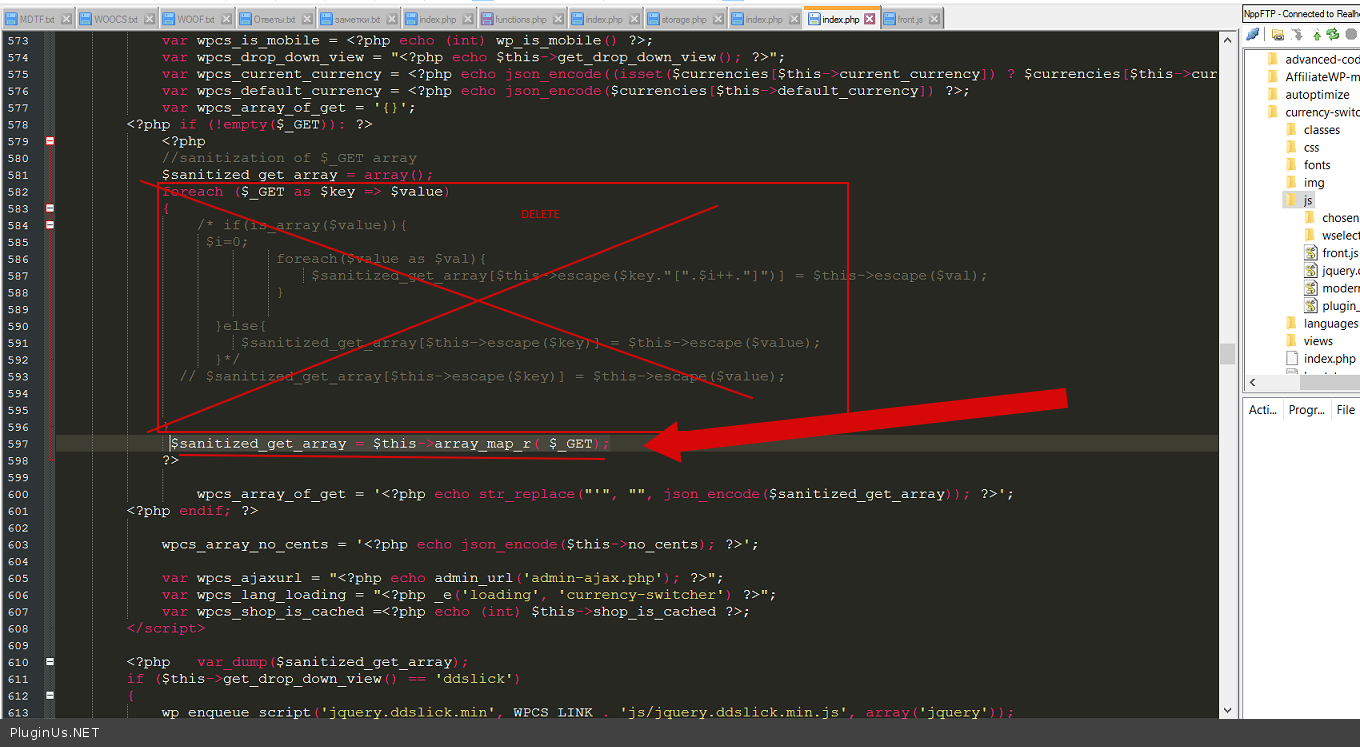
    In file index.php paste code( http://c2n.me/3IksKXN.png ) – $sanitized_get_array = $this->array_map_r( $_GET);

    Add function –

     function array_map_r( $arr )
    	{
    		$newArr = array();
    
    		foreach( $arr as $key => $value )
    		{
    			$newArr[$this->escape($key) ] = ( is_array( $value ) )? $this->array_map_r( $value ) : $this->escape($value )  ;
    		}
    
    		return $newArr;
    	}

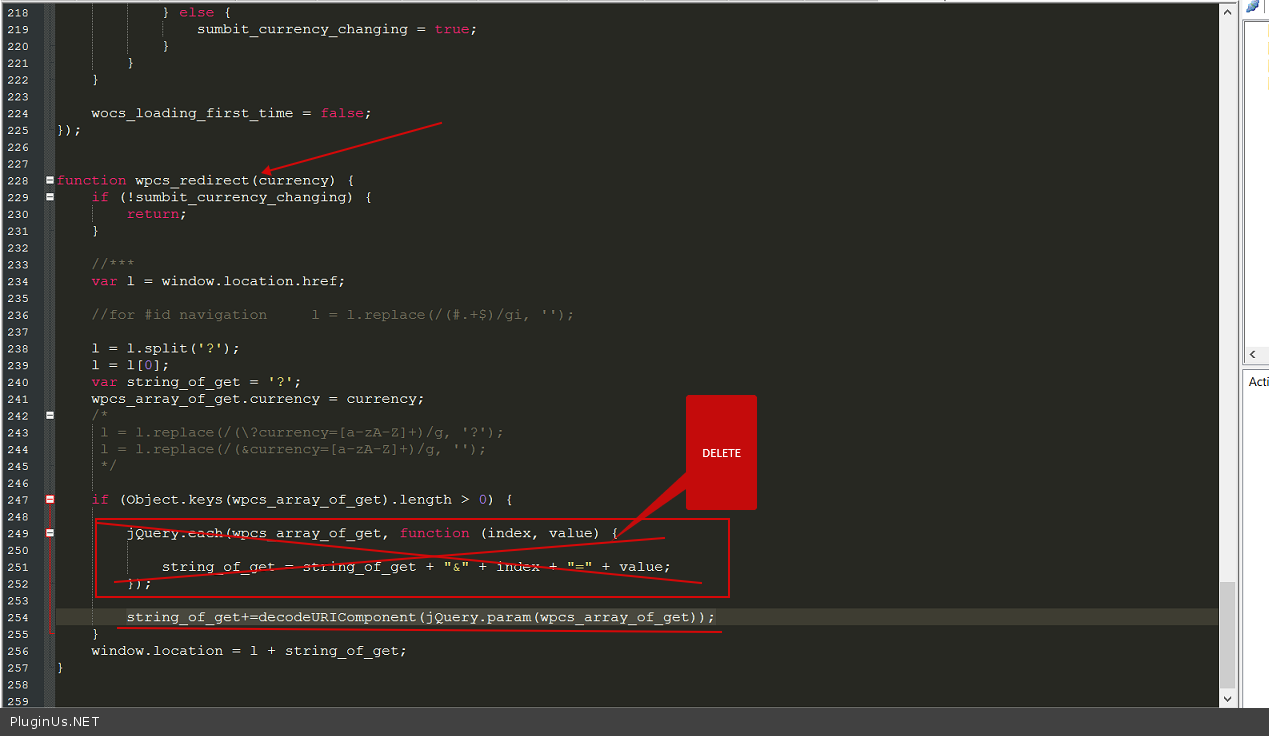
    In file – \plugins\currency-switcher\js\front.js paste this code ( http://c2n.me/3IkvIrB.png ) :
    string_of_get+=decodeURIComponent(jQuery.param(wpcs_array_of_get));

    Please do test.

    Thread Starter toolsavvy

    (@toolsavvy)

    Those changes give me a blank screen when I do a regular or advanced search so I can’t test the currency switcher.

    – I put that function code in the theme’s functions.php file, because I wasn’t sure where else to put it since you didn’t specify.

    – I made the changes you told me to do, but parts of the code you told me to remove are different. My plugin is updated so I’m not sure if maybe you are working with a beta updated version or what.

    Here are 2 images of what my files look like before your latest changes.

    http://i.imgur.com/a4IkJGH.png

    http://i.imgur.com/PzgOL1e.png

    Hello

    Add this function In file \plugins\currency-switcher\index.php – http://clip2net.com/s/3Ip6CM2

    In file – \plugins\currency-switcher\js\front.js – http://clip2net.com/s/3Ip5l7v

    In file \plugins\currency-switcher\index.php $sanitized_get_array = $this->array_map_r( $_GET);

    Thread Starter toolsavvy

    (@toolsavvy)

    Thank you for clarifying.

    As far as I can see, this is working properly now. Th URL stays the way it is supposed to stay after currency is changed.

    Thank you very much!

    Hello

    Great!

    Welcome;)

Viewing 10 replies - 1 through 10 (of 10 total)

The topic ‘Minor Problem with “Array” in URL – can this be modified?’ is closed to new replies.