hi there. I’m adding PPWP (free version) to my entire subdomain, and it worked once.. but now I only get the orange logo and no box to add in the password. I’ve cleared cache at both browser level and via my hosting panel
any thoughts / help?
please and thanks 😀
The page I need help with: [log in to see the link]
thanks for this – I dont think I’m using any custom CSS – I have no skills (!!!) so am using themes etc to create this site Not sure if I’ve accidentally done something- should I remove and re-install and then not touch anything?!
Thank you for the information. We will try to reproduce the issue on the staging site and check if there is any solution for you.
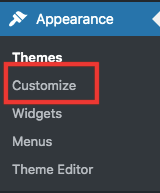
You can consider go to Appearance >> Customize from your admin dashboard.
Navigate to the Additional CSS section and input the code snippet below to overwrite the styles of the .pda-form-login and .ppw-swp-form classes and check if it works.
/* Overwrite to remove display: none */
.pda-form-login {
    display: initial !important; /* Or use 'block', 'flex', etc., based on your needs */
}

.ppw-swp-form {
    display: initial !important; /* Same as above */
}
In the meantime, could you please contact the owner of the theme and ask if they have any solution?
Looking forward to your reply.
Viewing 5 replies - 1 through 5 (of 5 total)
The topic ‘Missing password field!’ is closed to new replies.