Hi @bigmclargehuge,
Can you share a link to the timeline? It’s possible it’s a minor CSS conflict overriding the color or z-index.
We should be able to provide a solution if we have an example to reference and work off.
ahh that is a bit a problem it is all internal at the moment, something else i can provide?
Thanks for the quick reply!
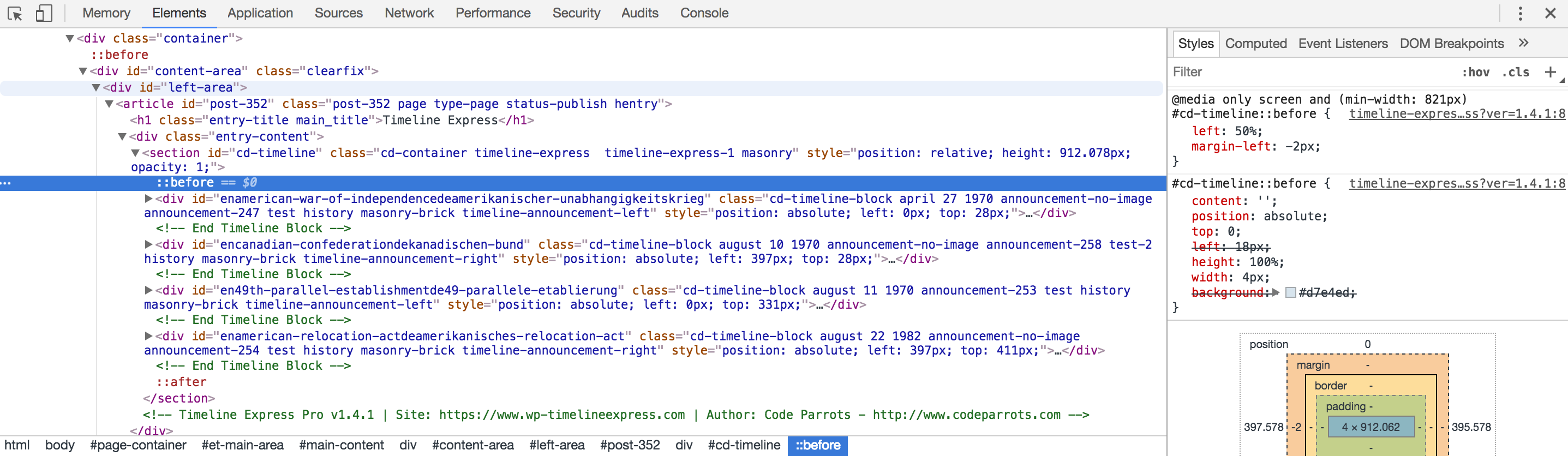
If you right click on the timeline and select ‘Inspect Element’ and then view the “Elements” tab of the console (This is in Chrome, your browser may differ), then locate the element <section id="cd-timeline", expand it and click the :before element nested beneath it, you should be able to view the CSS styles associated with the line running down the background.
Here is an example:
https://cldup.com/C7lOYzKPjT.png
You can see on the right-hand side the styles. Can you share a screenshot of yours or let us know what the styles are?
I believe this is what you need. Correct me if I am incorrect then I can upload a screenshot.
#cd-timeline::before {
background: #000000;
}
@media only screen and (min-width: 822px)
timeline-expres…ss?ver=1.4.4:8
#cd-timeline::before {
left: 50%;
margin-left: -2px;
}
timeline-expres…ss?ver=1.4.4:8
#cd-timeline::before {
content: ”;
position: absolute;
top: 0;
left: 18px;
height: 100%;
width: 4px;
background: rgba(179,177,179,.75);
}
style.css?ver=1.0.4:105
div:before, article:before, aside:before, details:before, figcaption:before, figure:before, footer:before, header:before, hgroup:before, menu:before, nav:before, section:before, div:after, ul:after, article:after, aside:after, details:after, figcaption:after, figure:after, footer:after, header:after, hgroup:after, menu:after, nav:after, section:after {
   content: “”;
   display: table;
}
style.css?ver=1.0.4:46
*:before, *:after {
-webkit-box-sizing: border-box;
-moz-box-sizing: border-box;
box-sizing: border-box;
It looks like the second part:
style.css?ver=1.0.4:105
div:before, article:before, aside:before, details:before, figcaption:before, figure:before, footer:before, header:before, hgroup:before, menu:before, nav:before, section:before, div:after, ul:after, article:after, aside:after, details:after, figcaption:after, figure:after, footer:after, header:after, hgroup:after, menu:after, nav:after, section:after {
content: “”;
display: table;
}
is what is throwing things off. Our styles look correct. It’s also possible the border-box; box sizing attr is doing it. Can you try checking/unchecking the styles for those to see if anything changes in your browser?
it looks like if I uncheck display:table; it correct the problem. Odd thing is when i remove that from the CSS it keep referencing back to it. As if it was never changed.
Are you removing it from the theme CSS?
You can try overriding the theme by doing the following:
.cd-timeline-block {
   display: inline !important;
}
right on I am looking good now!
Thanks again!
Awesome, no problem at all!
If you are enjoying the plugin we would love a positive review here in the ww.wp.xz.cn repo.
https://ww.wp.xz.cn/support/plugin/timeline-express/reviews/#new-post
Thanks again, glad we could help out and we hope that you have a great weekend!