I thought this issue was fixed based on my previous support ticket but it’s not. I enabled the modern email design for transactional emails feature to test again but the design still breaks. I’m testing on a newly created staging site using the Twenty Twenty-Five theme with only 4 plugins installed:
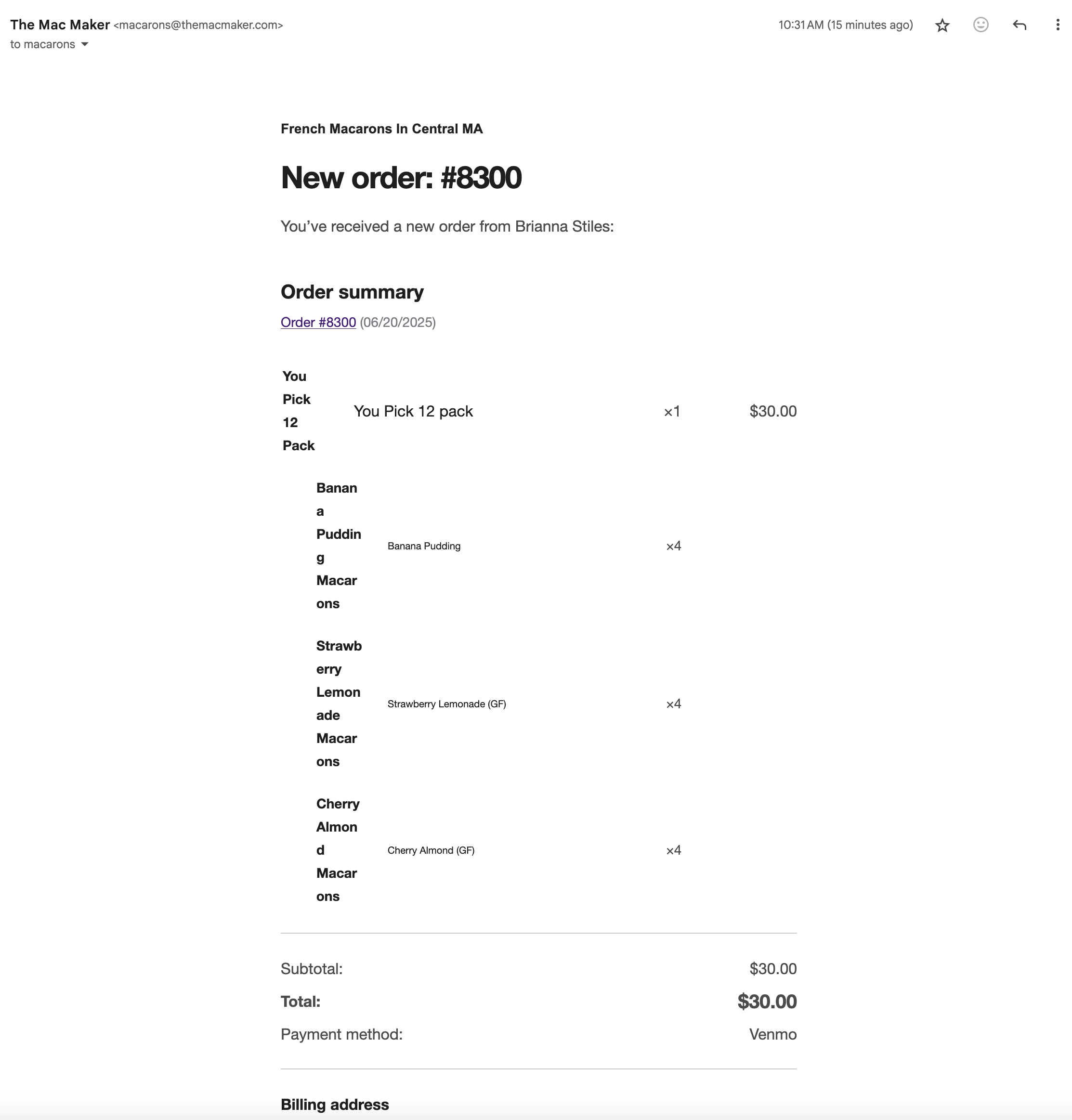
I placed a real order on the front end staging site and this is the New Order email I received:
I would really love to use this new modern email design! Can someone help? Here’s the status report: https://pastebin.com/wrE3jE1X
Thanks for checking back in, and I understand your eagerness to get the modern email design working properly — it’s a great update when styled correctly.
Since you mentioned this issue now reappears on the staging site, where you’re using the Twenty Twenty-Five theme with limited plugins, could you confirm if the production site is still working fine? That would help us understand if this is specific to the staging environment or if the issue has resurfaced more broadly.
On your staging site, I’d recommend the following:
Switch to the default Storefront theme temporarily.
Deactivate all plugins except WooCommerce and your payment gateway plugin.
Place another test order and check how the modern email design renders.
If the issue still persists after that, feel free to share:
The current content of your admin-new-order.php file (if one exists in your staging theme or child theme), and
Your updated system status report
You can share both using https://pastebin.com or a similar tool so we can take a closer look.
@lovingbro Thanks for the info. I followed your steps on my staging site to switch to the Storefont theme, all plugins deactivated except woocommerce and payment gateway, submitted another order, and the email I received is unchanged in appearance–looks exactly like the screenshot I shared above.
As for my production site, I uninstalled and deleted my child theme along with the child theme configurator plugin a few days ago. The site is now using Astra theme with Astra Pro add on. The transactional emails are untouched. Here’s the content for the admin-new-order email: https://pastebin.com/tcRctXJP.
I enabled the modern email templates again on Production and ran a test order. Here’s what the admin-new-order email looks like in gmail:
@themacmaker Try sending it to a different email handler. It could be something in the handler changing the css. If you’re sending it to your Gmail try Yahoo or custom domain.
@serafinnyc Glad we finally figured this out. I just switched all of my transactional emails to send through AutomateWoo and all is looking good now. Thanks for your help and patience!
I’m really glad to hear the issue is all sorted now—and great call switching your transactional emails to AutomateWoo! It’s awesome to hear that setup is working well for you.
However, If you have a moment, we’d truly appreciate it if you could share your experience with our support by leaving a review: https://ww.wp.xz.cn/support/plugin/woocommerce/reviews. Your feedback goes a long way in helping us improve!
Please don’t hesitate to create a new topic if you need further assistance.
@themacmaker you’re very welcome. Interesting that it straight out worked with Automatewoo. That means it has to be cache then. Either object or secondary.
Thank you for the update; it’s great to hear back from you. I can imagine how frustrating it must’ve been to trace this down, and I really appreciate the steps you took throughout. Also, a big shout-out to @serafinnyc for the thorough guidance and helpful suggestions along the way!
Since you’ve confirmed everything is working properly now after switching your transactional emails to AutomateWoo, I’ll go ahead and mark this thread as resolved for now. If anything else comes up or you need help down the road, don’t hesitate to start a new topic; we’ll be happy to help.
Wishing you continued success with your store!
Viewing 12 replies - 1 through 12 (of 12 total)
The topic ‘Modern email template design issues’ is closed to new replies.