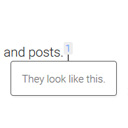
I’m not familiar BestWebSoft PDF & Print, but my experience with PDF generation tools that take in HTML is they are limited in their CSS support. So, it could be that the pseudo-elements you’re trying to set with CSS are being ignored by that plugin.
I’m not sure there is a way to do this through CSS alone in the PDF tool, so you might have to modify the Modern Footnotes plugin to make this work. I would try to modify the shortcode so it outputs hidden brackets where you want to display them in the PDF. In modern-footnotes.php, you could modify the modern_footnotes_func function to output different HTML. For example, you could replace lines 41 and 42 with something like this:
$content = '<sup class="modern-footnotes-footnote ' . $additional_classes . '" data-mfn="' . str_replace('"',"\\\"", $display_number) . '"><a href="javascript:void(0)" ' . $additional_attributes . '>' . $display_number . '</a></sup>' .
  '<span class="modern-footnotes-footnote__note" data-mfn="' . str_replace('"',"\\\"", $display_number) . '">' .
  '<span class="pdf-bracket">[</span>' .
  $content .
  '<span class="pdf-bracket">]</span>' .
  '</span>';
Then, you’d need to add a style of display:none for .pdf-bracket on the website, and a style of display:inline; to that same class for the PDF. Hopefully that will work!
Thanks for your quick response ! Unfortunately, I do not have time to work on this issue the next week. I will report my results as soon as I have tried your suggestions.
Sounds good, please let me know how it turns out when you do get a chance to work on it!
I had a few free minutes and added the script as instructed on my test system. It works fine !Just what I tried to do !
Thanks !