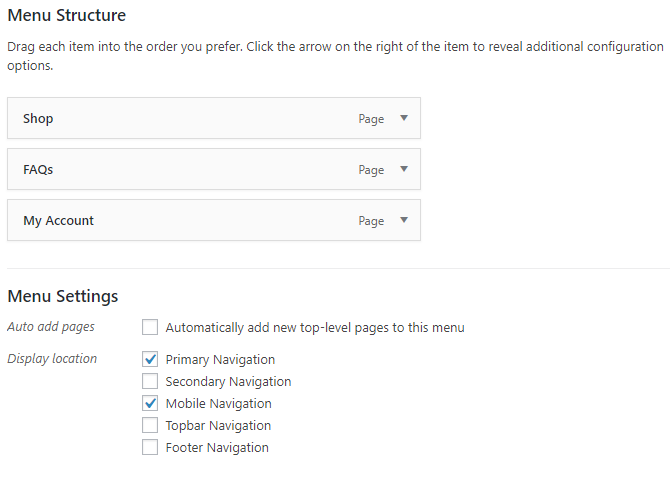
@gmsiegel You need to setup menu for this theme, Now its located on top bar you can switch to Primary menu bar
I’m not understanding your answer. My menus are currently set as shown in the attached screen shot (see URL below). Would you please walk me through the change I need to make? Thanks!
SCREEN SHOT
https://www.localgeek.us/public/menus.png
Hey,
I’m not sure I’m following. Can you please share some screens of what you’re wanting to move exactly?
Thanks,
Kevin
Hi @gmsiegel,
Can you re-enable the sitewide notice so we can provide accurate css in placing it at the bottom of your pages?
Thanks!
Hannah
I’ve re-enabled the Store Notice. I’d like to position it at the bottom of the SCREEN, rather than the bottom of the PAGE. If it’s at the bottom of the page, it might not be visible unless the user scrolls all the way down. Thanks!
Try adding this CSS to Theme Options> Advanced Settings, and let me know if it works for you:
p.woocommerce-store-notice.demo_store {
    position: relative;
}
-Kevin
That CSS puts the Store Notice at the bottom of the page, which is better than where it was. However, I’d like to see if we can get it at the bottom of the screen, so that you don’t need to scroll to the bottom to see it. Anyone know if this is possible?
Alternatively, if this is NOT possible, it might be an option if the Store Notice was kept at the top, and the Topbar was moved to just below it. I could probably make that work, too. Anyone have the CSS for those 2 items?
Thanks!
-
This reply was modified 8 years, 2 months ago by
 gmsiegel.
This css should make it sticky at the bottom:
p.woocommerce-store-notice.demo_store {
    position: fixed;
    bottom: 0;
    top: 95%;
}
Hope that works for you!
Hannah
Hannah-
This is fantastic! Exactly what I was looking for. Thanks very much!