Hi @goglobal2016,
Thank you for reaching out and providing details about the issue. I understand how frustrating it must be for your customers to experience this, and I’m here to help you resolve it.
I tested the Cash on Delivery (COD) payment method on my test site, and the “Place Order” button worked as expected, redirecting customers correctly without creating duplicate orders. This suggests that the issue may be caused by a conflict with a plugin or theme.
To help pinpoint the cause, please try the following steps:
1. Disable Plugins: Temporarily deactivate all plugins except WooCommerce and test the checkout process with COD.
2. Switch Theme: If the issue persists, switch to a default WordPress theme like Storefront and test again.
3. Re-enable Plugins Gradually: Reactivate your plugins one by one, testing after each, to identify if a specific plugin is causing the problem.
If the issue continues, it would be great if you could share the following:
• System Status Report: Go to WooCommerce > Status > Get System Report > Copy for Support.
• Fatal Error Logs (if available): You can find these under WooCommerce > Status > Logs.
Feel free to paste the information here or share it via a tool like https://gist.github.com/ and send us the link.
Looking forward to your reply!
Hi Mahfuzur,
My website is already live and running since long and there’s no-one working in the off-business hours to do the changes that you’ve suggested.
Would you mind helping me by changing the theme to “Stylon” in your test environment and do the same testing by placing an order with cash on delivery as payment method.
Based on the results, we can plan the downtime to make the changes on my website.
Also could you please let me know the consequences of changing the theme on a live website? I’ve not done that before, so would need your help to know if there will be any issue if I change the themes or disable all the plugins and re-enable them 1-by-1?
Thanks in advance for your help!
Hi @goglobal2016 ,
It looks like the Stylon theme is a premium theme, so I’m unable to test it on my end. However, I recommend creating a staging environment to troubleshoot the issue without affecting your live site. You can use the WP Staging plugin to set this up.
Once the staging environment is ready, you can:
- Deactivate all plugins except WooCommerce to check if one of the plugins is causing the issue.
- If the issue is resolved, reactivate your plugins one by one to identify the culprit.
- If the issue persists, try switching to the default Storefront theme to see if the problem lies with the Stylon theme itself.
Additionally, please check if your Order Received endpoint is correctly configured. You can do this by navigating to WooCommerce > Settings > Advanced > Checkout endpoints > Order Received, as shown in the screenshot below.
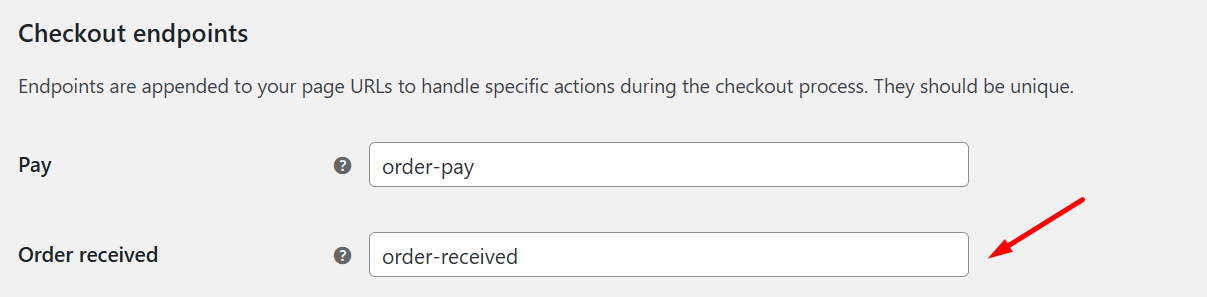
Let me know how it goes!
Hi Jonayed,
The checkout endpoint is perfectly configured. I’ve installed the above said plugin to create the staging environment to test the suggestions given by you.
Will let you know the outcome in 1-2 days.
Hi @goglobal2016
Thanks for your response, please take your time to test the suggestions by @jonayedhosen on the staging site.
If you need any help during the process or the outcome leads to more questions, just let us know. Hope everything goes smoothly!


