Nothing shown at all
-
Hello and thank you very much for the plugin!
In the backoffice the reviews were retrieved successfully but the shortcode shows nothing at all on the page itself.I’m using all latest versions: WordPress 5.4.2, Divi Theme 4.0.5, g-business-reviews-rating 1.28
I pasted it on this page for example: https://minimuzo.fr/test/
A screenshot of how the code is inserted:
http://s214903023.onlinehome.fr/divers/bugminimuzo.png
Any clues on what I might be doing wrong? Thank you!
-
I will have a look using a Divi theme later today.
-
This reply was modified 6 years, 6 months ago by
Noah Hearle.
Hello @evangun,
I can replicate the issue in Divi when using the Code field. I will have a look at finding a resolution later today.
This only relates to the Code field and not the Text field. I did load the Google Reviews/Rating when I used the Text field.
All the best,
Noah
Thank you very much for the quick workaround, I’ll use it if you are not able to fix the issue! No rush. Thanks again and congratulations on the nice plugin.
Hello @evangun,
I’ve studied the Divi theme support article about adding shortcodes. What you’ve done here seems to be correct according to the documentation.
At the moment, I am at a loss why the shortcode does not appear in a Code snippet yet it appears in the Text snippet. I’ve searched online articles for similar issues but haven’t found anything useful.
I am going to mark this as resolved the time-being because you can simply use the Text snippet instead.
If you find anything, other plugin shortcodes with a similar problem or the differences between Divi’s handling of Code and Text snippets – please drop me a message here or through the support link.
In the meantime, I will look at better integration with popular page editors such as Divi, Cornerstone, Avada and WordPress’s Gutenberg.
All the best,
Noah
Thank you very much for your investigation.
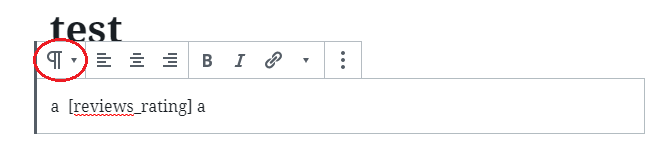
It’s weird because on my end I can’t get this working even with a text component.Whether I create the page with the Divi builder or the WordPress editor, it does not work. You can see that the type of my bloc is indeed “paragraph”:
http://s214903023.onlinehome.fr/divers/bugmm.png
and still nothing shows up.
I deactivated all other plugins in case there was a conflict but it did not help.
I installed another plugin that generates shortcodes, namely uix-shortcodes: https://fr.ww.wp.xz.cn/plugins/uix-shortcodes/
and it does work with Divi (to be fair the plugin conflicts with the Divi builder, but once this issue is overcome, the shortcode works. So I had to first activate the plugin, generate the shortcode, deactivate the plugin, insert the shortcode in the page in the divi builder or the classic editor, save the page, and the reactivate the plugin for it to be interpreted).
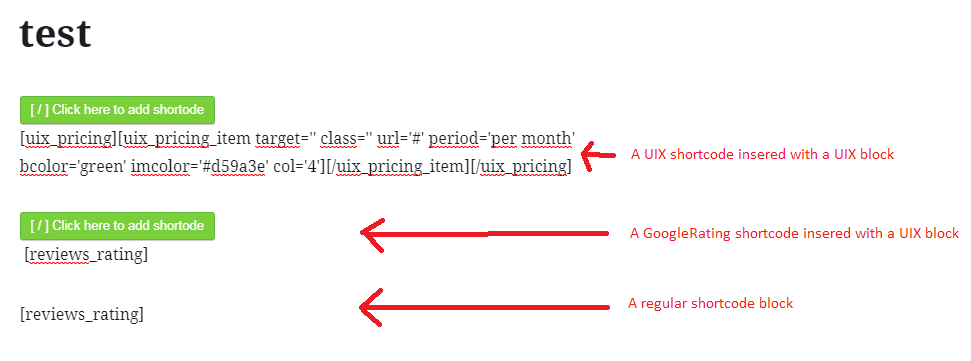
Then I had the idea to insert your shortcode in a uix-shortcodes block like so:
http://s214903023.onlinehome.fr/divers/bugmm2.png
And this is the result: https://minimuzo.fr/test/
So it “starts” working (no reviews shown though, although I see them well retrieved in the backoffice). It’s weird because if I delete the 3rd block, nothing shows up anymore. I think at some point when I created other blocks (none of which were UIX block), I had the same result. So the presence of the UIX blocks might be coincidental.
I can see in the source that the code generated by the UIX blocks is like this:
<div class=”wp-block-myplugin-block-uix-shortcodes” cid=”d0931567-129d-47b7-9238-a0f1b2e96b6c”>[uix_pricing]….[/uix_pricing]</div>
<!– /wp:myplugin/block-uix-shortcodes –>I don’t know if that is relevant.
I can open an issue at Divi support if you wish.
Thank youWow, that’s quite a convoluted way to display a shortcode here!
I performed the test on an empty page on a client’s website with the latest Divi/WordPress. It did display by simply using the shortcode in the Text snippet. In the Code snippet, I also tried a
do_shortcode()function call with PHP tags, but that didn’t work.Anyway, inserting a shortcode in Divi either in Code or Text snippets should show the plugin’s output without further workarounds.
I will look into this at a later date – as support snippets for various visual editors. However, it isn’t a priority right now.
If possible, please can you post something on the Divi forum/support section?
Thanks,
Noah
Hello, good news, today everything works although I made no changes since yesterday. Do you rely on a third party service that could have been down for the last two days? (nota: the reviews themselves were already loaded and could be seen in the backoffice).
That’s good news!
There are no third party services involved in the running of this plugin. The data collection using the Google API is a tentative request and will add new records or update existing records when a valid request is completed.
I think this was a Divi-only issue… so I’m marking this one as resolved.
Fair enough 😉 Thank you again.
-
This reply was modified 6 years, 6 months ago by
The topic ‘Nothing shown at all’ is closed to new replies.