• Resolved John

    (@dsl225)


    Hello,

    I’m trying to make a custom template based on the Overlay-Full for some tiles mosaic at the homepage and I’m halfway there…

    Is there some way to give those blocks an increased height value?
    By default, they seem to adapt their height based on the longest title but I’m trying to make them somehow square or, at least, higher than what is needed for the titles.

    Square will probably be mission impossible because of responsiveness.
    Maybe a value relative to the width?

    Also, I don’t well understand the “Preview width (px)” in template design. Is this just for the preview window?

    Thanks!

Viewing 4 replies - 1 through 4 (of 4 total)
  • Plugin Author Code Amp

    (@codeamp)

    Hey John

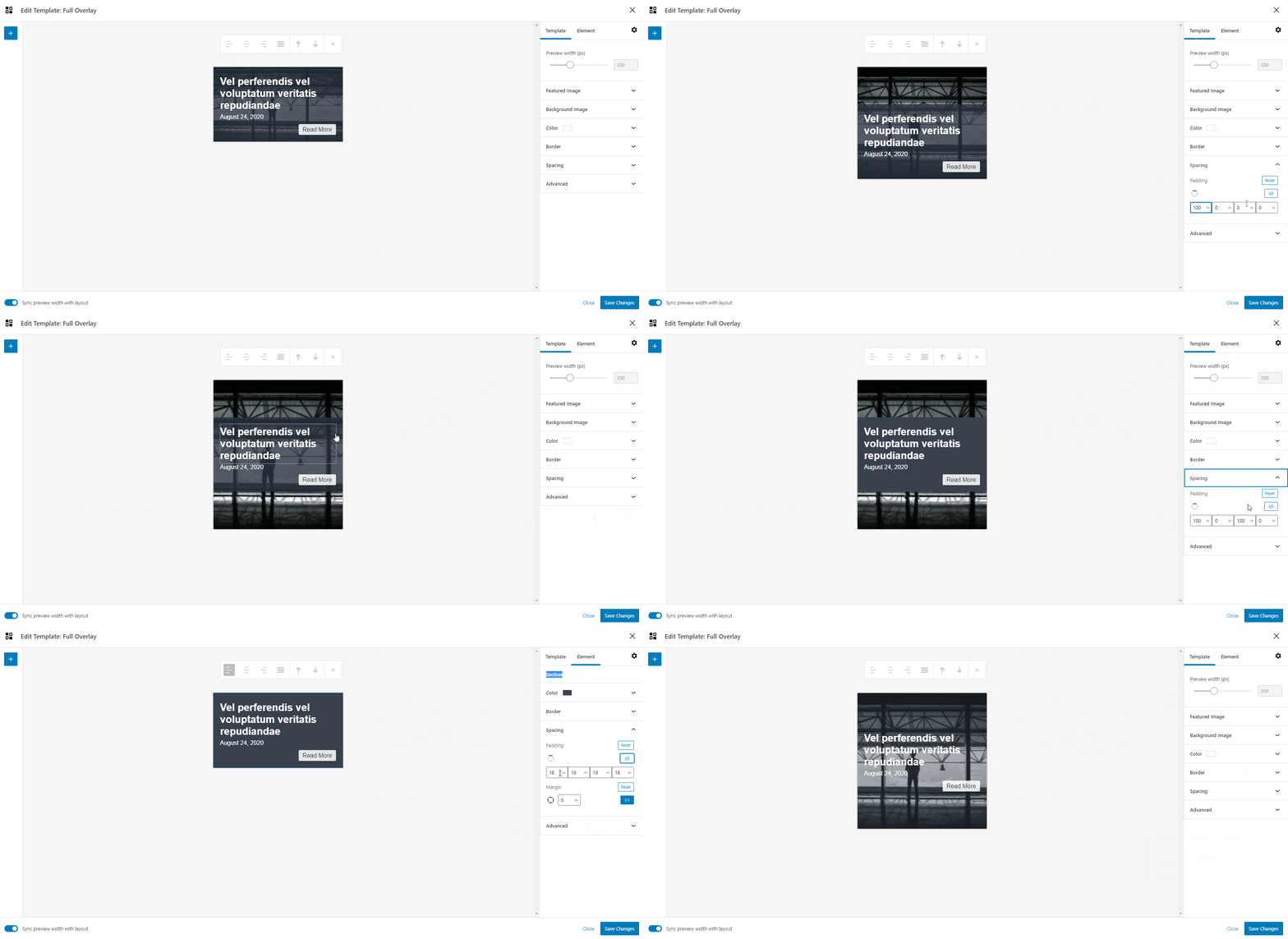
    Right now there is no way to choose a height, but you can always increase the height by using padding.

    So you can add padding to either the template, or, the section, which is the container where you add all your elements.

    I’ve highlighted both methods here:
    https://customlayouts.com/wp-content/uploads/2021/04/cl-increase-height.gif

    Alternatively, you can add some CSS to your site to set the height to specific value:

    .cl-template {
        min-height: 600px;
    }

    This CSS would apply to every template though, but if you add custom classes to your layouts / templates (in the Advanced Panel) then you can target the templates individually.

    Let me know if all that makes sense!

    Best

    • This reply was modified 5 years, 1 month ago by Code Amp.
    • This reply was modified 5 years, 1 month ago by Code Amp.
    • This reply was modified 5 years, 1 month ago by Code Amp.
    Thread Starter John

    (@dsl225)

    Many thanks for this!

    The first option, for templates and sections, works better.
    The CSS doesn’t work good with my tests as it applies only in the last 2 boxes (for a 2 columns layout) and doesn’t seem to have any effect on mobile size.

    I also tried individual settings for something like this:
    .cl-template--id-2322
    but getting the same results.

    It’s not much important at this stage as I’m mainly experimenting with different possibilities and I got severely distracted by this amazing layout and was wondering how close I could get…

    So, I don’t want to waste your time.
    This plugin is really great – and one can spend hours experimenting with different layouts.

    Plugin Author Code Amp

    (@codeamp)

    No worries, thanks for you time and comments! Feel free to add anything else – its always useful to hear how people are using the plugin and what they would like to see next.

    BTW, in the future it will be possible to get closer to that layout you have linked – we’ll be adding hover effects and animations too 🙂

    Best

    • This reply was modified 5 years, 1 month ago by Code Amp.
    Thread Starter John

    (@dsl225)

    Thanks!

Viewing 4 replies - 1 through 4 (of 4 total)

The topic ‘Overlay Full template with increased height’ is closed to new replies.