Hello Alexandra
Did you read this – https://wp-filter.com/howto/pagination-doesn-work-what-to-do/
Please drop me link to the issue
Hello Pavlo,
thank you for the reply.
i tried your link already before.
“-I tried your two advices & one of the forum”
A link to the site ist:
http://www.black-sapote.com/
You have to set the filter on the right sidebar to come to the problem page.
Page 1
http://www.black-sapote.com/mdtf-results-page/?slg=taschenlampe&mdf_cat=23&page_mdf=81000f5319f1c7d9bc2f6374b92c809f
Page 2
http://www.black-sapote.com/mdtf-results-page/page/2/?slg=taschenlampe&mdf_cat=23&page_mdf=81000f5319f1c7d9bc2f6374b92c809f
Same 10 results when you use the pagination links.
Hello Pavlo,
i found a part of the solution:
In MDTF if made the following settings:
-Search Result Page: blank
-Output search template:search
That leads me to index.php with template content.php
Pagination does not work.
So i made some more tests:
In MDTF if made the following settings:
-Search Result Page: blank
-Output search template:archive
That leads me to archive.php with template content.php
Pagination does WORK.
In MDTF if made the following settings:
-Search Result Page: blank
-Output search template:archive-test (a testtemplate for my cpt)
That leads me to archive.php with template content.php
Pagination does WORK.
But not the right template.
In MDTF if made the following settings:
-Search Result Page: blank
-Output search template:archive-fsfsf (which does NOT EXISTS)
That leads me to archive.php with template content.php
Pagination does WORK.
In MDTF if made the following settings:
-Search Result Page: blank
-Output search template:fsdedfs (which does NOT EXISTS)
That leads me to archive.php with template content.php
Pagination does WORK.
As you can see, it seems that it does not matter what i am using in MDTF as search template except search.php which does not work.
Sory must correct myself: In all constellations above there are troubles.
Either paginations works or the search filter. I just noticed that by a test.
Hello
Your site has not a standard pagination( http://c2n.me/3N6hPwu.png )
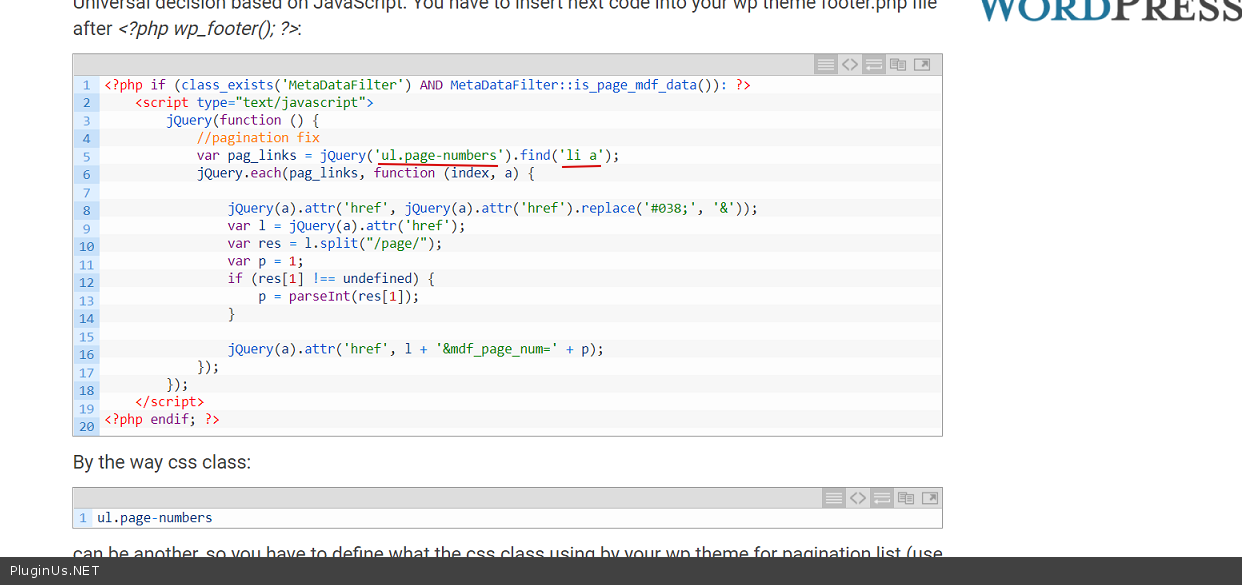
In this article there is a solution – https://wp-filter.com/howto/pagination-doesn-work-what-to-do/ You just need to change the code a bit that would suit your pagination ( http://c2n.me/3N6irYm.png )
Thanks for your reply, i just testet the code. But i am not sure how to change it. If i look in firefox-inspector, i could only find class page-numbers not ul.page-numbers.
I testet this some days before with:
var pag_links = jQuery(‘page-numbers’).find(‘a’);
But it does not worked.
Hello
Try it:
var pag_links = jQuery(‘.nav-links’).find(‘a.page-numbers’);
Hello Pavlo,
thank you very much for your support! Your snippet works finde for me!