Thread Starter
 linae
linae
(@linae)
Up,
The problem occurs randomly and now affects the yellow and the blue image.
I don’t even know why the rows background are parallax because I don’t have this choice in the rows settings…
Plugin Contributor
 alexgso
(@alexgso)
Hi linae,
This looks to be as a result of the images you’re using. Specifically, they aren’t large enough for them to be applied to the full width of the row and still parallax.
To clarify, what is your Limit Parallax Motion set to? You can check this by navigating to WP Admin > Settings > Page Builder and open the General tab.
Thread Starter
linae
(@linae)
Hi,
My parallax limit is 10. I have noticed that the more the resolution of the screen is low, the more the parallax fails for my example.
What should I do ?
My image is large enough (800px) but the parallax focus looks to be too low because we only can see 1/4 of the height of my image.
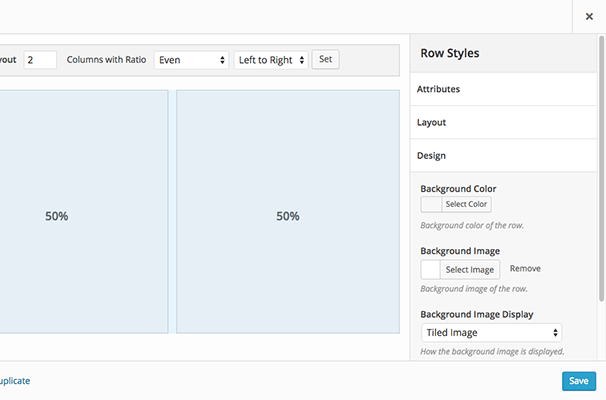
PS : Why don’t I have the option to choose how the background image is displayed anymore just like on the screen below ?
https://siteorigin.com/wp-content/themes/siteorigin-theme/pages/page-builder/images/row-styles.png
-
This reply was modified 8 years, 4 months ago by
 linae.
-
This reply was modified 8 years, 4 months ago by linae.
-
This reply was modified 8 years, 4 months ago by linae.
Plugin Contributor
alexgso
(@alexgso)
Hi linae,
To clarify, the issue isn’t the height. It’s a mixture of both the height and the width., with the width being the primary issue here.
Regarding the PS. I’m not too sure. What do you see instead? Can you show me a screenshot of that?
Thread Starter
linae
(@linae)
Hi,
Thanks for your answers.
A screenshot of my row design settings below (there’s no “how the background image displays” which means that I can’t even set my background as a cover to avoid the parallax issue.
https://image.noelshack.com/fichiers/2018/07/3/1518614313-capture.jpg
I’ve tried to change the images, but depending on the screen I use (resolution), the problem occurs or not. I can’t make it work with every screen, that’s the most important.
Plugin Contributor
alexgso
(@alexgso)
Hi linae,
Okay so that suggests something you have installed is removing this option and enforcing it as we do not force users to use Parallax.
I’m not too sure what is doing this so I would recommend running a plugin conflict test. This is not to suggest this is a plugin conflict (it’s not), only that this is a good way of figuring out what plugin/theme is doing what.
For reference, here are our typical plugin conflict test steps:
You can start by disabling all non-SiteOrigin plugins and see if this fixes the issue. You’ll need to clear all your caches after disabling your plugins. So just to confirm, double check if the issue is coming up while all other plugins are disabled.
If it does fix the issue, then try re-enabling your plugins one by one until the issue comes back. This procedure will help diagnose which plugin is causing the issue. Once we know that, we’ll be able to look at what might be causing the conflict and either solve the problem or help you find an alternative plugin.
You could also try temporarily switching to a default WordPress theme like Twenty Sixteen. Default WordPress themes are generally very light weight which lowers the chance that they’ll conflict with plugins, so they’re a good way to test if your original theme is the source of the issue.
Thread Starter
linae
(@linae)
Hi alexgso,
Indeed, I have tested your solutions and it seems that leaving Sydney (child) for Twenty “fixed” it even though I always have worked with Sydney on this site.
Perhaps an update suppressed the option…
For the moment, I used the widget background to get a parallax background on the whole row and it works this way.