• Resolved petrwoff

    (@petrwoff)


    Hello Iulia,

    thank you very much for this amazing plugin, I am your fan and if someboedy from my surroundings will need Wp developer, I will recommend Iulia Cazan (if you are not against). But I please for a help. I need a list of latest articles, where will be names of the authors with the links on their sites (that works) and titles of the articles with the links on the articles: that does not work on my sites. I test it here:

    https://kupnisila.cz/test/

    The shortcodes are:

    [latest-selected-content limit=”1″ display=”title” url=”yes” elements=”0″ css=”one-columns” type=”post” status=”publish” orderby=”dateD” show_extra=”author,taxpos_author_before-title”]

    [latest-selected-content limit=”1″ display=”title” url=”yes” linktext=”Read more” elements=”0″ css=”one-columns” type=”post” status=”publish” orderby=”dateD” show_extra=”author,taxpos_author_before-title”]

    Can you, please, advise me, what should I change to get links to the articles from the titles of the articles?

    Thank you!

    Petr

Viewing 6 replies - 1 through 6 (of 6 total)
  • Plugin Author Iulia Cazan

    (@iulia-cazan)

    Hi Petr,

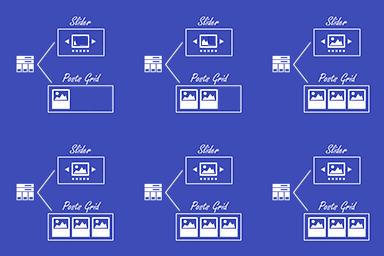
    I thank you for using my plugin and for the message you sent, it means a lot to me. I checked the shortcode you sent and I think that you have to change the tile template in the shortcode, like elements="5". It can be changed from the plugin UI when you go to element template (basically, the icons show with red where there is a link in the markup, so you can select the one you prefer, depending on the context), or by simply updating the value in the shortcode.

    Let me know how it goes.

    Regards,
    Iulia

    • This reply was modified 7 years, 6 months ago by Iulia Cazan.
    Thread Starter petrwoff

    (@petrwoff)

    Hi Iulia,

    thank you for fast and good advice. It seems we are closer to the goal. Now is the link to the article included in the words “Read more”, but still is missed in the title of the article. Have you, please, any other idea, how to fix that?

    Thanks a lot!

    Petr

    Plugin Author Iulia Cazan

    (@iulia-cazan)

    Hello,

    The only way to show two different links per tile in this context (without having the whole tile wrapped in the link, and not using the read more text and link) would be if you put the author after the title, something liks this [latest-selected-content limit="1" display="title" url="yes" elements="3" css="one-columns" type="post" status="publish" orderby="dateD" show_extra="author,taxpos_author_before-image"].

    Let me know if this works for you.

    Regards,
    Iulia

    Plugin Author Iulia Cazan

    (@iulia-cazan)

    Sorry, I have you the wrong shortcode, try this one [latest-selected-content limit="1" display="title" url="yes" elements="3" css="one-columns" type="post" status="publish" orderby="dateD" show_extra="author,taxpos_author_after-text"]

    Thread Starter petrwoff

    (@petrwoff)

    Iulia, bravo, now it works! My Christmas begins now, thanks to you. I am your debtor (I believe, if I will be as kind as you, the kindness comes back to you early, thru another kind people). 🙂

    Plugin Author Iulia Cazan

    (@iulia-cazan)

    This is great, I’m glad it works! I will mark this issue as resolved. Please do not forget to rate the plugin.

    Happy holidays!
    Iulia

Viewing 6 replies - 1 through 6 (of 6 total)

The topic ‘Plea for simple help’ is closed to new replies.