[Plugin: Events Manager] Admin Tool – Events (Event Mngr Plugin)
-
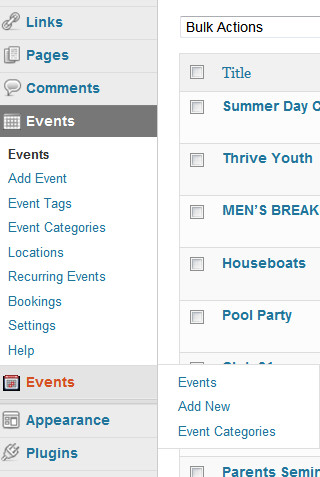
HELP!! Anyone know how to fix the Double entry in the Admin area tool bar. WordPress has its own Events Tool/menu and after I installed Event Manager Plugin, it also created a NEW Events tool/menu in the Admin area. How do I get rid of the original Events tool/menu. I do not want others that have access to accidentally create events using the old/original WordPress Events tool.
Here is a link http://new.bearcreekchurch.com/images/dual-events-tool.jpg
to what my Admin Menu bar looks like with the Dual “Events” tool I need to remove the bottom one – that uses the original WordPress events app.

Viewing 3 replies - 1 through 3 (of 3 total)


Viewing 3 replies - 1 through 3 (of 3 total)
The topic ‘[Plugin: Events Manager] Admin Tool – Events (Event Mngr Plugin)’ is closed to new replies.