Hey WillYurman,
I just checked your website. The code seems to be added, but due to some caching the CSS is not working. I would recommend disabling CSS and trying again. Let me also know once you disable the caching plugins.
Hi Harish,
Thanks for the quick reply! I don’t have any caching plugins running. )I have Super Cache installed but it wasn’t activated). I tried deactivating most of my other plugins, but I’m still not seeing IRT on my posts.
I then deleted all the custom CSS I had, and I’m still not seeing the heart.
any other ideas?
thanks again
will
Hello Will,
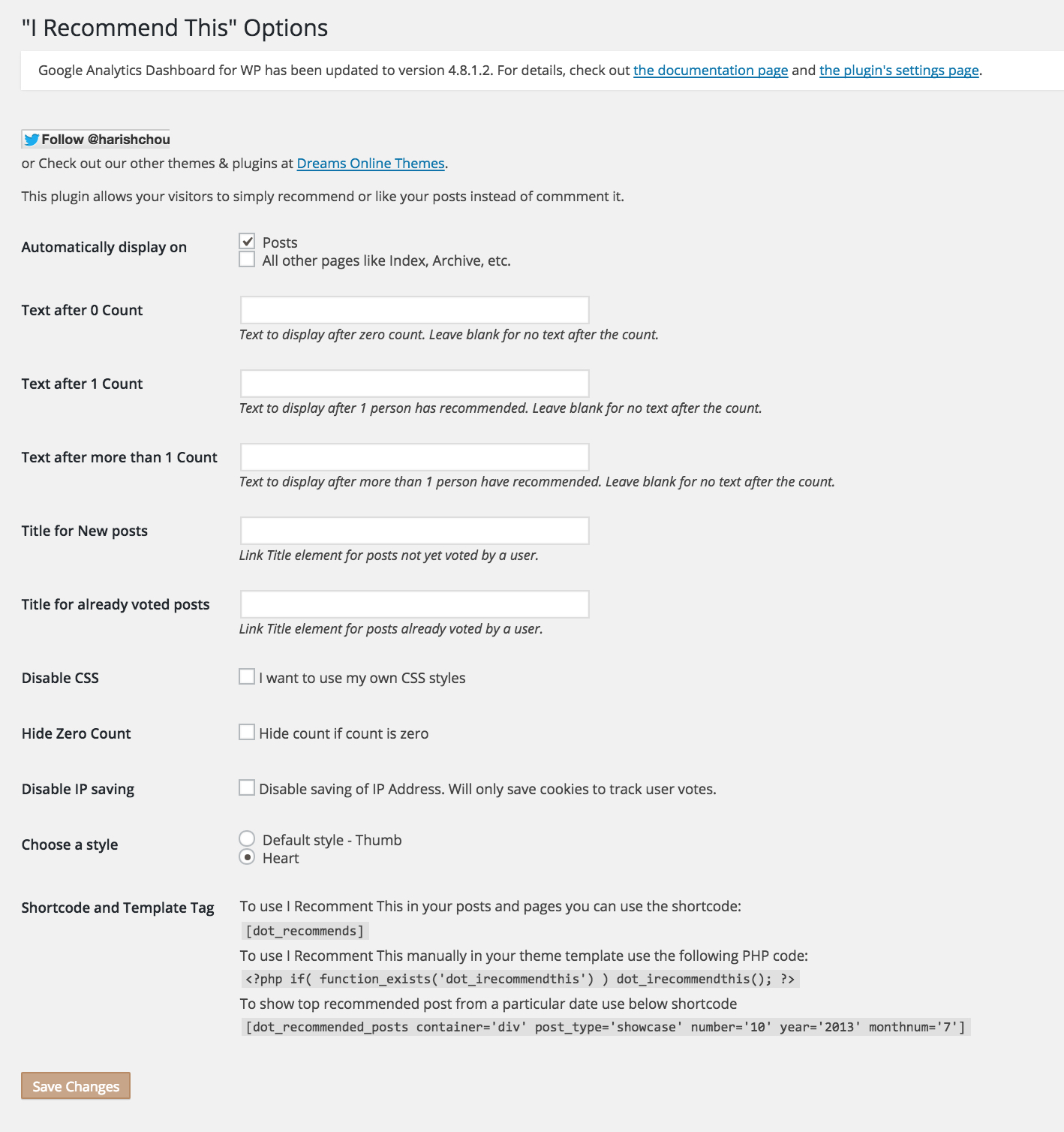
Being a CSS issue it’s out of scope of support. But can you please try switching to default theme and testing. Let me know if it works. Also can you please share screenshot of the settings page for “I Recommend This” plugin.
 Andrew Nevins
(@anevins)
WCLDN 2018 Contributor | Volunteer support
If it is a general CSS issue that does not require knowledge of the plugin to debug, then Will can post on the How To forum: https://ww.wp.xz.cn/support/forum/how-to-and-troubleshooting#postform
Hi Harish,
I tried to use the default 2015 theme, and still don’t see it working. Here’s a link to a screen shot of the settings.
http://www.willyurman.com/IrecommendthisSettings.jpg
Andrew, thanks for the suggestion. I’ll give it a try and see if anyone there knows what’s up.
thanks again,
will
Hey @willyurman,
Looking at the source code, I noticed that the .CSS added by the plugin is absent but the code is directly added to the theme.
Are you using some special setup like PageSpeed or some plugin that might be doing this?
Hi Harish,
I’m not using PageSpeed or any plugin like it. I tried turning off all my plugins except yours, but that didn’t work either. (I’ve since turned them back on)
Hello WillYurman,
If that is nothing to do with plugin, then I’m guessing it’s 100% related to your web host. Can you let me know where you are hosted and if you have some control panel to manage such as cPanel.
This is a weird issue so I would try my best to work with you to get it resolved just for learning something new. But please bear with me as I might not be quick in replying due to client work.
Thanks Harish for any help. I certainly understand that paying work comes first.
I’m hosted by Dreamhost. I don’t believe they use cPanel, at least not according to this link: https://besthostingsearch.net/tutorial/does-dreamhost-use-cpanel/
But I have some access to controls. Happy to try to solve this.
thanks again,
Will
Hey WillYurman,
Can you please ask DreamHost if they are using any caching mechanism and to disable it for your domain. Ask them to check the source of of your site so they will get an idea.
Hi Harish,
Dreamhost says they don’t use caching,
“We wouldn’t automatically enable any caching mechanisms on your site
actually! If you had any for any part of the site in particular, you
would’ve had to enable that on your end.”
best
Will
Hello Will,
That is strange. I am not sure of your experience with WordPress or general web development, but if you could look at the source code you would notice something like:
http://www.willyurman.com/AdayAphoto/wp-content/themes/retouch-pro/lib/js/gallery.js,qver=1.0.pagespeed.jm.kGbEz-pOEC.js Most of the scripts/css that are used in the site get this pagespeed thing at the front. There is some kind of caching going on. But it’s hard for me to test it just by looking at your website.
Can you please email me at “hello @ dreamsmedia . in” and we can discuss this.