Hi @heatherms27
honestly, I haven’t understood the issue.
Please, correct me where I’m wrong and answer my questions.
“I installed the plugin, and it appears in the dashboard” => I understand you see Specific Content For Mobile in the page of plugins in the backend and you see that it’s active.
“and there’s a header on the page” =>
What page? On frontend or backend?
What is blank? After the header?
If it’s on the frontend, please if possible, share the URL.
In any case, it will help if you activate the debug. Open your wp-config.php and set:
define( 'WP_DEBUG',true );
define( 'WP_DEBUG_LOG',true );
define( 'WP_DEBUG_DISPLAY',false );
be sure they are before the comment /* That’s all, stop editing! Happy blogging. */ and you don’t have duplicated definitions. If you already have define( ‘WP_DEBUG’,false ); replace it with define( ‘WP_DEBUG’,true );
Then visit the page where you have the issue and check the file wp-content/debug.log.
If you find errors in that file, please let me know them.
Hi Jose,
Thank you for getting back to me. Sorry, I hope I can be clearer.
1) You said
“I installed the plugin, and it appears in the dashboard” => I understand you see Specific Content For Mobile in the page of plugins in the backend and you see that it’s active.
That’s correct.
2) According to your instructions, on “pages”, there should be a link or a + symbol on listed page to initiate the changes. Unfortunately, I don’t have that.
3) In the page editor, I have a block that says ” Mobile Version “, but it is inactive.
Best,
Heather
Hi Heather
thank you for the clarification.
Let’s focus on point 2)
I think neither WP Fastest Cache nor Assets Cleanup are the cause of this issue.
Do you have any plugins to customize the backend or manage the user roles?
I suggest you check the same page disabling the theme and all plugins, but Specific Content For Mobile, and check if you still have the same issue.
You can do it in preview mode with Freesoul Deactivate Plugins.
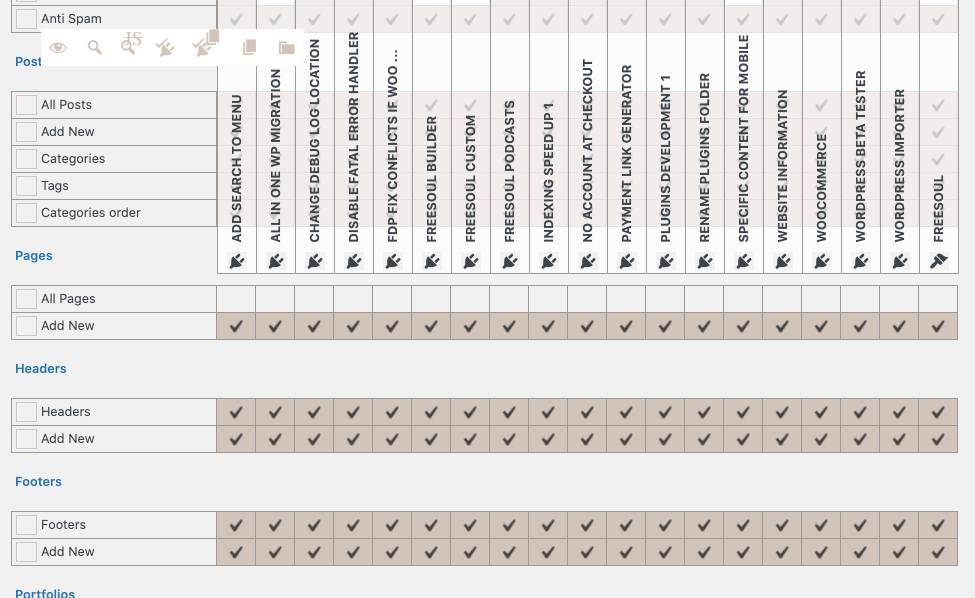
After installing FDP, go to Freesoul Deactivate Plugins => Backend => Backend Singles, and disable all the plugins and the theme in the row related to “Pages”, but keeping active Specific Content For Mobile.
See this picture to have an idea: https://freesoul-deactivate-plugins.com/wp-content/uploads/2021/03/freesoul-deactivate-plugins-backend-singles.png
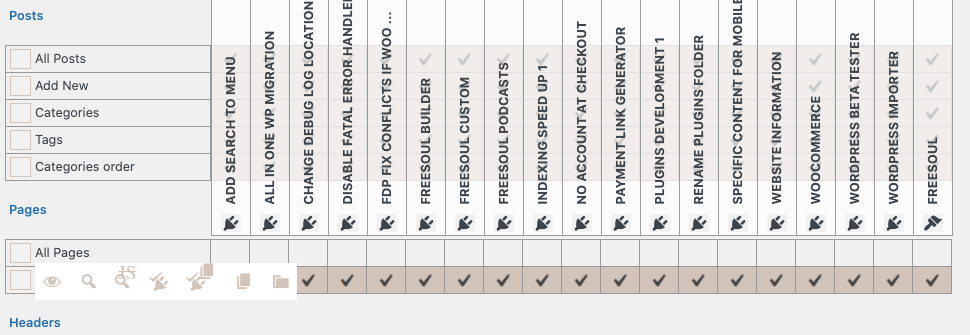
Then click on the Lens icon, the second one next to the eye that you see in this picture: https://freesoul-deactivate-plugins.com/wp-content/uploads/2021/03/freesoul-deactivate-plugins-backend-singles-preview.png
This will be only a preview, you can do it also on a site that is live.
If without plugins and theme it works, activate the theme and check again.
Then activate a plugin after the other always checking if it works.
By doing so you will be able to say if one of the plugins or the theme is the cause of the issue. Then we can focus on the plugin or theme.
If you have the issue in any case, even disabling all plugins and the theme, I will ask you some questions.
Hi @heatherms27
do you have any news? Do you still need help with this issue?
Thank you for checking Jose, I don’t need any more help. Thank you.