Good morning, I’m encountering an issue with numbering and consecutive dates, and I’m not sure if I’m doing something wrong or if there’s a problem with the plugin.
I have it set up so that invoices are only generated for completed orders, and I only allow downloads from “My Account” once the invoice has been created from the backend, as you can see here: https://ibb.co/XjG8Q6B
I’m wondering, when is the invoice generated? Does it happen automatically when the order is marked as complete, or is it generated only after we click the invoice button from the order? https://ibb.co/nw5xt60
I ask because this weekend we had an issue with numbering and consecutive dates. A customer clicked the “Download Invoice” button before we had clicked the “Generate Invoice” button, which caused the invoice to be created out of sequence. This skipped the correct order, as there was a prior order to theirs. Consequently, the invoice date for this customer is incorrect.
Our plugin will always create a sequential number for your invoices, so if you’re seeing gaps in your numbering invoices, it could be caused by:
Order deleted (manually/automatically): If you delete an order with an invoice, this action will not decrease or restore the invoice numbering to -1. You’ll need to restore the invoice numbering under WooCommerce > PDF Invoices > Documents > Invoice > Next invoice number.
WooCommerce also has a Personal data retention group of settings that allows you to automatically delete orders based on its order status and a specific number of days after its placement:
You may need to have these settings working, but then you’ll need to disable the automatic invoice creation, to avoid create invoices for order statuses different to Processing and/or Completed, under WooCommerce > PDF Invoices > Documents > Invoice > Attach to:
Invoices deleted: If you delete not the order itself, but an invoice created for it, this action either will not decrease your invoice numbering to -1.
PayPal race condition: This is a known WooCommerce issue with a specific PayPal configuration, and it affects more than just invoice creation. PayPal has two different methods for confirming payment of an order (name “PDT” and “IPN”). If you have enabled both of them, PayPal sends two notifications to WooCommerce at the same time. This results in what is called a “race condition”: the processes start in parallel (not being able to see the other yet), doing the same tasks. The client receives two emails for their order (each with an invoice), stock gets reduced twice, and other processes might be duplicated as well. Because an order can only have one invoice, only one of them ‘survives’ after the processes have finished.
IPN and PDT serve the exact same purpose, so you only need one of them. Two options (choose one):
To disable PDT, clear the “PayPal identity token” in the PayPal gateway settings in WooCommerce
To disable IPN, you will need to go to your PayPal merchant backend (where you can also disable PDT by the way).
The next invoice number has been changed manually: It is possible to change the next invoice number in the PDF invoice settings. This is a useful setting when you are configuring the plugin or when an issue happens with a specific invoice. However, if you use it wrongly, it can create gaps into your invoice numbers, when you do not follow your last invoice number created.
That said, you can take advantage of the Numbers tracking tool, that you will find under WooCommerce > PDF Invoices > Advanced > Numbers, that allows you to track the document numbers (invoices, packing slips, etc.), including the creation date, related order, and order status:
Please note that if you set manually the Next invoice number, within the document settings, the numbering log is restarted, so you’ll only see the new numbers created afterward.
I’m wondering, when is the invoice generated? Does it happen automatically when the order is marked as complete, or is it generated only after we click the invoice button from the order?
Our free plugin creates a PDF invoice automatically based on the order email notifications attachments, which you can configure under WooCommerce > PDF Invoices > Documents > Invoice > General > Attach to: The attachment process will create an invoice document with its respective number:
For instance, if you have the “Processing order” or/and “Completed order” options selected, when the order has reached the Processing or Completed statuses, the invoice should be attached in its respective notification.
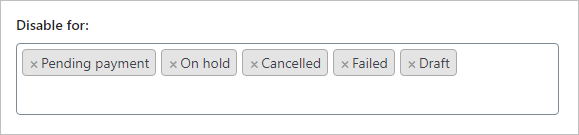
However, even if you do not have any option selected in the “Attach to” setting, you would be still able to create an invoice manually, using the document buttons in the order list, or the order details screen, unless you have disabled the document altogether, selecting the order statuses in which you do not want to create an invoice yet.
You can do this within the “Disable for” option, which is located in the PDF invoices settings as well:
The issue lies with the correlation between the date and the number. For example, if invoice number 1 has a date of 16/01/2025, invoice number 2 cannot have a date before than that; it must always be after, and that’s what is happening to us. I know there are two types of dates I can select in the settings: “invoice date” and “order date.” Right now, I have “order date” selected, but I’m not sure what the difference is and whether changing this might solve the issue.
In any case, if the invoice is generated automatically when the order is completed (that’s how I have it configured), I understand there shouldn’t be any difference in this date, right?
The problem I’m having with the automatic generation of invoices might be due to the fact that the orders on my website are subscriptions. For the first order of the subscription, the invoice is sent automatically, but for the renewal orders, which are created automatically using the YITH Subscriptions plugin, an email is sent automatically, but the invoice is not attached. So, I think that the invoices for the renewal orders are not actually generated until we click on the invoice button in the order, or until the customer clicks on the download invoice button. And that’s what I think is causing the inconsistencies with the dates.
Please note that the invoice numbers and date are assigned based on when the document is generated, and this does not always match the sequence in which orders arrive (unless you generate an invoice at order creation, regardless of whether you have received payment or not, e.g. by sending the document to the administrator).
For instance, let’s say that your next invoice number is I-101 and you only generate an invoice when the order changes to Completed status (that in fact appear to be your case). If you receive three orders in a row, with the order numbers 100, 101 and 102, but the order status changes to Completed in a difference sequence: 102, 100, 101, the invoice numbers would look like this:
Order: 100 = Invoice: I-102 (second to change to Completed) Order: 101 = Invoice: I-103 (third to change to Completed) Order: 102 = Invoice: I-101 (first to change to Completed)
This is completely normal, but if you are using the order date, instead of the invoice date (which is the default date and the one we recommend), it can produce the issue you have described.
To illustrate this better, and following with the previous example, let’s say that the order and invoices were created the following dates:
Order: 100 was placed on January 1st = Invoice: I-102 created on January 5th
Order: 101 was placed on January 2nd = Invoice: I-103 created on January 6th
Order: 102 was placed on January 3rd = Invoice: I-101 created on January 4th
If you are using the order date, the number sequence and date of the documents would be like this:
Invoice: I-101 – Document date: January 3rd
Invoice: I-102 – Document date: January 1st
Invoice: I-103 – Document date: January 2nd
But if you use the invoice date instead, the number sequence and date would be this way:
Invoice: I-101 – Document date: January 4th
Invoice: I-102 – Document date: January 5th
Invoice: I-103 – Document date: January 6th
Hope it makes sense! 😉
Viewing 4 replies - 1 through 4 (of 4 total)
The topic ‘Problem with invoice date and number’ is closed to new replies.