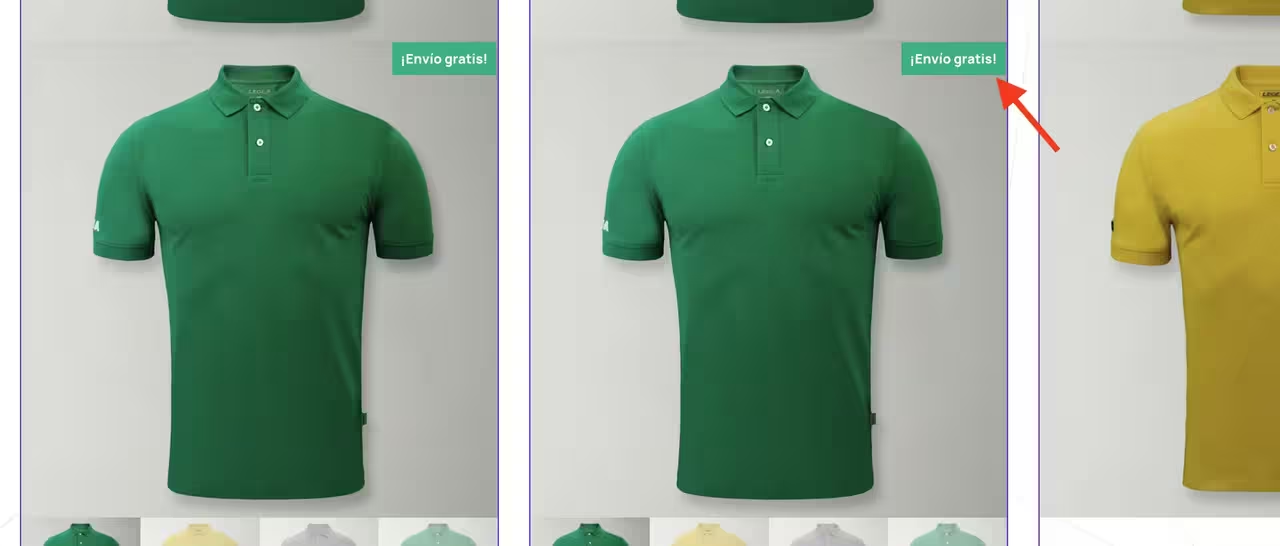
Product thumbnail
-
I dont see the sale flash option for the product thumbnail widget. It should have it.

-
Hi @legeaclubs
Thanks for reaching out to us.
I’m sorry, but I’m having a bit of difficulty fully grasping your query. Based on my current understanding, I’d like to share the following information.
In CoDesigner, the Flash Sale feature is a module. This feature only works only with CoDesigner Shop widgets. You must activate it first to use it. To enable it, go to your Dashboard, navigate to CoDesigner > Modules, and turn on the Flash Sale module. After saving the settings, a new Flash Sale tab will appear below the Modules section. From there, you can make any necessary changes and save them to activate the feature.
Now navigate to your shop page where you want to set the Flash Sale option. Click on the Edit with Elementor. You’ll discover a new tab on the editor panel. Set the campaign time duration properly. You can go through these docs for proper guidance.
If you have any further questions or need assistance, feel free to reach out, and we’ll be happy to help!
Best regards,
NayeemThe thing I want is this badge to appear on the product image thumbnail. Now is not showing, it only appears on the product gallery widget.
Hi @legeaclubs
The image link you provided is not appearing. Could you please recheck it or share the link again? We kindly request you to submit a ticket to our support channel through this link. Our support team will then be able to take a closer look at your request.
Thank you,
the link opens to me
Hi @legeaclubs
We regret to inform you that the link you provided is not opening from our end. I’ve attached the screenshot link here. Could you please review the attached link? If possible, please provide an alternative link or re-upload the screenshot so we can review it properly and assist you further.
Thanks for your cooperation.
Hi @legeaclubs
If you want to display a badge on the product image thumbnail, please follow these steps:
- First, Navigate to the CoDesigner Modules section and enable the Badge module.
- After that, go to the Products section and choose the specific product for which you want to show the badge.
- Mark the Badge for this product option and click Update to save the changes.
- Open your Shop Widget in Elementor. In the editor, you’ll find a Badge setting where you can customize and add the badge as needed.
You can refer to this documentation for more details. Kindly let me know if these steps were helpful to you.
Thank you,
im using a global badge plugin. As I said, it only appears on the product gallery widget not on the product thumbnail widget. https://postimg.cc/gallery/kKjHWCn
Look at the difference, product gallery widget has the sale flash option but product thumbnail doesn’t has it.
Hi @legeaclubs
Thank you for clarifying. We’ve tested it and confirmed that the “Sale Flash” option is currently available on the Product Gallery widget. We have prioritized this and will implement the “Sale Flash” feature on the Product Thumbnail as soon as possible. Once it’s implemented, I will notify you.
Thank you for your understanding.
thanks 😉
any news?
Hi @legeaclubs
We appreciate your follow up. The feature has not been implemented yet as our development team is currently focused on other priority tasks. However, we are working on it gradually, and I will notify you as soon as it is added.
Thanks,

The topic ‘Product thumbnail’ is closed to new replies.