Redirect a website.
-
Hello,
I had a WordPress website and changed my domain name from “example1.com” to “example2.com” and reconfigured my Apache web server too. When I enter “example2.com” in my browser, then it forward to “example1.com”.
Can WordPress configuration do it? If no, then can it a DNS or… problem? My Linux server doesn’t have any DNS service. Which part of my system must be examined?Thank you.

-
@hack3rcon Check your .htaccess file. What’s in there?
Check your Rewrite rules again. It should look like this if you want your users to go from example1.com to example2.com:
RewriteEngine on
RewriteCond "%{HTTP_HOST}"   "!^www\.example1\.com" [NC]
RewriteCond "%{HTTP_HOST}"   "!^$"
RewriteRule "^/?(.*)"        "http://www.example2.com/$1" [L,R,NE]
If you are using redirect, it should look like this:
RewriteEngine on
Redirect 301 / http://example2.com/
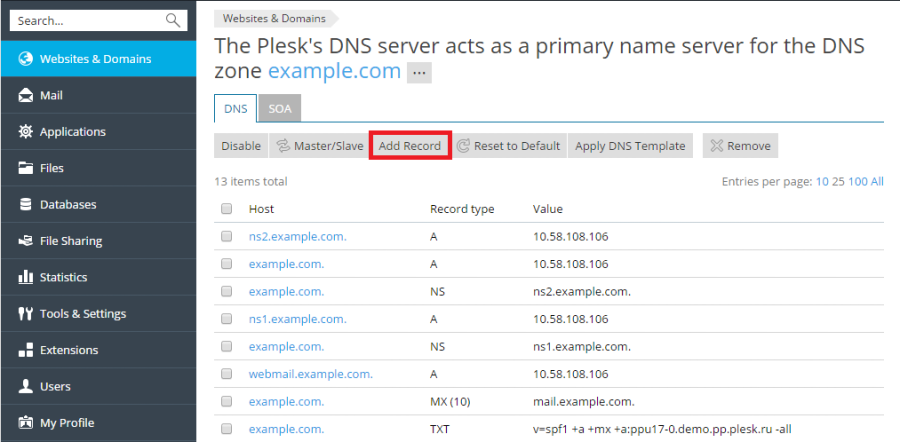
If you wanna change it via DNS (no redirection), Just point your A record to the new IP address. Here is how that would look like: https://docs.plesk.com/en-US/onyx/quick-start-guide/images/77088.webp
Let me know how it goes 🙂
Thank you.
My VirtualHost is:<VirtualHost *:80> ServerAdmin root@localhost ServerName www.example2.com ServerAlias www.example2.com DocumentRoot /var/www/wp ErrorLog /var/log/httpd/wordpress_error.log CustomLog /var/log/httpd/wordpress_access.log common RewriteEngine on RewriteCond %{SERVER_NAME} =example2.com [OR] RewriteCond %{SERVER_NAME} =www.example2.com [OR] RewriteRule ^ https://%{SERVER_NAME}%{REQUEST_URI} [END,NE,R=permanent] Redirect permanent / https://www.example2.com TraceEnable off ServerSignature Off # SSL SSLCipherSuite ECDHE-ECDSA-AES128-GCM-SHA256:ECDHE-RSA-AES128-GCM-SHA256:ECDHE-ECDSA-AES256-GCM-SHA384:ECDHE-RSA-AES256-GCM-SHA384:ECDHE-ECDSA-CHACHA20-POLY1305:ECDHE-RSA-CHACHA20-POLY1305:DHE-RSA-AES128-GCM-SHA256:DHE-RSA-AES256-GCM-SHA384 SSLHonorCipherOrder on SSLCompression off SSLSessionTickets off </VirtualHost> <Directory "/var/www/wp> # Options -Indexes +FollowSymLinks Options -Indexes AllowOverride All Require all granted </Directory></code></pre>And .htaccess file is:
# BEGIN W3TC Browser Cache <IfModule mod_mime.c> AddType text/css .css AddType text/x-component .htc AddType application/x-javascript .js AddType application/javascript .js2 AddType text/javascript .js3 AddType text/x-js .js4 AddType video/asf .asf .asx .wax .wmv .wmx AddType video/avi .avi AddType image/bmp .bmp AddType application/java .class AddType video/divx .divx AddType application/msword .doc .docx AddType application/vnd.ms-fontobject .eot AddType application/x-msdownload .exe AddType image/gif .gif AddType application/x-gzip .gz .gzip AddType image/x-icon .ico AddType image/jpeg .jpg .jpeg .jpe AddType image/webp .webp AddType application/json .json AddType application/vnd.ms-access .mdb AddType audio/midi .mid .midi AddType video/quicktime .mov .qt AddType audio/mpeg .mp3 .m4a AddType video/mp4 .mp4 .m4v AddType video/mpeg .mpeg .mpg .mpe AddType video/webm .webm AddType application/vnd.ms-project .mpp AddType application/x-font-otf .otf AddType application/vnd.ms-opentype ._otf AddType application/vnd.oasis.opendocument.database .odb AddType application/vnd.oasis.opendocument.chart .odc AddType application/vnd.oasis.opendocument.formula .odf AddType application/vnd.oasis.opendocument.graphics .odg AddType application/vnd.oasis.opendocument.presentation .odp AddType application/vnd.oasis.opendocument.spreadsheet .ods AddType application/vnd.oasis.opendocument.text .odt AddType audio/ogg .ogg AddType application/pdf .pdf AddType image/png .png AddType application/vnd.ms-powerpoint .pot .pps .ppt .pptx AddType audio/x-realaudio .ra .ram AddType image/svg+xml .svg .svgz AddType application/x-shockwave-flash .swf AddType application/x-tar .tar AddType image/tiff .tif .tiff AddType application/x-font-ttf .ttf .ttc AddType application/vnd.ms-opentype ._ttf AddType audio/wav .wav AddType audio/wma .wma AddType application/vnd.ms-write .wri AddType application/font-woff .woff AddType application/font-woff2 .woff2 AddType application/vnd.ms-excel .xla .xls .xlsx .xlt .xlw AddType application/zip .zip </IfModule> <IfModule mod_expires.c> ExpiresActive On ExpiresByType text/css A31536000 ExpiresByType text/x-component A31536000 ExpiresByType application/x-javascript A31536000 ExpiresByType application/javascript A31536000 ExpiresByType text/javascript A31536000 ExpiresByType text/x-js A31536000 ExpiresByType video/asf A31536000 ExpiresByType video/avi A31536000 ExpiresByType image/bmp A31536000 ExpiresByType application/java A31536000 ExpiresByType video/divx A31536000 ExpiresByType application/msword A31536000 ExpiresByType application/vnd.ms-fontobject A31536000 ExpiresByType application/x-msdownload A31536000 ExpiresByType image/gif A31536000 ExpiresByType application/x-gzip A31536000 ExpiresByType image/x-icon A31536000 ExpiresByType image/jpeg A31536000 ExpiresByType image/webp A31536000 ExpiresByType application/json A31536000 ExpiresByType application/vnd.ms-access A31536000 ExpiresByType audio/midi A31536000 ExpiresByType video/quicktime A31536000 ExpiresByType audio/mpeg A31536000 ExpiresByType video/mp4 A31536000 ExpiresByType video/mpeg A31536000 ExpiresByType video/webm A31536000 ExpiresByType application/vnd.ms-project A31536000 ExpiresByType application/x-font-otf A31536000 ExpiresByType application/vnd.ms-opentype A31536000 ExpiresByType application/vnd.oasis.opendocument.database A31536000 ExpiresByType application/vnd.oasis.opendocument.chart A31536000 ExpiresByType application/vnd.oasis.opendocument.formula A31536000 ExpiresByType application/vnd.oasis.opendocument.graphics A31536000 ExpiresByType application/vnd.oasis.opendocument.presentation A31536000 ExpiresByType application/vnd.oasis.opendocument.spreadsheet A31536000 ExpiresByType application/vnd.oasis.opendocument.text A31536000 ExpiresByType audio/ogg A31536000 ExpiresByType application/pdf A31536000 ExpiresByType image/png A31536000 ExpiresByType application/vnd.ms-powerpoint A31536000 ExpiresByType audio/x-realaudio A31536000 ExpiresByType image/svg+xml A31536000 ExpiresByType application/x-shockwave-flash A31536000 ExpiresByType application/x-tar A31536000 ExpiresByType image/tiff A31536000 ExpiresByType application/x-font-ttf A31536000 ExpiresByType application/vnd.ms-opentype A31536000 ExpiresByType audio/wav A31536000 ExpiresByType audio/wma A31536000 ExpiresByType application/vnd.ms-write A31536000 ExpiresByType application/font-woff A31536000 ExpiresByType application/font-woff2 A31536000 ExpiresByType application/vnd.ms-excel A31536000 ExpiresByType application/zip A31536000 </IfModule> <IfModule mod_deflate.c> AddOutputFilterByType DEFLATE text/css text/x-component application/x-javascript application/javascript text/javascript text/x-js text/html text/richtext text/plain text/xsd text/xsl text/xml image/bmp application/java application/msword application/vnd.ms-fontobject application/x-msdownload image/x-icon application/json application/vnd.ms-access video/webm application/vnd.ms-project application/x-font-otf application/vnd.ms-opentype application/vnd.oasis.opendocument.database application/vnd.oasis.opendocument.chart application/vnd.oasis.opendocument.formula application/vnd.oasis.opendocument.graphics application/vnd.oasis.opendocument.presentation application/vnd.oasis.opendocument.spreadsheet application/vnd.oasis.opendocument.text audio/ogg application/pdf application/vnd.ms-powerpoint image/svg+xml application/x-shockwave-flash image/tiff application/x-font-ttf application/vnd.ms-opentype audio/wav application/vnd.ms-write application/font-woff application/font-woff2 application/vnd.ms-excel <IfModule mod_mime.c> # DEFLATE by extension AddOutputFilter DEFLATE js css htm html xml </IfModule> </IfModule> <FilesMatch "\.(css|htc|less|js|js2|js3|js4|CSS|HTC|LESS|JS|JS2|JS3|JS4)$"> FileETag MTime Size <IfModule mod_headers.c> Header unset Set-Cookie </IfModule> </FilesMatch> <FilesMatch "\.(html|htm|rtf|rtx|txt|xsd|xsl|xml|HTML|HTM|RTF|RTX|TXT|XSD|XSL|XML)$"> FileETag MTime Size </FilesMatch> <FilesMatch "\.(asf|asx|wax|wmv|wmx|avi|bmp|class|divx|doc|docx|eot|exe|gif|gz|gzip|ico|jpg|jpeg|jpe|webp|json|mdb|mid|midi|mov|qt|mp3|m4a|mp4|m4v|mpeg|mpg|mpe|webm|mpp|otf|_otf|odb|odc|odf|odg|odp|ods|odt|ogg|pdf|png|pot|pps|ppt|pptx|ra|ram|svg|svgz|swf|tar|tif|tiff|ttf|ttc|_ttf|wav|wma|wri|woff|woff2|xla|xls|xlsx|xlt|xlw|zip|ASF|ASX|WAX|WMV|WMX|AVI|BMP|CLASS|DIVX|DOC|DOCX|EOT|EXE|GIF|GZ|GZIP|ICO|JPG|JPEG|JPE|WEBP|JSON|MDB|MID|MIDI|MOV|QT|MP3|M4A|MP4|M4V|MPEG|MPG|MPE|WEBM|MPP|OTF|_OTF|ODB|ODC|ODF|ODG|ODP|ODS|ODT|OGG|PDF|PNG|POT|PPS|PPT|PPTX|RA|RAM|SVG|SVGZ|SWF|TAR|TIF|TIFF|TTF|TTC|_TTF|WAV|WMA|WRI|WOFF|WOFF2|XLA|XLS|XLSX|XLT|XLW|ZIP)$"> FileETag MTime Size <IfModule mod_headers.c> Header unset Set-Cookie </IfModule> </FilesMatch> <FilesMatch "\.(bmp|class|doc|docx|eot|exe|ico|json|mdb|webm|mpp|otf|_otf|odb|odc|odf|odg|odp|ods|odt|ogg|pdf|pot|pps|ppt|pptx|svg|svgz|swf|tif|tiff|ttf|ttc|_ttf|wav|wri|woff|woff2|xla|xls|xlsx|xlt|xlw|BMP|CLASS|DOC|DOCX|EOT|EXE|ICO|JSON|MDB|WEBM|MPP|OTF|_OTF|ODB|ODC|ODF|ODG|ODP|ODS|ODT|OGG|PDF|POT|PPS|PPT|PPTX|SVG|SVGZ|SWF|TIF|TIFF|TTF|TTC|_TTF|WAV|WRI|WOFF|WOFF2|XLA|XLS|XLSX|XLT|XLW)$"> <IfModule mod_headers.c> Header unset Last-Modified </IfModule> </FilesMatch> <IfModule mod_headers.c> Header set Referrer-Policy "no-referrer-when-downgrade" Header always edit Set-Cookie (.*) "$1; HttpOnly" Header always edit Set-Cookie (.*) "$1; Secure" </IfModule> # END W3TC Browser Cache # BEGIN W3TC Page Cache core <IfModule mod_rewrite.c> RewriteEngine On RewriteBase / RewriteCond %{HTTPS} =on RewriteRule .* - [E=W3TC_SSL:_ssl] RewriteCond %{SERVER_PORT} =443 RewriteRule .* - [E=W3TC_SSL:_ssl] RewriteCond %{HTTP:X-Forwarded-Proto} =https [NC] RewriteRule .* - [E=W3TC_SSL:_ssl] RewriteCond %{HTTP:Accept-Encoding} gzip RewriteRule .* - [E=W3TC_ENC:_gzip] RewriteCond %{HTTP_COOKIE} w3tc_preview [NC] RewriteRule .* - [E=W3TC_PREVIEW:_preview] RewriteCond %{REQUEST_METHOD} !=POST RewriteCond %{QUERY_STRING} ="" RewriteCond %{HTTP_COOKIE} !(comment_author|wp\-postpass|w3tc_logged_out|wordpress_logged_in|wptouch_switch_toggle) [NC] RewriteCond %{REQUEST_URI} \/$ RewriteCond "%{DOCUMENT_ROOT}/wp-content/cache/page_enhanced/%{HTTP_HOST}/%{REQUEST_URI}/_index%{ENV:W3TC_SSL}%{ENV:W3TC_PREVIEW}.html%{ENV:W3TC_ENC}" -f RewriteRule .* "/wp-content/cache/page_enhanced/%{HTTP_HOST}/%{REQUEST_URI}/_index%{ENV:W3TC_SSL}%{ENV:W3TC_PREVIEW}.html%{ENV:W3TC_ENC}" [L] </IfModule> # END W3TC Page Cache core # BEGIN rlrssslReallySimpleSSL rsssl_version[4.0.7] <IfModule mod_rewrite.c> RewriteEngine on RewriteCond %{HTTPS} !=on [NC] RewriteRule ^(.*)$ https://%{HTTP_HOST}/$1 [R=301,L] </IfModule> # END rlrssslReallySimpleSSL # BEGIN WordPress <IfModule mod_rewrite.c> RewriteEngine On RewriteRule .* - [E=HTTP_AUTHORIZATION:%{HTTP:Authorization}] RewriteBase / RewriteRule ^index\.php$ - [L] RewriteCond %{REQUEST_FILENAME} !-f RewriteCond %{REQUEST_FILENAME} !-d RewriteRule . /index.php [L] </IfModule> # END WordPressWhich part is wrong?
@hack3rcon Your server config file file should look like this:
<VirtualHost *:80>
ServerName www.example1.com
Redirect 301 / http://www.example2.com/
</VirtualHost>

<VirtualHost *:80>
ServerName www.example2.com
. . .
. . .
</VirtualHost>
Go through the following thread: https://serverfault.com/questions/344614/simple-apache2-redirect-from-one-domain-to-another
I had a WordPress website and changed my domain name from “example1.com” to “example2.com”
Just to rule out the possibility…
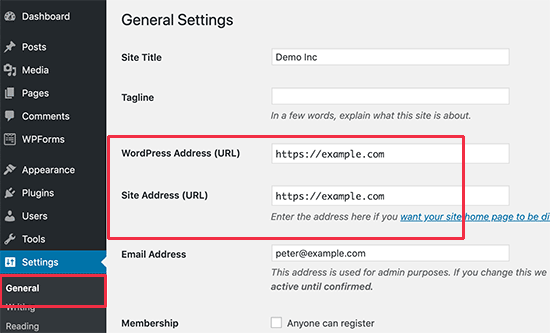
When you say you changed your domain, did you actually swap the two domains in BOTH the “WordPress Address” and “Site Address” fields in the WordPress dashboard (or their equivalent rows in the database)?
If you didn’t make the change in WordPress, then this is the root of your problem!
Hello @soberbanda,
Thank you for your help.
I changed my VirtualHosts configuration and it is now as follows:<VirtualHost *:80> ServerName www.example1.com Redirect 301 / http://www.example2.com </VirtualHost> <VirtualHost *:80> ServerAdmin root@localhost ServerName www.example2.com ServerAlias www.example2.com DocumentRoot /var/www/wp ErrorLog /var/log/httpd/wordpress_error.log CustomLog /var/log/httpd/wordpress_access.log common RewriteEngine on RewriteCond %{SERVER_NAME} =example2.com [OR] RewriteCond %{SERVER_NAME} =www.example2.com [OR] RewriteRule ^ https://%{SERVER_NAME}%{REQUEST_URI} [END,NE,R=permanent] Redirect permanent / https://www.example2.com TraceEnable off ServerSignature Off # SSL SSLCipherSuite ECDHE-ECDSA-AES128-GCM-SHA256:ECDHE-RSA-AES128-GCM-SHA256:ECDHE-ECDSA-AES256-GCM-SHA384:ECDHE-RSA-AES256-GCM-SHA384:ECDHE-ECDSA-CHACHA20-POLY1305:ECDHE-RSA-CHACHA20-POLY1305:DHE-RSA-AES128-GCM-SHA256:DHE-RSA-AES256-GCM-SHA384 SSLHonorCipherOrder on SSLCompression off SSLSessionTickets off </VirtualHost> <Directory /var/www/wp> # Options -Indexes +FollowSymLinks Options -Indexes AllowOverride All Require all granted </Directory>Then, I did:
# systemctl restart httpd
When I enter “example2.com” in my browser, then it showed me “example1.com”!
Can it because of the wrong configuration in the domain name panel (NS1.example1.com) or DNS server?Hello @gappiah,
I edited the “wp-config.php” file and added those lines, but about the “functions.php” file, which file must be edited:./wp-content/plugins/recent-posts-widget-extended/includes/functions.php ./wp-content/themes/example/functions.php ./wp-content/themes/twentytwentyone/functions.php ./wp-includes/functions.phpThank you.
Can it because of the wrong configuration in the domain name panel (NS1.example1.com) or DNS server?
If properly configured, using example1.com as the NS for example example2.com shouldn’t cause such a redirect. Hosting companies use their own NS domains for thousands of their own clients’ domains, and this never causes any issues.
Of course, some DNS record(s) could be causing this. But it’s impossible to say without knowing the domains in question and checking their DNS records.
If you could share the actual domains involved, that would help.
@hack3rcon Try and Put
/$after^on this line:RewriteRule ^ https://%{SERVER_NAME}%{REQUEST_URI} [END,NE,R=permanent]Thanks @soberbanda, but I got below error:
Oct 03 11:53:30 example httpd[1183294]: AH00526: Syntax error on line 26 of /etc/> Oct 03 11:53:30 example httpd[1183294]: RewriteRule: bad flag delimiters@gappiah, which one of those files must be edited?
@hack3rcon Change /$ to just (.*)$ and check.
It is kind of hard to ascertain the exact thing going wrong here.
Here are the rewrite rules: https://httpd.apache.org/docs/trunk/rewrite/intro.html
I don’t think there’s an issue with the DNS unless you specified it to redirect from example2.com to example1.com and forgot about it.
You would need to debug the virtualhost config file.
I don’t have any access to the DNS server and I can’t check it.
How can I debug the VirtualHosts config file? In your opinion, is my VirtualHosts file incorrect?@hack3rcon We need more information here to help you out. Did u migrate your website to a new server? What are your domain names pointing at?
We would need screenshot of your DNS records too, to check if there is any redirection applied. Use this: https://mxtoolbox.com/DNSLookup.aspx
The server config file looks fine to me (if I am not missing a detail here).
What @gappiah suggested here, has to be applied to your current theme’s functions.php file.
Please let us know all the details along with a link to your website.
Hello @soberbanda,
Thank you so much for your help.
I added below lines to my “wp-config.php” file:define( 'WP_HOME', 'http://example.com' ); define( 'WP_SITEURL', 'http://example.com' );And about the “functions.php” file, as you see my website using two theme’s:
./wp-content/themes/example/functions.php
./wp-content/themes/twentytwentyone/functions.php
Should I add below lines to both of them and refresh my WordPress website and then remove those lines?
update_option( 'siteurl', 'http://example.com' );
update_option( 'home', 'http://example.com' );
And about the DNS records, I can’t reveal my website name because of the security:
Link-
This reply was modified 4 years, 8 months ago by
hack3rcon.
@hack3rcon The other one is the default WordPress theme not an active one.
Without website link, it is very difficult to be able to help.
Check these things:
1. Is example2.com set to redirect to example1.com?
2. Did you migrate your website on a new server?
3. How does it look like in your settings?:
https://www.wpbeginner.com/wp-content/uploads/2019/10/changesiteurls-adminarea.pngThanks 🙂
-
This reply was modified 4 years, 8 months ago by


The topic ‘Redirect a website.’ is closed to new replies.