Hi @tmora ,
I’m really sorry to hear you’re running into trouble with the plugin. I know how frustrating it can be when something like this gets in the way of your site working the way it should—especially when it involves tracking important user data.
The error you’re seeing — ReferenceError: Can't find variable: pintrk — usually means that the Pinterest tracking script isn’t loading properly. That script plays a key role in tracking visitor interactions and conversions, so it’s definitely something we want to get sorted.
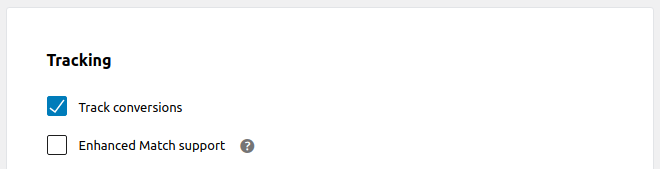
When you get a chance, could you head over to Marketing > Pinterest in your WordPress dashboard? From there, click on the Settings tab, and look for the Publish Pins and Rich Pins section. Within that, you’ll see a Tracking group. Just make sure that Track conversions is enabled—it should be turned on by default, but it’s worth double-checking.
Also, if you’ve added any custom scripts to your site recently (especially anything Pinterest-related), try removing them temporarily. It’s a good idea to do a quick conflict test as well. That means:
- Deactivating all plugins except for WooCommerce and Pinterest
- Switching your theme to the default Storefront theme
Then, see if the issue still pops up.
If it does, the next best step is to grab your System Status Report so we can take a closer look. To grab that:
- Head to WooCommerce > Status in your dashboard.
- Click Get system report and then Copy for support.
If there are any fatal error logs showing up, please send those over too. You can find them under WooCommerce > Status > Logs.
Once you’ve gathered that info, feel free to paste it into a code block here or upload it to pastebin.com and send us the link. That’ll help us dig deeper and get you a clearer answer.
Looking forward to your reply!
Thread Starter
 tmora
tmora
(@tmora)
@jonayedhosen
Thanks for information. I checked all – all is fine. Switched off all plugins, and turn on -and I found out that issue is with Siteground SPEED OPTIMIZER (basic plugin for cache).
Unfortunately there is no option to Exclude JavaScript . Can you fix the issue with SiteGround? Thanks
Hi @tmora ,
Thanks so much for getting in touch.
I really appreciate you digging into this and identifying the plugin that’s likely behind the issue. That’s a big step forward!
The best next step would be to reach out directly to the plugin developer. They’ll be in the best position to guide you on how to fix the issue—hopefully without needing to fully deactivate the plugin.
Since things seem to be working as expected now, I’ll go ahead and mark this thread as resolved.
If you have a moment, we’d really appreciate it if you could share your experience by leaving us a review: https://ww.wp.xz.cn/support/plugin/pinterest-for-woocommerce/reviews/#new-post. Your feedback helps us keep improving!
Please don’t hesitate to create a new topic if you need further assistance.
Cheers!