• Resolved Henry

    (@henrybaum)


    I’ve tried everything for a simple string on Woocommerce checkout and it’s not working.

    For regex – /Billing\Example\Text/ replace with: Example Text

    The non-regex code is <strong>Billing Example Text - <small>Subheading Text</small></strong>

    replace with: Example Text

    Nothing seems to work – and there are other strings working on the site.

    • This topic was modified 8 years, 2 months ago by Henry.
Viewing 13 replies - 1 through 13 (of 13 total)
  • Plugin Author Marios Alexandrou

    (@marios-alexandrou)

    I don’t think your regex is correct. Why do you have backslashes in the rule? I would start with something really simple such as matching a single word to confirm the plugin works on your site and then go from there.

    Thread Starter Henry

    (@henrybaum)

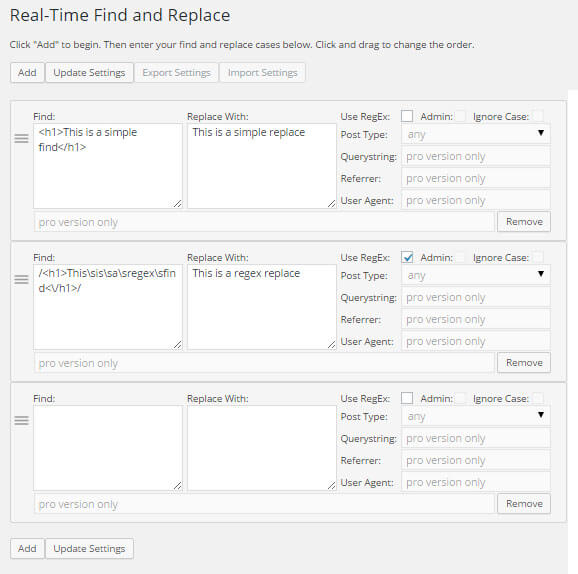
    I was just using the example from your screenshot for slashes, so I’m not entirely sure how to use it.

    Yeah, it’s not even working if I just use the words – which was why I hoped regex would “force-look” for the text.

    It is working consistently with other code. This is for Woocommerce’s error message “is a required field” if it helps – also with the Avada theme.

    Plugin Author Marios Alexandrou

    (@marios-alexandrou)

    I don’t think I have an example with just backslashes. If I do, please direct me to it as it is incorrect.

    Not sure why even a basic rule isn’t working. Does a basic 1-word rule work when the regex box is not checked?

    Thread Starter Henry

    (@henrybaum)

    I was going by this – https://ps.w.org/real-time-find-and-replace/assets/screenshot-1.jpg?rev=1313778.

    I notice now there are “s”‘s that I didn’t use, but /sBilling\sExample\sText/ or /Billing\sExample\sText/ didn’t work either.

    Confirmed that a single word works.

    Thread Starter Henry

    (@henrybaum)

    However…a single word doesn’t work in the error message, which seems to be the only place where I’m seeing the issue.

    Plugin Author Marios Alexandrou

    (@marios-alexandrou)

    Ah yes, the s is important. Regex is powerful, but very particular and you can’t remove or add things without breaking something. Even a single out of place character will break it the rule.

    Please post the simplest rule you can test with so I can take another look.

    Thread Starter Henry

    (@henrybaum)

    I’m using /Example/ which works fine for checkout fields, but if you don’t input anything, the error message still says “Example is a required field.”

    Plugin Author Marios Alexandrou

    (@marios-alexandrou)

    Can you see the text you’re trying to replace when you view the source in your browser? Not that using the inspect feature isn’t the same as viewing the source so be sure you’re viewing the source. If the error is coming in via an AJAX call, my plugin won’t work as AJAX bypasses it.

    Thread Starter Henry

    (@henrybaum)

    Must be an ajax issue – I’m only seeing the text for the checkout field one time in page source, so it’s not showing the error message. Do you know of any other plugin fix for this?

    Plugin Author Marios Alexandrou

    (@marios-alexandrou)

    Sorry, but I don’t know of a plugin that works with AJAX.

    Thread Starter Henry

    (@henrybaum)

    Thanks for the help – I figured it out with a snippet.

    Is the pro version still available – the link is coming up empty.

    Plugin Author Marios Alexandrou

    (@marios-alexandrou)

    I’m glad you got it to work. The pro version is still available. Not sure which link you followed, but this one works:

    https://infolific.com/technology/software-worth-using/real-time-find-and-replace-for-wordpress/#pro-version

    Thread Starter Henry

    (@henrybaum)

    Very old browsers here – a blank page on Firefox, got it on Safari.

Viewing 13 replies - 1 through 13 (of 13 total)

The topic ‘Regex Not Working’ is closed to new replies.