Plugin Contributor
 webnus
(@webnus)
Hi @jaesa,
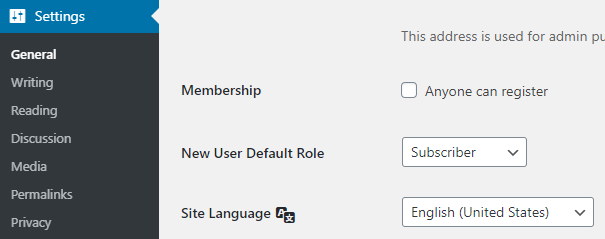
You can head over to WordPress Settings > General Settings and find and enabling the Membership option on your site. here: https://i.postimg.cc/hjQc5N8c/image.png.
Then the register button will appear in DC section.
Best Regards
Thread Starter
 juju75
(@jaesa)
hello,
thank you the register appear. 🙂
I wanted to test the register, I always have the same message that appears : “The information you entered did not pass the verification process. Please check your registration data and try again.”
what are the conditions for pass the verification process ? I have tested several times, does not want to work.
Greetings
Plugin Contributor
webnus
(@webnus)
Hello @jaesa,
Thanks for reaching out,
Would you please contact us via this email [email protected] and also send a screenshot of your issue?
Best Regards
Thread Starter
juju75
(@jaesa)
the problem came from the test mail I used, it was already in “role=subscriber” and used for another plug.
I tested with another mail that did not have this role, it worked.
for me it’s ok 🙂
thanks for the feedback!
greetings