• vanbrel

    (@vanbrel)


    20-May-2026 09:34:39 UTC] PHP Notice: Die Funktion WP_Scripts::add wurde fehlerhaft aufgerufen. Das Skript mit dem Handle „oceanwp-butterbean“ wurde mit nicht registrierten Abhängigkeiten eingereiht: butterbean. Weitere Informationen: Debugging in WordPress (engl.). (Diese Meldung wurde in Version 6.9.1 hinzugefügt.) in /www/htdocs/w0213575/shop.gp-innovation.de/wp-includes/functions.php on line 6131
    [20-May-2026 09:35:12 UTC] PHP Notice: Die Funktion WP_Scripts::add wurde fehlerhaft aufgerufen. Das Skript mit dem Handle „oceanwp-butterbean“ wurde mit nicht registrierten Abhängigkeiten eingereiht: butterbean. Weitere Informationen: Debugging in WordPress (engl.). (Diese Meldung wurde in Version 6.9.1 hinzugefügt.) in /www/htdocs/w0213575/shop.gp-innovation.de/wp-includes/functions.php on line 6131

Viewing 1 replies (of 1 total)
  • Shahin

    (@skalanter)

    Hello @vanbrel,

    Thank you for reaching out.

    I have fully examined the issue you raised but was unable to replicate it on my end. Additionally, no similar issues have been reported by other users so far.

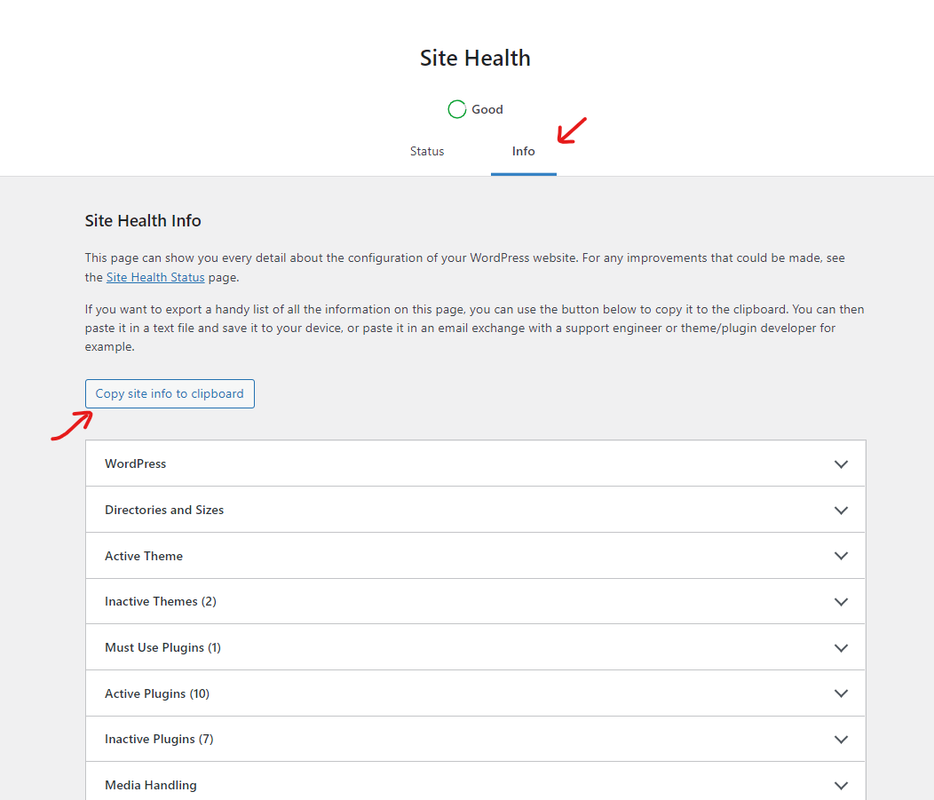
    To help us better understand your website’s setup and the exact issue you are encountering, could you please provide us with your system environment information? You can easily find this by navigating to your WP Dashboard > Tools > Site Health, selecting the Info tab, and clicking the “Copy site info to clipboard” button. You can paste that information directly here as code, or upload it to Pastebin site or GitHub Gist site and share the link with us (feel free to remove your email address from the content before sharing). Here is a quick visual guide to help you find it: https://i.postimg.cc/fbjtkFyJ/image.png

    Please note that, these are just warnings and notices; they will not harm your website or affect its functionality. If you’d like to hide them from your visitors, you can simply turn off the WordPress debugger by following this guide: https://ww.wp.xz.cn/support/article/debugging-in-wordpress/#wp_debug. Alternatively, you can configure the debugger to log errors into a private debug.log file instead of displaying them on the front end of your website.

    Once we have this information, we will be able to proceed with more targeted troubleshooting.

    Please keep us updated.
    Thank you.
    Best Regards

    • This reply was modified 1 week ago by Shahin.
Viewing 1 replies (of 1 total)

You must be logged in to reply to this topic.