Remove 2FA
-
Hi.
How can I remove completely the new 2fa authentication? I tried from the settings and I couldn’t find the option.
Thanks in advance.

-
Hey @japiera,
From the WordPress Dashboard navigate to Wordfence > Login Security. There you’ll see the option to
DEACTIVATETwo-Factor.May I ask why you’re doing this? Are you running into issues? One of the best security defences is Two-Factor authentication.
Thanks,
Gerroald
Hi @wfgerald,
I have not activated the 2fa anywhere and suddenly, without asking for it, a column appears in my Users screen, why? Can you tell me?
Anyway, I think it’s deactivated (At least I hope so because as I wrote above, I didn’t activate it) but there is the column. I don’t need (and don’t want) it there because I’m not going to use it.
Best regards,
José AndrésHey @japiera,
Currently, even with Two-Factor deactivated this is on the Users page. There is currently a feature enhancement filed to remove it when it’s deactivated. I believe this will be addressed in the next release.
Please let us know if anything else comes up.
Thanks,
Gerroald
I’ve had to deactivate WordFence because of two-factor authentication. The extra column in the Users Screen is somehow interfering with another plugin. (One that is needed.)
Is there a setting to remove it from the Users page?
Hi @wfgerald,
Sorry, but I think you didn’t answer my questions, why did you change my User’s screen if I didn’t give you permission and you didn’t even ask me?
Best regards,
José Andrés-
This reply was modified 7 years ago by
Jose Andres Piera.
Hey @japiera,
I do apologize if this has caused an inconvenience. We develop features that help secure sites, and with releasing two-factor to all users this was added as it’s a standard for users to configure two-factor on the Users page. I do understand that it might not be ideal for all users, and as I previously mentioned in the next update we’ll remove it if two-factor isn’t being used.
My apologies for the inconvenience.
@dsjohnson – Can you please start a new thread so we can take a look at your issue. I’ll note that currently there isn’t a way to remove it.
Thanks,
Gerroald
-
This reply was modified 7 years ago by
WFGerroald.
My apologies for not starting a new thread. I have re-read the ‘before you post’ However I have found the problem. It was with my own custom plugin. It was working fine before your update. But your update caused a bug to raise it’s ugly head.
thank you
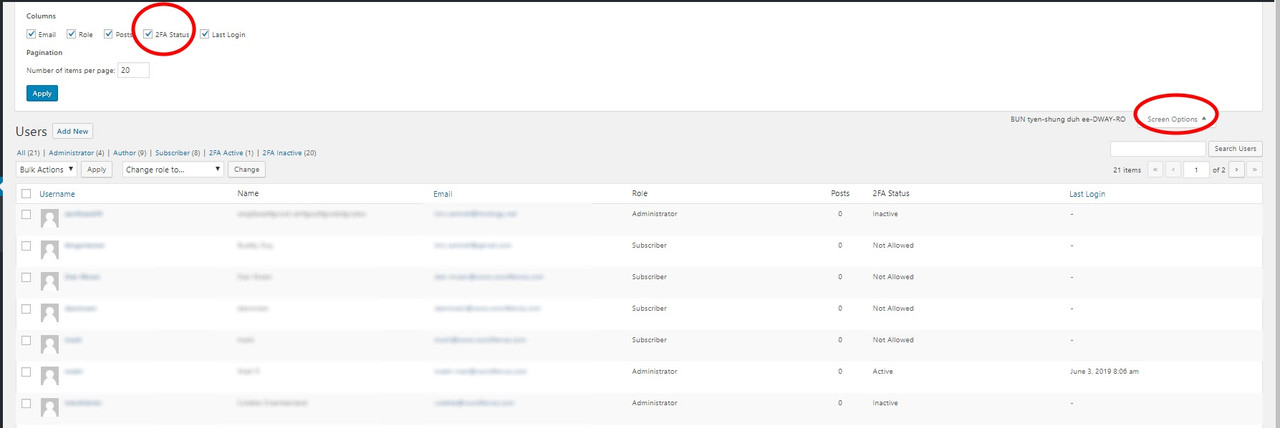
To remove it from the user’s page (wp-admin/users.php) just expand the Screen Options at the top right hand of the page and uncheck 2FA status.
https://i.postimg.cc/hPkmHLMF/users-list.jpg
Tim
-
This reply was modified 7 years ago by
WFSupport.
Hei, @wfsupport,
Thanks for your suggestion and for taking a couple of minutes to answer me, but I don’t think it’s a good idea.
1. That option is a user’s option, so removing it from the Screen Options only would work for my user, not for the others.
2. Doing that only will hide the option, the column still would be there.I still don’t understand why you add a column of a feature that is deactivated, sorry.
Kindly Regards,
José AndrésHi @wfsupport,
I’ve just installed the new WordFence’s version, and I can see you removed the column as you said.
Many thanks for doing that and for answering so kindly and quickly.
Best Regards,
José And´res -
This reply was modified 7 years ago by


The topic ‘Remove 2FA’ is closed to new replies.