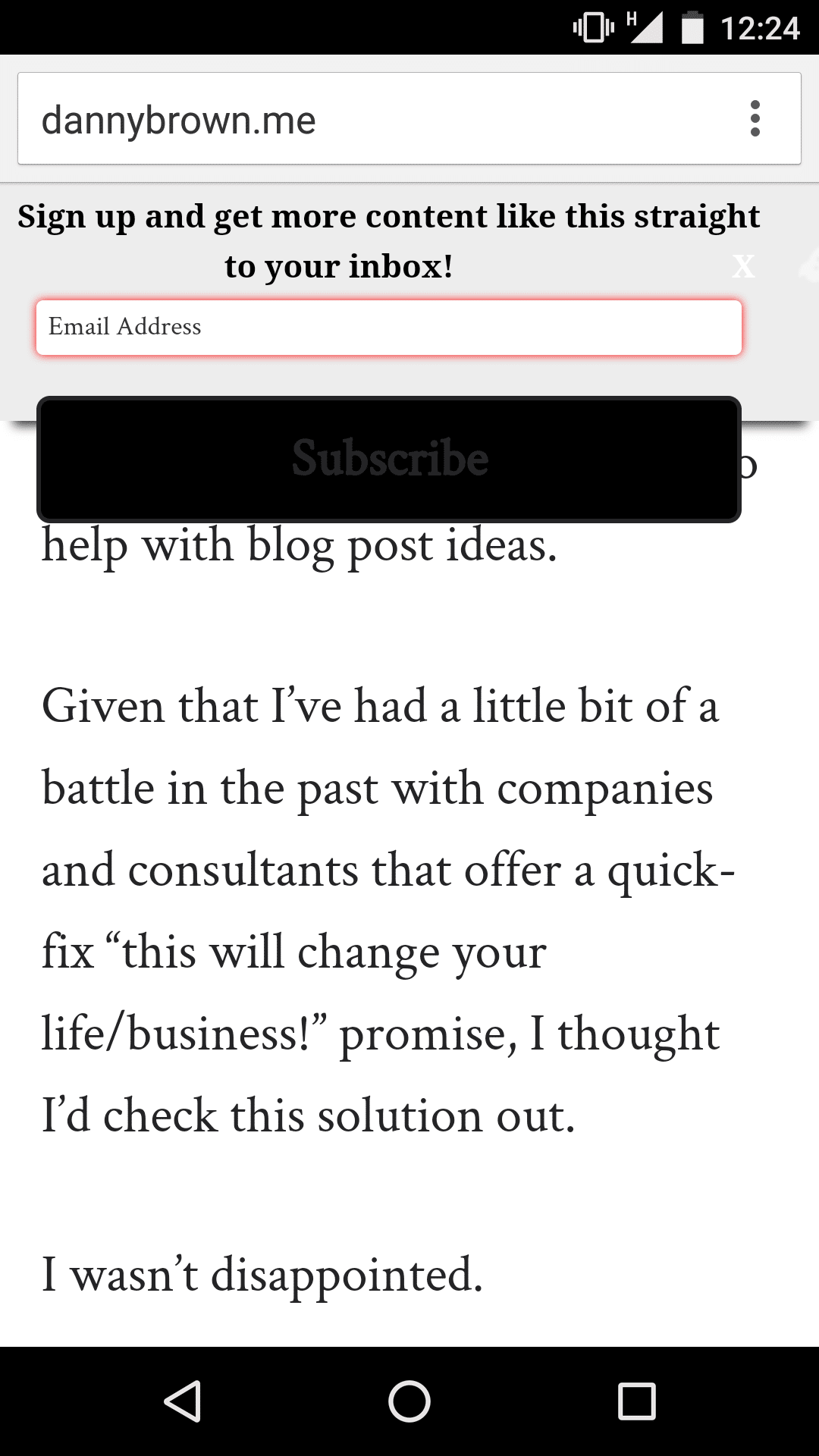
Hey Danny,
it looks like the button is outside the form as well, although on mobile it’s running the mobile stylesheet (by looking at your screenshot), maybe there is something wrong with the mobile stylesheet, do you still have it active on your site on mobile so we can do some debugging for you?
Could you clarify your remark regarding desktop and mobile display as well? You would like an option where you could say only display the welcome bar on desktop or on mobile?
Cheers!
Hans (from Inbound Rocket)
Hi there Hans,
Thanks for the reply. 🙂 I don’t have it active at the moment, as it was causing quite the display takeover on mobile, so deactivated for now. I can set up a temp admin access if that helps?
With regards mobile/desktop, yes, an option to have the bar on desktop only would be great, as I have pretty good uptake from my after post box on mobile.
Thaanks!
Hiya Danny,
we can do some more debugging on the style sheet problems with you later via email (a bit safer than handing over account details here). Some good news in the mean time, the option to have the welcome bar only on desktop, only on mobile or running on both is currently in our local development code.
We will do some more testing on it and will release an update of the plugin with this option soon!
Have an amazing day!
Awesome, thanks for the update, guys, and look forward to hearing from you. 🙂