Hi @bernardberry646
We understand that when you duplicate a page, it removes the website title from the browser’s tab.
Just to clarify, are you also using the Yoast SEO for WordPress plugin? If so, could you check if the post or page you’ve duplicated is using the SEO title field and is using snippet variables? We do know that the SEO title field influences the <title> field which is also what outputs in the browser tab title.
No, from Yoast I am only using Yoast Duplicate Post.. no other Yoast products.
Hi,
Under WP admin dashboard > Settings (sidebar) > Duplicate Post > What to copy tab > did you check if ‘title’ is selected for post/page elements to copy?
We tested this out on a default site with WP TwentyTwenty and only the Yoast Duplicate Post plugin activated, and when we selected the ‘clone’ option, it created a new draft, and it kept the same title in the browser tab, which was the ‘page name – site title’ and verified that it had the same HTML <title> tag.
Could you view the page source and check on the <title> tag of the cloned post or page? You may have to do a test on a fresh installation and see if you can reproduce this issue with just a default theme and only the Yoast Duplicate Post plugin, to rule out that there’s a potential conflict with another plugin or theme on your setup.
@mikes41720 yes, I do have “title” checked.
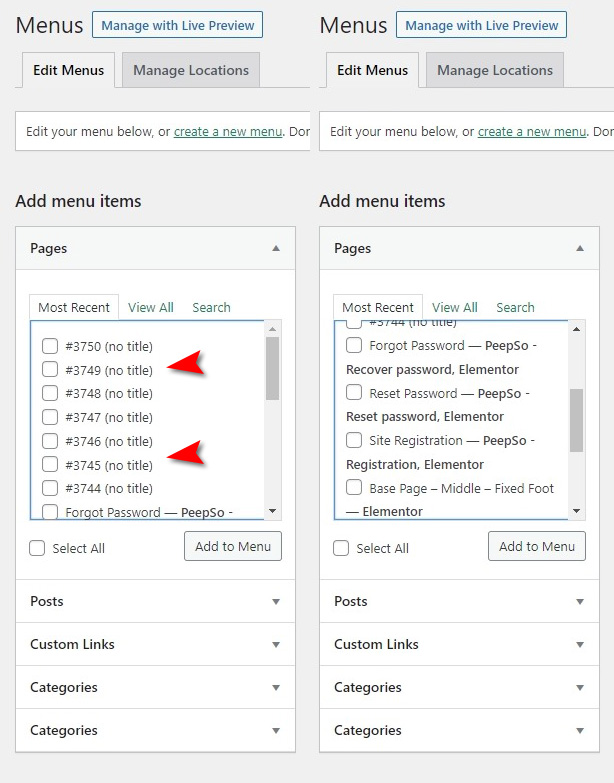
In addition to the above.. all pages that I have cloned also don’t show a title when I visit Menu editing page.
A screenshot is attached (red arrows point to the cloned pages):
https://i.postimg.cc/05H1n6Ts/screenshot-2022-02-28-12-23-03.jpg
Hey @bernardberry646,
Thank you for your reply and screenshot.
Looking at it, we still think that this is due to a possible theme or plugin conflict that might hijack the title management of content.
Can you please check in an isolated environment, which means a default Twenty Twenty theme and only Duplicate Post active, and see if you can replicate the behavior? If it works in that scenario, then switch back to the theme you use and check again. If it remains functional, then enable 1 plugin at a time to check when the issue reappears. When it does, you’ve found the culprit and then we can check if we can replicate the behavior with that plugin and if that’s something we can enhance in our plugin, or with the relevant plugin developer.
More information on doing such conflict check can be found here: https://yoast.com/help/how-to-check-for-plugin-conflicts/