Hi trmkr!
Yes, of course, you can do that from the Media Library. Here’s a screenshot for your reference: https://i.imgur.com/APrWi2s.png
Cheers!
Thread Starter
 trmkr
trmkr
(@trmkr)
Hi Gerard,
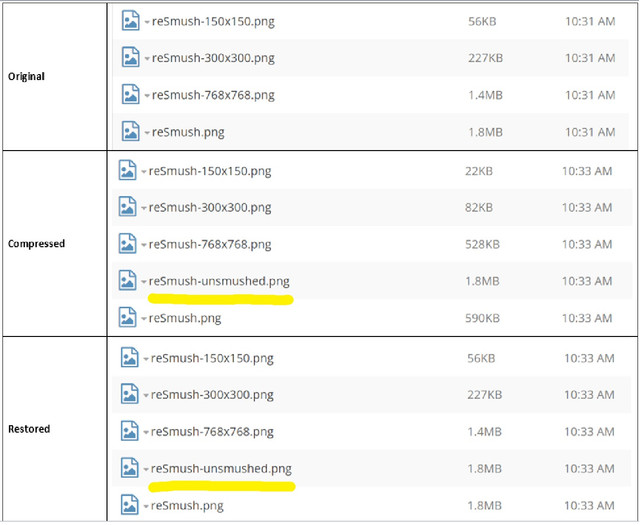
Thanks for your reply. I have restored my single image using the Media Library option you provided, but it does not delete the “unsmushed” backup image. Therefore, there is a compatibility issue with ShortPixel’s “Enable Media Replace” plugin. I cannot replace the original image because of the “unsmushed” backup file. You can see the details below.
https://i.ibb.co/QJKq9Qv/reSmush.jpg
Thanks in advance.
Hi trmkr,
We have not built any compatibility with Enable Media Replace yet, so issues can be expected. I would recommend you installing ShortPixel Image Optimizer instead for better compatibility with Enable Media Replace.
Having said that, it is true that the “unsmushed” backup image is not removed upon restoring the image, which seems to be a bug. I will forward it to the developers so they can fix it.
Stay tuned to your updates 🙂
Thread Starter
trmkr
(@trmkr)
Hi Gerard,
Thank you very much for your help. Both ShortPixel and reSmush.it are great plugins. I prefer reSmush.it for its simplicity and performance. Looking forward to the updates 🙂
Best Wishes