You select ‘regex/match’ as your validation mode on your second password field and then put the name of the first password field into the little box that shows up.
I have tried that already before but that does not work.
What I’ve got is:
#1– Name: email, Title: Email, Default: -, Group: Main, Form Element: Text-line, Validation: Email, Display column: 0, Admin Column: 4, CSV: on, Signup: on
Then I set the following:
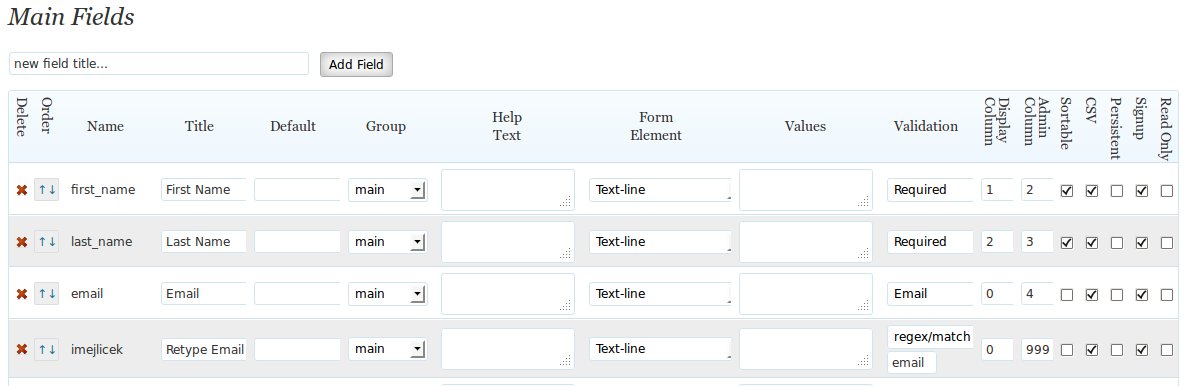
#2– Name: imejlicek, Title: Retype Email, Default: -, Group: Main, Form Eelement: Text-line, Validation: regex/match and in the other field I put email (just as is), Display column: 0, Admin Column: 99, CSV: on, Signup: on
see http://bandoneon.cz/files/screenshot1.jpg
which after saving changes by itself to
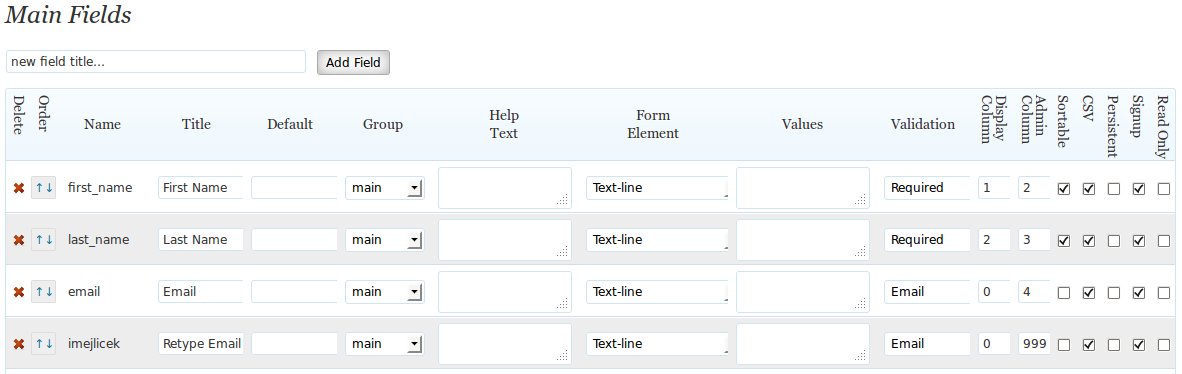
#2– … Validation: Email (without the other field containing the symbol email) …
see http://bandoneon.cz/files/screenshot2.jpg
So basically any two emails pass the test, no equality is checked.
What am I doing wrong?
You’re doing it right, it’s me that messed up.
I’m going to have to give you a bug fix…the problem is, it sees the word ’email’ and instead of looking at the field named ’email’ it validates the input as an email. Wrong.
So, two edits to the plugin files are needed. In the plugin file classes/FormValidation.class.php on line 335, you’ll find:
case ( $field->validation == 'email' ) :
change this to:
case ( $field->validation == 'email-regex' ) :
In the file participants-database.php on line 2078, you’ll find:
__('Email','participants-database') => 'email',
change this to:
__('Email','participants-database') => 'email-regex',
this will eliminate the confusion and the feature will work.
You will need to re-set the validation values for both fields on the “manage database fields” page.
Great – that worked! [Just the line number to change in the participants-database.php was 2071 in my case, not 2078; but it was the only line with that syntax within the whole file anyway. 😉 ]
Glad it worked…I must have had some extra lines in my copy of the file.
And thanks for the bug report! Not sure how I missed it, but it’s fixed.