Hi,
Would you be able to share the rewrite rules in your .htaccess file?
Thread Starter
 saadgb
(@saadgb)
Hi here is the file data:
<IfModule mod_rewrite.c>
RewriteEngine On
RewriteRule .* – [E=HTTP_AUTHORIZATION:%{HTTP:Authorization}]
RewriteBase /
RewriteRule ^index\.php$ – [L]
RewriteCond %{REQUEST_FILENAME} !-f
RewriteCond %{REQUEST_FILENAME} !-d
RewriteRule . /index.php [L]
</IfModule>
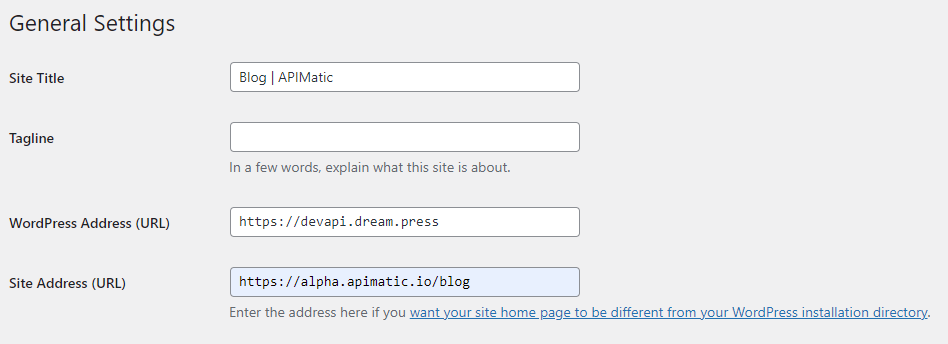
WordPress Settings:
https://i.postimg.cc/tT63b599/screencapture-devapi-dream-press-wp-admin-options-general-php-2021-08-07-14-07-03.png
-
This reply was modified 4 years, 10 months ago by
 saadgb.
-
This reply was modified 4 years, 10 months ago by saadgb.
Hi @saadgb,
You can check out these methods:
Method 1
You just need to log in to wp-admin and go to Settings » General. From here, you can change the WordPress site URL in the WordPress Address (URL) and Site Address (URL) options.
Method 2
Change WordPress site URL using functions.php . file. This method is recommended for users who cannot access wp-admin. Just connect to your hosting via FTP/sFtp then go to /wp-content/Themes/folder-your-theme-and open the functions.php file and add the following code:
update_option( 'siteurl', 'https://example.com' );
update_option( 'home', 'https://example.com' );
Remember to replace https://example.com with your own website URL.
Method 3.
Change WordPress site’s URL using wp-config.php file: Simply connect to your site using an FTP client and edit the wp-config.php file. You need to add the following code just above the sentence ‘That’s all, stop editing! Happy publishing’:
define ( 'WP_HOME', 'https://example.com' );
define( 'WP_SITEURL', 'https://example.com' );
Don’t forget to replace https://example.com with your domain name.
Please let me know if my answer can help you resolve your issue.
Thread Starter
saadgb
(@saadgb)
Nope not working, this was already done by me.
Thread Starter
saadgb
(@saadgb)
I found something:
This URL is working now: https://alpha.apimatic.io/blog/index.php/blog/announcing-code-generation-api/
I need to format this URL as this:
https://alpha.apimatic.io/blog/announcing-code-generation-api/
Also https://alpha.apimatic.io/blog is just forwarding traffic from this domain (CNAME) to this actual blog URL: https://devapi.dream.press.
How can I do it now? Please help anyone
-
This reply was modified 4 years, 10 months ago by saadgb.