Rounded corners box widgets
-
Hi everyone,
I’m trying to add a box with rounded corner to my widgets. The theme I’m currently using is piano-black. It comes with an ‘information box’ at the top of the sidebar that has the sort of rounded corner background I want to recreate.
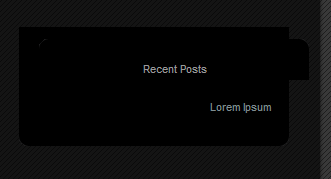
However, when I try and do this the top part is misaligned with the rest of the widget: http://gyazo.com/13f431115f6353441e8d68ceacb4e79f.png
I’m using the following code
.side-title { margin:0px 0 20px 0;
font-size:11px;
text-transform:none;
text-align:center;
color:#999;
font-weight:normal;
line-height:100%;
background:url(img/info-box-top.gif) no-repeat left top;
padding:25px 20px 5px 20px;
width:232px;
}

.side-box { color:#aaa;
line-height:160%;
margin:0 0 50px 30px;
font-size:11px;
width:232px;
background:url(img/info-box-bottom.gif) no-repeat bottom left;
padding:12px 20px 20px 20px;
}
Any help would be greatly appreciated. I’ve already played around with eh padding and the margins, trying every possible combination, but the top bit just won’t budge.
Thanks!

Viewing 2 replies - 1 through 2 (of 2 total)

Viewing 2 replies - 1 through 2 (of 2 total)
The topic ‘Rounded corners box widgets’ is closed to new replies.