Plugin Support
 Laszlo
(@laszloszalvak)
Hi @helvetica123
Could you tell us what validation error did you receive exactly?
The page that you linked currently returns an 503 error so I couldn’t check the problem there.
Since the “style” one that you see in the other topic is not an error, as style tags are allowed since HTML 5.2 like my colleague mentioned in that topic and the other problem was already fixed in the live version.
In the other topic, the dropbox link with the .zip file is a very outdated version, so you shouldn’t use that. You should rather install the latest Smart Slider 3 version what you can install from the WordPress plugin library. Themeforest can also find it there.
Note:
If you actually meant the .zip file, that you can use to install the Pro version, then please rather open a support ticket here: https://smartslider3.com/contact-us/support/
As on this forum we are only allowed to provide help for the Free version.
Best regards,
Laszlo.
-
This reply was modified 5 years, 6 months ago by
 Laszlo.
As the other user said, the errors:
1. Element <style> not allowed as child of element <div>
and

2. CSS: tab1: Parse Error.
ver:FOCUS{@tab1}div#n
I will try css mode option for 1. html problem.
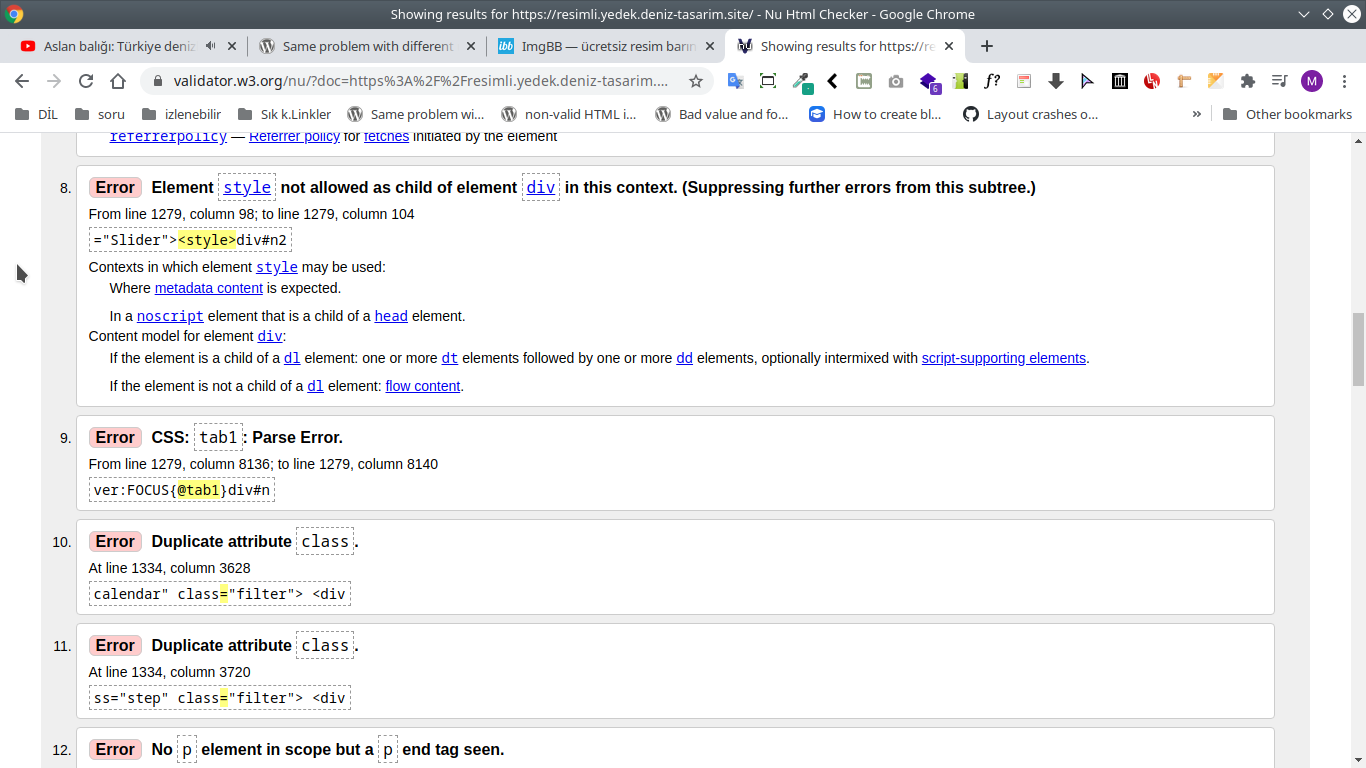
I pasted code and am giving related screen shot
Error: Element style not allowed as child of element div in this context. (Suppressing further errors from this subtree.)

From line 1176, column 98; to line 1176, column 104

="Slider"><style>div#n2

Contexts in which element style may be used:
Where metadata content is expected.
In a noscript element that is a child of a head element.
Content model for element div:
If the element is a child of a dl element: one or more dt elements followed by one or more dd elements, optionally intermixed with script-supporting elements.
If the element is not a child of a dl element: flow content.
Error: CSS: tab1: Parse Error.

From line 1176, column 8136; to line 1176, column 8140

ver:FOCUS{@tab1}div#n
https://i.ibb.co/WpXfcCR/image.png
503 error will hide if you resresh page after 1 minute/ some seconds because you know server is busy.
Hi @helvetica123
I see what you mean about the FOCUS{@tab1}. We’re investigating this problem to figure out what exactly causes it. I’ll keep you posted. Thanks for reporting the problem!
What I found is that turning off Improved frontend accessibility at Global settings > Framework settings:
https://smartslider.helpscoutdocs.com/article/1785-framework
doesn’t produce this problem, so as a temporary workaround, you could try turning it off.