Plugin Support
 WFAdam
(@wfadam)
Hello @jaginho and thanks for reaching out to us!
Can you do the following so I can get the information I need to help you?
- Stop the existing scan if it is still running (The “Start New Scan” button turns into a “Stop” button while the scan is running).
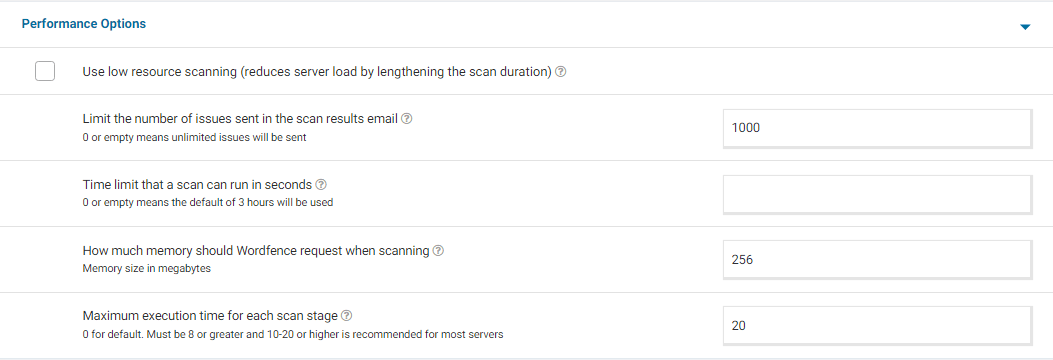
- Go to your Wordfence > Scan > Manage Scan and locate the “Performance Options” section. Set “Maximum execution time for each scan stage” to 20.
- Click to “Save Changes”.
- Go to the Tools > Diagnostics page.
- In the “Debugging Options” section check the circle “Enable debugging mode”.
If “Start scan remotely” is checked, uncheck this option.
- Click to “Save Changes”.
- Start a new scan on the Scan page.
- If the scan fails again, copy the last 20 lines or so from the Log (click the “Show Log” link) once the scan finishes and paste them in the post.
On some sites, this will correct the issue. Adding “20” for the “Maximum execution time for each scan stage” tells the scan to pause every 20 seconds and start again where it left off, which makes the scan more performance-friendly for some servers. If this fixes the issue and scans run again, you can leave all the settings above except for “Enable Debugging Mode”.
For a screenshot of my recommended Performance setting options click here.
Thanks again!