Scan Stage Failed / Server State
-
Not sure what’s up, but Wordfence won’t scan my sites. In addition to the above messages I see “Scan stop request received.”
[Apr 15 03:54:08:1776225248.700767:1:info] Scan stop request received.

[Apr 15 03:54:07:1776225247.294620:1:info] Scan stop request received.

[Apr 15 03:53:04:1776225184.254621:2:info] Attempting to resume scan stage (0 attempt(s) remaining)...

[Apr 15 03:48:04:1776224884.026666:2:info] Attempting to resume scan stage (1 attempt(s) remaining)...

[Apr 15 03:45:31:1776224731.821044:1:info] Scan stop request received.

[Apr 15 03:44:54:1776224694.039478:1:info] Scan stop request received.

[Apr 15 03:43:04:1776224584.804012:2:info] Attempting to resume scan stage (1 attempt(s) remaining)...

[Apr 15 03:41:04:1776224464.667515:1:info] Scan stop request received.

[Apr 15 03:40:05:1776224405.072310:2:info] Attempting to resume scan stage (1 attempt(s) remaining)...

[Apr 15 03:32:21:1776223941.110646:1:info] Scan stop request received.

[Apr 15 03:30:59:1776223859.135421:1:info] Scan stop request received.

[Apr 15 03:30:04:1776223804.830421:2:info] Attempting to resume scan stage (1 attempt(s) remaining)...

[Apr 15 03:29:21:1776223761.699408:1:info] Scan stop request received.

[Apr 15 03:20:04:1776223204.906907:2:info] Attempting to resume scan stage (0 attempt(s) remaining)...
I’ve tried starting remotely too. No dice. Can access admin-ajax.php with a 200.
Could I please send a diagnostic email to see if you can shed any light?
Thanks!

-
Hi @walkingpaper,
Thank you for reaching out and for the details on what troubleshooting you’ve done so far!
Please do the following for me so I can get the information I need:
- Stop any running scan by pressing the STOP SCAN button.
- Click on Scan Options and Scheduling.
- In Advanced Scan Options, enable the option Use only IPv4 to start scans.
- Hit the SAVE CHANGES button.
- Go to Wordfence > Tools > Diagnostics and expand the Debugging Options section.
- Enable the option Enable debugging mode.
- Disable the option Start all scans remotely if it is enabled.
- Hit the SAVE CHANGES button.
- Start a new scan.
- Use Email Activity Log to send a copy of the activity log to wftest @ wordfence . com once the scan finishes.
Remember to disable Enable debugging mode after you have finished.
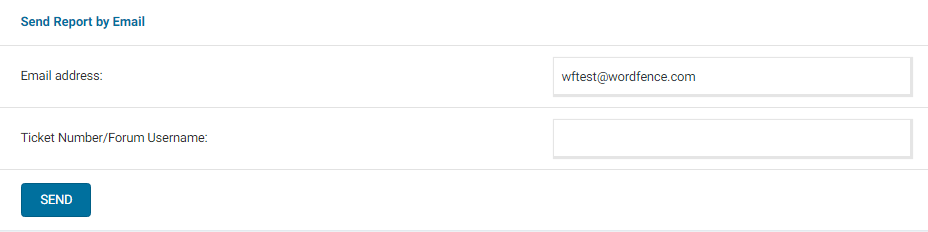
Can you also send a diagnostic report to wftest @ wordfence . com? You can find the link to do so at the top of the Wordfence > Tools > Diagnostics page. Then click on “Send Report by Email”. Please add your forum username where indicated and respond here after you have sent it.
NOTE: It should look as follows – Screenshot of Tools > Diagnostic > Send by Email
Thanks,
MargaretUnfortunately Use only IPv4 to start scans. did not help.
I enabled debugging mode and then sent the report.
Thanks very much.
Hi @walkingpaper,
Thanks for sending over the diagnostics. Please go to Wordfence > Tools > Diagnostics > Debugging Options and disable “Start all scans remotely.” I noticed it was still enabled in the diagnostics.
Then, start a fresh scan while debugging is enabled. Once the scan fails, please send the activity log to wftest @ wordfence . com using the option Email Activity Log located under the scan.
Please let me know once you’ve sent that.
Thanks,
MargaretSent. Thanks!
Hi @walkingpaper,
I see a new copy of your diagnostics, but I don’t see an updated activity log. Can you please double-check that you’ve sent the activity log from Wordfence > Scan > Email Activity Log?
If you’re having any trouble sending that, please use View Full Log to view the full activity log and send me the most recent 20 lines or so here. The most recent entries are located at the top of the full log.
Thanks,
MargaretAh, sent correctly now. Here’s some relevant bits too.
[Apr 15 19:41:16:1776282076.316120:4:info] Skipping unneeded hash: /srv/users/prefabpower/apps/prefabpower/public/wp-content/plugins/PDFImporterForWPForm/core/js/RNTranslator.ts

[Apr 15 19:41:16:1776282076.308689:4:info] Skipping unneeded hash: /srv/users/prefabpower/apps/prefabpower/public/wp-content/plugins/PDFImporterForWPForm/Lib/TextProcessor/readme.txt

[Apr 15 19:41:16:1776282076.304928:4:info] Skipping unneeded hash: /srv/users/prefabpower/apps/prefabpower/public/wp-content/plugins/PDFImporterForWPForm/Font/dejavusans.gid.dat

[Apr 15 19:41:16:1776282076.303745:4:info] Skipping unneeded hash: /srv/users/prefabpower/apps/prefabpower/public/wp-content/plugins/PDFImporterForWPForm/Font/dejavusans.cw.dat

[Apr 15 19:41:16:1776282076.301422:4:info] Skipping unneeded hash: /srv/users/prefabpower/apps/prefabpower/public/wp-content/plugins/PDFImporterForWPForm/Font/dejavusans.GSUBGPOStables.dat

[Apr 15 19:41:16:1776282076.298539:4:info] Skipping unneeded hash: /srv/users/prefabpower/apps/prefabpower/public/wp-content/plugins/PDFImporterForWPForm/Font/DejaVuSans.ttf

[Apr 15 19:41:16:1776282076.287735:10:info] SUM_DISABLED:Skipping unknown core file scan

[Apr 15 19:41:16:1776282076.280610:10:info] SUM_START:Scanning for known malware files

[Apr 15 19:41:16:1776282076.273250:10:info] SUM_DISABLED:Skipping plugin scan

[Apr 15 19:41:16:1776282076.270164:10:info] SUM_DISABLED:Skipping theme scan

[Apr 15 19:41:16:1776282076.267587:10:info] SUM_DISABLED:Skipping core scan

[Apr 15 19:41:16:1776282076.258204:10:info] SUM_ENDSUCCESS:Fetching list of known malware files from Wordfence

[Apr 15 19:41:16:1776282076.255628:4:info] Using cached malware prefixes

[Apr 15 19:41:16:1776282076.251447:10:info] SUM_START:Fetching list of known malware files from Wordfence

[Apr 15 19:41:16:1776282076.237213:10:info] SUM_ENDSUCCESS:Fetching core, theme and plugin file signatures from Wordfence

[Apr 15 19:41:15:1776282075.555922:4:info] Calling Wordfence API v2.27:https://noc1.wordfence.com/v2.27/?k=e0ccfa380883c79cf14e3ae63081a69877fcd65005ff703ac8e1daf03abab23a&s=eyJ3cCI6IjYuOS40Iiwid2YiOiI4LjEuNCIsIm1zIjoiMzciLCJoIjoiaHR0cHM6XC9cL3ByZWZhYnBvd2VyLmNvbSIsInNzbHYiOjI2OTQ4ODE0MywicHYiOiI4LjEuMzQiLCJwdCI6ImZwbS1mY2dpIiwiY3YiOiI3LjU4LjAiLCJjcyI6Ik9wZW5TU0xcLzEuMS4xIiwic3YiOiJBcGFjaGVcLzIuNC42NiAoVW5peCkgT3BlblNTTFwvMS4xLjEiLCJkdiI6IjUuNy40Mi0wdWJ1bnR1MC4xOC4wNC4xLWxvZyIsImxhbmciOiIifQ&action=get_known_files

[Apr 15 19:41:15:1776282075.554354:10:info] SUM_START:Fetching core, theme and plugin file signatures from Wordfence

[Apr 15 19:41:15:1776282075.436844:2:info] Found 8 themes

[Apr 15 19:41:15:1776282075.434397:2:info] Getting theme list from WordPress

[Apr 15 19:41:15:1776282075.432324:2:info] Found 61 plugins

[Apr 15 19:41:15:1776282075.430863:2:info] Getting plugin list from WordPress

[Apr 15 19:41:15:1776282075.420927:10:info] SUM_ENDBAD:Checking for paths skipped due to scan settings

[Apr 15 19:41:15:1776282075.412534:10:info] SUM_START:Checking for paths skipped due to scan settings

[Apr 15 19:41:15:1776282075.402466:10:info] SUM_ENDOK:Checking for future GeoIP support

[Apr 15 19:41:15:1776282075.396665:10:info] SUM_START:Checking for future GeoIP support

[Apr 15 19:41:15:1776282075.383315:10:info] SUM_ENDOK:Checking Web Application Firewall status

[Apr 15 19:41:15:1776282075.376255:10:info] SUM_START:Checking Web Application Firewall status

[Apr 15 19:41:15:1776282075.362126:10:info] SUM_ENDSKIPPED:Checking for the most secure way to get IPs

[Apr 15 19:41:15:1776282075.355821:10:info] SUM_START:Checking for the most secure way to get IPs

[Apr 15 19:41:15:1776282075.346769:4:info] getMaxExecutionTime() returning half ini value: 45

[Apr 15 19:41:15:1776282075.344591:4:info] ini value of 600 is higher than value for WORDFENCE_SCAN_MAX_INI_EXECUTION_TIME (90), reducing

[Apr 15 19:41:15:1776282075.343363:4:info] Got max_execution_time value from ini: 600

[Apr 15 19:41:15:1776282075.341108:4:info] Got value from wf config maxExecutionTime: 0

[Apr 15 19:41:15:1776282075.065724:4:info] Calling Wordfence API v2.27:https://noc1.wordfence.com/v2.27/?k=e0ccfa380883c79cf14e3ae63081a69877fcd65005ff703ac8e1daf03abab23a&s=eyJ3cCI6IjYuOS40Iiwid2YiOiI4LjEuNCIsIm1zIjoiMzciLCJoIjoiaHR0cHM6XC9cL3ByZWZhYnBvd2VyLmNvbSIsInNzbHYiOjI2OTQ4ODE0MywicHYiOiI4LjEuMzQiLCJwdCI6ImZwbS1mY2dpIiwiY3YiOiI3LjU4LjAiLCJjcyI6Ik9wZW5TU0xcLzEuMS4xIiwic3YiOiJBcGFjaGVcLzIuNC42NiAoVW5peCkgT3BlblNTTFwvMS4xLjEiLCJkdiI6IjUuNy40Mi0wdWJ1bnR1MC4xOC4wNC4xLWxvZyIsImxhbmciOiIifQ&action=log_scan

[Apr 15 19:41:15:1776282075.063247:4:info] Scan process ended after forking.

[Apr 15 19:41:15:1776282075.063072:1:info] Contacting Wordfence to initiate scan

[Apr 15 19:41:15:1776282075.053679:10:info] SUM_PREP:Preparing a new scan.

[Apr 15 19:41:15:1776282075.048693:4:info] Setting up scanRunning and starting scan

[Apr 15 19:41:15:1776282075.047614:4:info] Setting up error handling environment

[Apr 15 19:41:15:1776282075.046498:4:info] Requesting max memory

[Apr 15 19:41:15:1776282075.044342:1:info] Using low resource scanning

[Apr 15 19:41:15:1776282075.036717:4:info] Checking if scan is already running

[Apr 15 19:41:15:1776282075.031199:4:info] Checking saved cronkey against cronkey param

[Apr 15 19:41:15:1776282075.029294:4:info] Checking cronkey: 555a5ce8cd050cada46a0014fec4a57a (expecting 555a5ce8cd050cada46a0014fec4a57a)

[Apr 15 19:41:15:1776282075.026415:4:info] Fetching stored cronkey for comparison.

[Apr 15 19:41:15:1776282075.022832:4:info] Verifying start request signature.

[Apr 15 19:41:15:1776282075.019840:4:info] Scan engine received request.

[Apr 15 19:41:14:1776282074.056970:4:info] Starting cron with normal ajax at URL https://prefabpower.com/wp-admin/admin-ajax.php?action=wordfence_doScan&isFork=0&scanMode=custom&cronKey=555a5ce8cd050cada46a0014fec4a57a&signature=6d62808c42bcb36c1b3e2cef6bfc663115ec56e2753d62eb08fa4035858a8dd9

[Apr 15 19:41:14:1776282074.049914:4:info] Test result of scan start URL fetch: array ( 'headers' => WpOrg\Requests\Utility\CaseInsensitiveDictionary::__set_state(array( 'data' => array ( 'date' => 'Wed, 15 Apr 2026 19:41:14 GMT', 'content-type' => 'text/html; charset=UTF-8', 'server' => 'cloudflare', 'vary' => 'Accept-Encoding', 'x-robots-tag' => 'noindex', 'x-content-type-options' => 'nosniff', 'expires' => 'Wed, 11 Jan 1984 05:00:00 GMT', 'cache-control' => 'no-cache, must-revalidate, max-age=0, no-store, private', 'referrer-policy' => 'strict-origin-when-cross-origin', 'x-frame-options' => 'SAMEORIGIN', 'content-security-policy' => 'frame-ancestors \'self\';', 'report-to' => '{"group":"cf-nel","max_age":604800,"endpoints":[{"url":"https://a.nel.cloudflare.com/report/v4?s=6CbaNHOunvs2azA9rP%2Bnb36oV0jRffUrTV9GabTd86GIM%2B2%2FtfDE6BRMS7BG0OIP5Y87SdneKTSFQkm8W7pnoyDB75dPq9B52jRTch2I7DhDIarparlRFdKvLO8YjdCYVuA%3D"}]}', 'cf-cache-status'

[Apr 15 19:41:13:1776282073.003519:4:info] getMaxExecutionTime() returning half ini value: 45

[Apr 15 19:41:13:1776282073.001304:4:info] ini value of 600 is higher than value for WORDFENCE_SCAN_MAX_INI_EXECUTION_TIME (90), reducing

[Apr 15 19:41:12:1776282072.999966:4:info] Got max_execution_time value from ini: 600

[Apr 15 19:41:12:1776282072.996744:4:info] Got value from wf config maxExecutionTime: 0

[Apr 15 19:41:12:1776282072.983085:4:info] Entering start scan routine

[Apr 15 19:41:12:1776282072.975943:4:info] Ajax request received to start scan.

[Apr 15 19:40:36:1776282036.974573:4:info] Calling Wordfence API v2.27:https://noc1.wordfence.com/stats.json

[Apr 15 18:36:52:1776278212.093013:10:info] SUM_KILLED:A request was received to stop the previous scan.

[Apr 15 18:36:52:1776278212.089666:1:info] Scan stop request received.

[Apr 15 18:18:04:1776277084.830687:4:info] Calling Wordfence API v2.27:https://noc1.wordfence.com/v2.27/?Hi @walkingpaper,
Thanks for sending those logs. Looking at the activity log, I can see your scan was actively hashing files right up until 18:13:00 UTC, and then it just went silent, with no further activity for 23 minutes until the stop request came in at 18:36 (which I’m guessing was you clicking STOP because it was clearly stuck). This could mean something else is killing the process at the PHP or server level.
Your diagnostic shows a PHP error log that’s actively being written to in Wordfence > Diagnostics > Log Files. You can download it using the Download link next to that file. Could you grab that file and send it over to wftest @ wordfence . com? Use your forum username for the subject.
Thanks,
MargaretSent! Thanks.
Hi @walkingpaper,
Thanks for sending the error log, and for letting me know you’ve already tried with Redis disabled.
Since the scan is still failing without Redis, the Redis connection errors are likely a separate issue. Looking at the activity log again, the scan was actively working right up until 18:13:00 UTC and then went completely silent, with no error, no warning, nothing.
Could you contact your hosting provider and ask them to check all server log files at the time the scan died (15 Apr 2026, 18:13:00 UTC)? Your hosting provider should be able to see what killed the process at that time. Let us know what they find, and we can go from there.
Thanks,
MargaretSame issue here: Scan starts, then immediately gets a Stop command.
Reading this in the docs:
If you see a FORBIDDEN message, then you have probably set up a “.htaccess” file that blocks access to your “wp-admin” directory and you will need to add an exclusion for the WordPress AJAX handler.Do you have an example of what specifically to add to .htaccess?
Mark
I set my php to request_terminate_timeout = 90s and the scan completed. *shrug*
Thanks for your help @wfmargaret and good luck @mcyzyk


You must be logged in to reply to this topic.