Scrolling doesn’t adjust automatically on Mobile?
-
Hello everything is fine?
Doesn’t the automatic adjustment work on a cell phone like it does on a desktop if lazy-loaded images change the anchor position?
Thanks
The page I need help with: [log in to see the link]

-
Hello,
Yes, it should. Can you temporarily deactivate “Page scroll to id” to see what happens? Does it stop to the same position?
It scrolls like any website made in Elementor and stops in the same position.
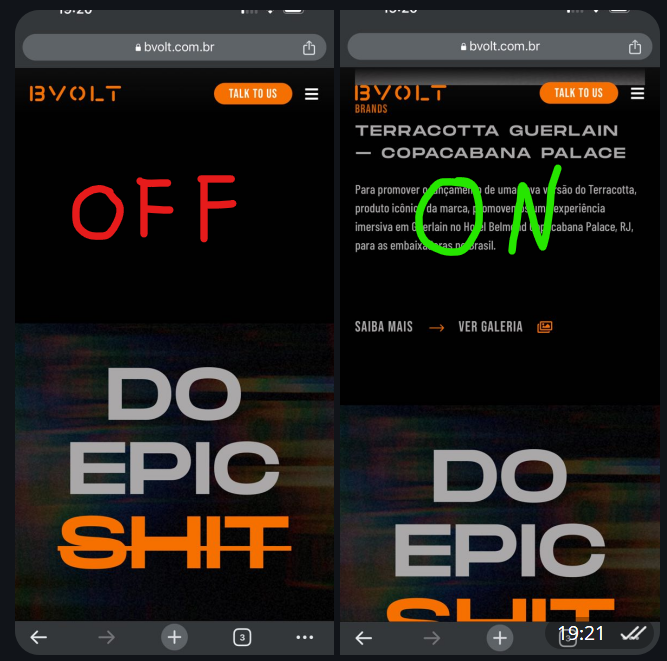
Not exactly in the same position:
https://i.postimg.cc/SsLD4X4B/image.pngOk I see. I did some tests and it seems the issue comes from the script that closes the mobile menu when the link is clicked. I tested an off-menu link and it works correctly (i.e. scrolling auto-adjusts as expected). Seems that there’s a conflict between this script and the Verify target position and readjust scrolling functionality.
The only way to solve this is via javascript, which will delay the closing of the mobile menu, i.e. the menu will close only after the smooth scrolling is complete.
Let me know if you want to add such js script in your template so I can give you the code.
Ahhh okay I can add extra code.
OK. The extra script is this:
(function($){
	var scrollCheck;
	$(function(){
		$("#menu-1-151bc56c .menu-item.fecharpopup").removeClass("fecharpopup");
	});
	$(window).on("load",function(){
		$(document).on("click","#menu-1-151bc56c .menu-item a[data-ps2id-api]",function(){
            if(scrollCheck){
            	clearInterval(scrollCheck);
            	scrollCheck=null;
            }
            scrollCheck=setInterval(function () {
            	if(!$("body").is(":animated")){
            		$(".dialog-close-button").trigger("click");
            		clearInterval(scrollCheck);
            		scrollCheck=null;
            	}
            }, 300);
        });
	});
})(jQuery);
A proper way to add it is in your theme/child-theme functions.php:
function ps2id_custom_script(){
	wp_register_script( 'ps2id-custom-script', '', array('jquery', '', true );
	wp_enqueue_script( 'ps2id-custom-script' );
	wp_add_inline_script( 'ps2id-custom-script', '(function($){
		var scrollCheck;
		$(function(){
			$("#menu-1-151bc56c .menu-item.fecharpopup").removeClass("fecharpopup");
		});
		$(window).on("load",function(){
			$(document).on("click","#menu-1-151bc56c .menu-item a[data-ps2id-api]",function(){
				if(scrollCheck){
					clearInterval(scrollCheck);
					scrollCheck=null;
				}
				scrollCheck=setInterval(function () {
					if(!$("body").is(":animated")){
						$(".dialog-close-button").trigger("click");
						clearInterval(scrollCheck);
						scrollCheck=null;
					}
				}, 300);
			});
		});
	})(jQuery);');
}
add_action( 'wp_enqueue_scripts', 'ps2id_custom_script' );
Let me know 🙂
If you add the script directly in your template don’t forget to include the script tags:
<script> ...code... </script>Hello Thanks for your help,
It had no effect, I added the second block to functions.php.
And from what I read in your script, it ends up removing the function of closing the popup, right?
But I need it, there wouldn’t be any other way, right?
Perhaps approaching the script that closes the popup in another way, do you know what is conflicting with yours?
I checked the page and the script is not present on the frontend. Do you have cache enabled? Maybe you need to clear/flush cache to see the script?
If it still doesn’t work can you add it directly to your theme/child-theme footer.php template (at the bottom before the closing
</body>tag)?Also, the script removes the function of closing the popup from the links but it’ll close the popup automatically after the smooth scrolling is complete 😉
It worked when I added it via the Elementor code snippet, thanks for the help 😉
I ended up modifying jquery so it didn’t take too long to close, I lost the exit animation like that, but it’s ok 😀
(function($){ // Variáveis configuráveis var scrollCheckInterval = 300; var popupClass = '.elementor-popup-modal'; var closeBtnClass = '.fecharpopup'; $(window).on("load", function(){ // Fecha popup ao clicar em .fecharpopup $(document).on("click", closeBtnClass, function(){ $(popupClass).css('display', 'none'); }); // Fecha popup ao clicar em um menu item var scrollCheck; $(document).on("click", "#menu-1-151bc56c .menu-item a[data-ps2id-api]", function(){ if(scrollCheck) { clearInterval(scrollCheck); } scrollCheck = setInterval(function(){ if(!$("body").is(":animated")){ $(popupClass).css('display', 'none'); clearInterval(scrollCheck); } }, scrollCheckInterval); }); }); })(jQuery);Awesome 🙂
Glad I helped.

The topic ‘Scrolling doesn’t adjust automatically on Mobile?’ is closed to new replies.