Hi beetle,
I’m not sure what you mean by “informations.” I assume that is a translation of one of the areas of the admin. Perhaps the Details button?
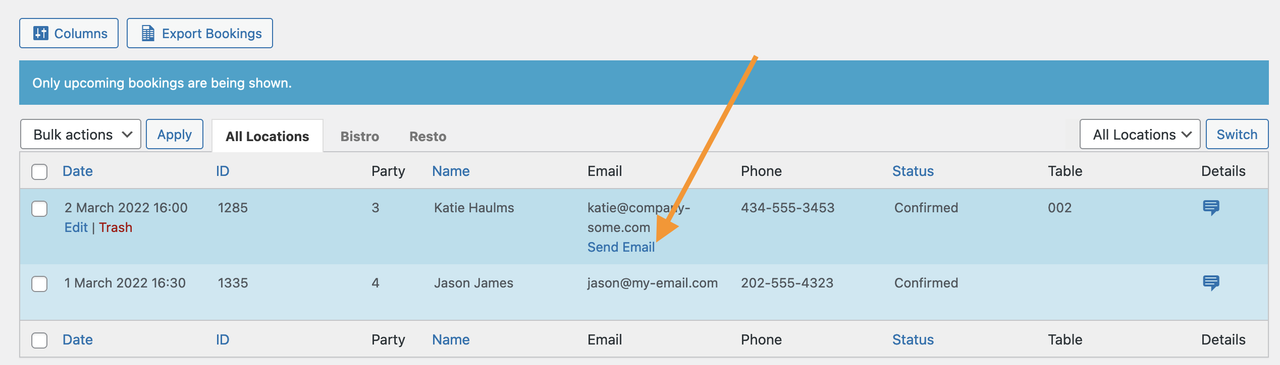
If so, that is not where you go to send an email to a customer. You need to hover over the booking and then click the “Send Email” button.
Screenshot for reference: https://i.postimg.cc/GhSfCTpJ/screenshot.png
If you are doing that and it is not sending the email, then I would suggest that you install an email logging plugin like https://ww.wp.xz.cn/plugins/email-log/. This will track every email sent out from your WordPress. With that, you’ll be able to see if the problem is that emails are not being sent at all or just that they are not being received.
-
This reply was modified 4 years, 3 months ago by
 jaysupport.
Hi,
First of all, I have the 2.5 version. You’re right about translation, it was “details” but I have to click on this button to go to “send an email” link.
If I hover over the list, nothing happens.
When I click on details, there is “send an email” link but nothing happens when I click over there.
Hi beetle,
When Email column is hidden and you click “Send Email” link from Details pop-up, it indeed does not work and is a bug. We have fixed this issue and it will be added to the next plugin update.
Meanwhile, we recommend you enable the “Email” column from “Columns” button (above the booking records in admin) and display it in the table. There, the “Send Email” link is working as expected.