Server burned down and BackWPup doesn’t work
-
Hello everyone,
Maybe some of you heard the news that on the night between the 9 & 10 of march a big datacenter owned by OVH and located in Strasbourg burned down .
And well if I’m here it’s because I have the misfortune of being the administrator of a wordpress website that was hosted on one of server that were destroyed.The website itself is quite simple , a few pages and videos that give information on a small foundation dedicated to video art .
And like that in one night everything was gone.At first I wasn’t concerned too much because I had a few backups done with BackWPup.
So I started the process of renting a new VPS and installing the Pro plugin.From there I went in despair.
For reasons I don’t quite understand there is nothing I can do for the Backup to work.
Terrible idea not to test the backup before everything went wrong ….At first as soon as I used the backup I got a message saying Error connecting to the database.So I changed the config.php file in the zip to match the new SQL database.It worked and the backup seemed to have deployed .

It says there is a need to update the database and I clicked OK .
Except nothing changed in the wordpress administration interface, noone of the pages that existed on the website reappeared.
The only difference is that in the plugin menu all the plugins that were installed on the old website are there but it’s quite useless without the pages …
The IP of the site leads me to a light green empty page.The previous website was installed on an old PHP and WordPress version so I guessed it didn’t like the new updated version installed on the VPS and the problem might come from this incompatibility .
So I installed localwp to see if I could tinker with php and other options to at least get the website working in local .
Unfortunately it didn’t work.
I installed the Pro plugin again but this time I got this message about needing the encryption key to open the backup , a message I have never seen while I was trying on the VPS .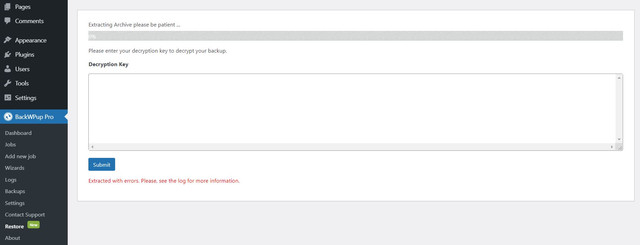
So if anyone has any idea of what I could do to get the backup to work one way or the other I would greatly appreciate the help .
Thank you very much.


The topic ‘Server burned down and BackWPup doesn’t work’ is closed to new replies.
