hi @oli89
the video talking about triggers is a good example of how you can collect clicks on some elements.
https://matomo.org/tag-manager-training/
Please check also the console of your browser to check for errors when setting your tags.
Kind regards
Mat
Thread Starter
 oli89
oli89
(@oli89)
Hey @mattmary
Thank very much for you link to this video.
I have watch all parts of this video and also other youtube videos, but I still don’t know how I can select a trigger to a css class with have other subordinate css classes. At the end the trigger should start with any klick in the selected css class or and subordinate css classes. How ist this possible?
Best regards
Oli
hi @oli89
Do you have an example of the dom content you want to listen for clicks?
Thread Starter
oli89
(@oli89)
@mattmary
yes sure. On my page for exanmple https://aquarienmagazin.com/aquariumheizung/ you can find related posts under the h3 headings “Das könnte für dich interessant sein” and “Weitere interessante Themen”. I liek to track all clicks in the area of this related posts. If I take now a look to the css-classes so I see that the classes overstretch the hole area.
My problem is, that the tracking only works if i set the smalles css classes like “cprp_thumbnail”.
Do you have an idea how I can track the hole “cprp_items list slick-initialized slick-slider” class?
I will be really happy to hear from you, because I tried it now for many hours.
Best regards
Oli
hi @oli89
I did not try but using cprp_items.list.slick-initialized.slick-slider as the css class should do the job.
Tell me
Thread Starter
oli89
(@oli89)
Thanks,
I try it at the moment, but it is not working:-(
I set it now as click class match cprp_items.list.slick-initialized.slick-slider
Hope this is as you mean it.
Do you have any idea about the problem?
Best regards
Thread Starter
oli89
(@oli89)
Hey @mattmary,
do you maybe have one more idea about the problem?
For me it doesn’t make sence at the moment, especially because i can also set the trigger as “include” cprp but for example the class “cprp_title” will not be tracked:-(
I will be really happy for your help
Oli
hi @oli89
Have you tried to define your click trigger for the css selector element
.cprp_items > *
it will listen all the child elements of your cprp_items elements.
Thread Starter
oli89
(@oli89)
Dear @mattmary,
thanks for this tip.
I add the trigger .cprp_items > * now with click class corresponse to the CSS selector.
I hope this is like you mean it?
But the problem is, that this trigger is also not tracking all clicks. It is really stange, because for example the class “cprp_title” will be only tracked by an all klicks trigger. Also if I set a trigger to cprp_title it is not working:-(
Do you maybe have an idea about the problem?
My Ideas are really over now.
hi @oli89
No this selector must be used as css selector, not css class.
I don’t know why you don’t trigger the tag. Can you confirm with the preview mode that the tag is not raised?
Maybe you have an definition error. You can see them in your console: it will raise an error. Do you have some?
Kind regards
Mat
Thread Starter
oli89
(@oli89)
hi @mattmary,
sorry but what do you directly mean with “css selector”?
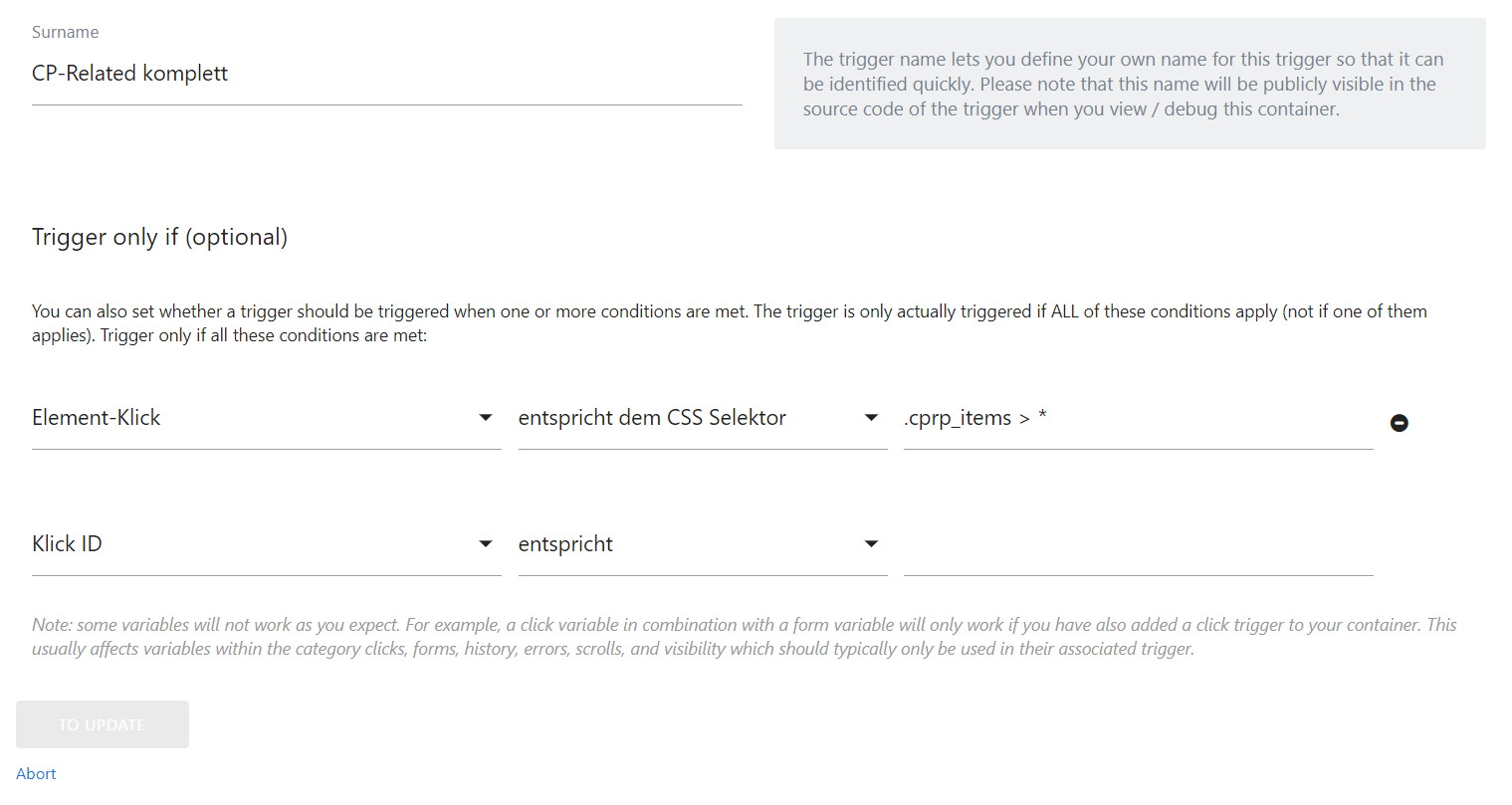
I’ve uplaod a picture from my current settings for you here https://aquarienmagazin.com/trigger_matomo_cp.jpg (sorry it’s in German). Can you please check if here is everything correct?
Best regards
Hi @oli89
I was talking about the way to set the CSS selector I gave you. But you define it the right way.
Do you have any javascript errors in the console when running the container? When running the preview mode is your trigger fired?
Kind regards
Mat
Thread Starter
oli89
(@oli89)
Hi @mattmary,
let me answer direct to your text:
I was talking about the way to set the CSS selector I gave you. But you define it the right way.–>Nice to hear that this is correct
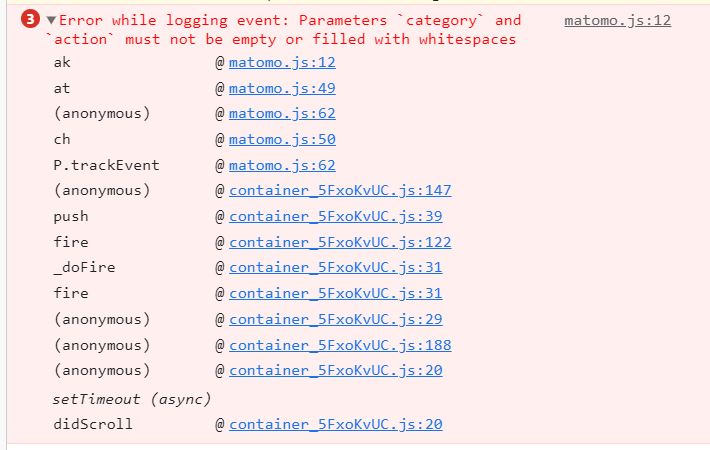
Do you have any javascript errors in the console when running the container?–>Yes your right, there is the follow error:https://aquarienmagazin.com/matomo_js_error.JPG
But I am not sure what the error means, because these are the settings of my tag and I can’t see the problem:-( https://aquarienmagazin.com/matomo_tag_settings.JPG Do you have an idea what the error means?
When running the preview mode is your trigger fired?–>I think it is not fired, but I am not sure, because the elements which I like to track are linked to other pages. In case of this, there is opening a new page without the debug slug on the end of the url. Do you understand what I mean?
I am really intressted in your answer.
Best regards
Oli
hi @oli89
thanks for your screenshots. Can you also share the screenshot for the trigger?
Kind regards
Thread Starter
oli89
(@oli89)
Hey @mattmary ,
the trigger is still the same than last time, which you can see here:
https://aquarienmagazin.com/trigger_matomo_cp.jpg
Is it that what you mean?
Best regards
Oli