• Resolved jetxpert

    (@jetxpert)


    Good Day!

    We are only using the Combine CSS Files and Preload Combined CSS features of your plugin’s Front Optimization tab.

    For some odd reason, every two or three days, the CSS styling of our website breaks. The console error that we’re getting on every page that is broken displays the following:
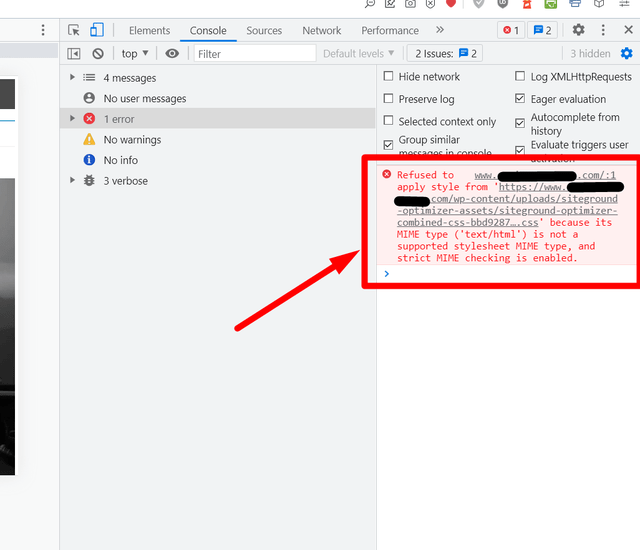
    sg-optimizer-css-console-error

    Screenshot: https://ibb.co/BrVk4KC

    Helpful Information:

    (1) We checked online as to what could be causing the above. The closest thing we found is the information contained in this Stackoverflow post which contains this comment:

    It happens when you set an incorrect URL to the file or when your server isn’t configured properly. In the result, the browser DOESN’T get the stylesheet, but it gets some HTML with 404 status and with the “Content-Type” header. Since the browser gets something from the server, it doesn’t tell you there is no reply, but it tells you the MIME type of the file is incorrect. The fastest way to check it is just to try to open the file directly http://localhost:3000/assets/styles/custom-style.css

    (2) When we click the URL provided in the console error, we get a 404 message (page not found).

    (3) When we clear Cloudflare’s cache, issue remains.

    (4) When we clear SiteGround’s Dynamic and Memcached, issue remains.

    (5) When we clear our theme’s (Avada) cache (called, “Reset Avada Caches”), followed by clearing SG Optimizer’s Dynamic and Memcached and then Cloudflare’s cache, issue is temporarily fixed.

    Please review and provide a fix.

    Thank you!

Viewing 5 replies - 1 through 5 (of 5 total)
  • Thread Starter jetxpert

    (@jetxpert)

    Useful Information:

    Apparently, the issue we reported above has been reported by others as well. See below links.

    In one case, SiteGround patched a site. Mmm, do we need a patch too?

    Last, we’re using Avada (theme) which offers several CSS compiling methods. Could this also be contributing to the issue? (Note: We are using the “File” CSS Compiling Method)

    Thank you!

    ———————-

    References:

    https://ww.wp.xz.cn/support/topic/404-pages-created-with-sg-optimizer/
    https://ww.wp.xz.cn/support/topic/css-404-error/
    https://ww.wp.xz.cn/support/topic/refused-to-apply-style-from-combined-css/

    Plugin Author Hristo Pandjarov

    (@hristo-sg)

    SiteGround Representative

    SG Optimizer is not breaking your site. It is WP Rocket as usual. I really recommend that you stop using it and the problems you experience with your website will be signifficantly reduced.

    We have a cleanup mehanism for the assets we generate (including CSS) and we purge our caching once this mechanism forces asset regeneration but the WP Rocket one remains. So it provides incorrect HTML to CF which then cache again.

    Just use the SGO and if absolutelly necessary – CF with full page caching. There is no reason for having WP Rocket in the middle causing nothing but problems.

    Thread Starter jetxpert

    (@jetxpert)

    @hristo-sg,

    Your point is well taken and we’ll give it a try.

    However, please know that none of our settings (between WP Rocket and SG Optimizer) overlap. Further, we are only using the JS Combine feature of WP Rocket, We have also deactivated the caching function of WP Rocket, so we can’t see how this set-up would break the CSS (styling) of our pages.

    The only reason why we’re using WP Rocket is because SG Optimizer’s JS Combine function is breaking our pages where Gravity Forms payment portals are used. WP Rocket’s JS Combine function does not. We confirmed this with Gravity Forms’ DevOps Team as noted in this Gravity Forms Community Forum topic.

    So, if you can help us fix our JS Combine issue with your plugin, we’ll stop using WP Rocket. Let us know which is the best avenue to fix this (this forum or a support ticket).

    Oh, and if you can also confirm that our theme’s CSS compiler (as explained above) does not affect your plugin’s CSS Combine functionality, that would be great too.

    Thank you.

    Thread Starter jetxpert

    (@jetxpert)

    Hi @hristo-sg,

    Good news. We have finally solved our SGO JS Combine issue. Solution posted here.

    Based on the above, we have deleted WP Rocket and are now only using SGO. Hopefully, this will also fix the original issue we reported above.

    Thank you for your help and patience.

    Cheers!

    Plugin Author Hristo Pandjarov

    (@hristo-sg)

    SiteGround Representative

    I am glad you have figured this out. Excluding these scripts from the Combination was the right thing to do 🙂

Viewing 5 replies - 1 through 5 (of 5 total)

The topic ‘SG Optimizer Generated CSS Files Breaking Site’ is closed to new replies.
