Plugin Contributor
 webnus
(@webnus)
Hi @warhonowicz,
Thank you for contacting us and using MEC,
Please follow the steps explained in this article:
https://webnus.net/dox/modern-events-calendar/no-event-found-issue-in-modern-event-calendar/
Best Regards
Hi,
My problem is not that the events are not found, they are. My problem is that the shortcodes are not found in a widget.
If you look at this page https://hsg-eppla.de/ on the right hand side, next to the first blog post I would like to show upcoming games for the adult teams. So I created a shortcode that filters by category. I have a category for adult teams and a different one for the youth teams.
The calendar on the front is a widget, for which I want to use the MEC widget. I can add the widget but when I try to select the shortcode, I can only see monthly view, upcoming events (list) and upcoming events (grid) as the options. I cannot see the short codes I created myself.
Thanks
Plugin Contributor
webnus
(@webnus)
Hi @warhonowicz,
Please don’t worry, use the code of the shortcode – Carousel widgets are included in the MEC WordPress widget.
So, please follow and do the steps below:
1- Create a new shortcode: https://webnus.net/dox/modern-events-calendar/making-advance-shortcodes-in-modern-event-calendar/
2- Copy the shortcode (explained on the number 15).
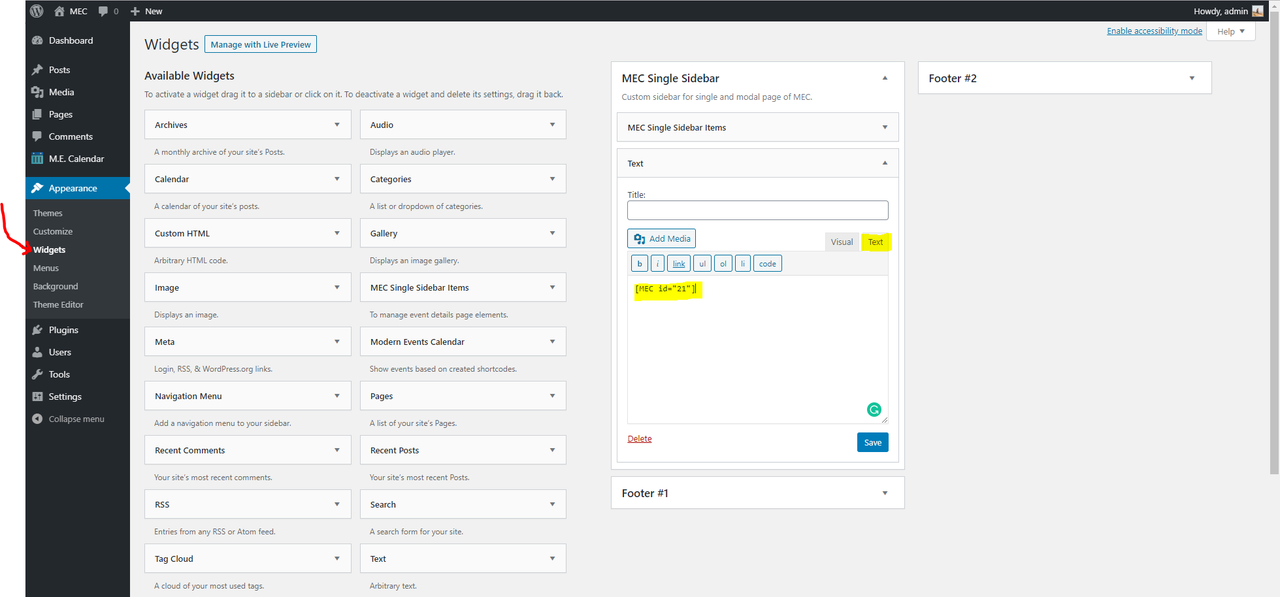
3- Head over to WP > Appearance > Widgets
4- Drag and Drop “Text Widget” to the desired sidebar
5- Go to the text tab and put your code here.
6- click on the Save Button and done.
Screenshot: https://i.postimg.cc/y8CC10s6/image.png
Best Regards
Hi @webnus,
Thanks, that works perfectly … now all we need is for this virus to go away so we can actually schedule matches etc.
best regards
Plugin Contributor
webnus
(@webnus)
You’re welcome,
I hope everything gets fine soon.
Stay safe