Shortcode not generating content on front end
-
Hello
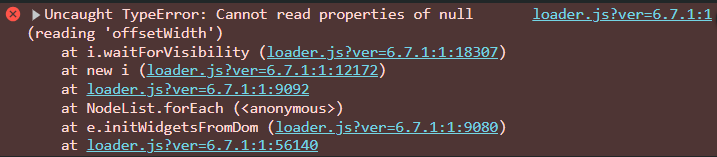
I’m having trouble getting the google reviews to display on the front end of my site.
I can add the shortcode to the page editor ok, but after saving and checking the live version of the site, the google reviews do not appear.
Back end page: https://snipboard.io/MwI1pt.jpg
Front end page: https://snipboard.io/TzH6vD.jpgCan you help?
Thanks!URL: https://katec68.sg-host.com
MySQL Version: 8.0.36
WP Table Prefix: xccHzL_
WP Version: 6.7.1
Server Name: katec68.sg-host.com
Cookie Domain: katec68.sg-host.com
CURL Library Present: Yes
CSS path: /home/customer/www/katec68.sg-host.com/public_html/wp-content/uploads/trustindex-google-widget.css
PHP Info:
Version: 8.0.30
Memory Usage: 164.92MB
Memory Limit: 768M
Max Upload Size: 256M
Max Post Size: 256M
Allow URL fopen: On
Allow URL Include: Off
Display Errors: Off
Max Script Execution Time: 120 seconds
WP_HTTP_BLOCK_EXTERNAL: not defined
WP_ACCESSIBLE_HOSTS: not defined
Plugin: Widgets for Google Reviews
Plugin Version: 12.4.5
Options:
active: 1
page-details: {
“id”: “ChIJtx9v-rM51moRaS6d1JvmiF0”,
“name”: “\”Manningham Business Network Inc\””,
“avatar_url”: “https:\/\/lh5.googleusercontent.com\/p\/AF1QipNlzVJk1VvV-gAsA_ozRx-4GmXNFyb2g50pYPle=w900-h900-p-k-no”,
“write_review_url”: “https:\/\/www.google.com\/maps\/place\/\/data=!4m3!3m2!1s0x6ad639b3fa6f1fb7:0x5d88e69bd49d2e69!12e1”,
“address”: “https:\/\/www.manninghambusinessnetwork.au\/”,
“rating_number”: “19”,
“rating_score”: “4.9”,
“timestamp”: 0
}
subscription-id:
proxy-check:
style-id: 36
review-content:
%reviewer_name%
%created_at%
%text%
PLATFORM_NAME rating score: RATING_SCORE of RATING_SCALE, based on RATING_NUMBER reviews
The page I need help with: [log in to see the link]


The topic ‘Shortcode not generating content on front end’ is closed to new replies.