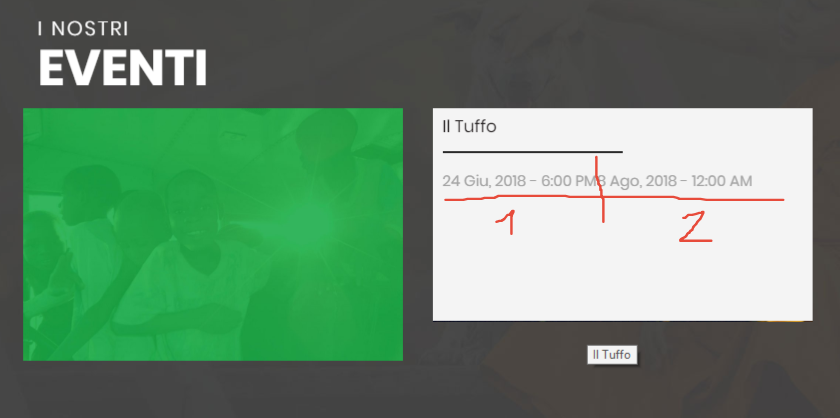
EDIT:
I’ve fixed the code as follows:
// Add Shortcode For Event Date

function start_date_shortcode() {

  global $post
  return tribe_get_start_date( $post->id, false, 'F j, Y - g:i a');
}

add_shortcode('start-date', 'start_date_shortcode');
But it doesn’t work.
 Ed
Ed
(@erishel)
Hey there @mrprainx!
Thanks for reaching out — sorry to hear that you are experiencing difficulties.
In order to use tribe_get_start_date(); you’ll need to place it inside a custom query so it knows what posts (actually events) it’s pulling the date from.
Here’s a great article that talks about both → https://theeventscalendar.com/knowledgebase/custom-event-queries/
Hope that helps!
Hello Ed.
This helped a lot! Thank you!
I’ve updated the code as follows:
// Add Shortcode For Event Date

function start_date_shortcode() {

	$events = tribe_get_events();

	foreach( $events as $event ) {

  		echo tribe_get_start_date( $event, false, 'j M, Y - g:i A');
  	}

}

add_shortcode('start-date', 'start_date_shortcode');
The issue now is that it’s showing the date of all the events, not just one. As you can see in the screenshot, I have 2 events; the shortcode is now showing the start date of both:
screenshot here
What am I missing?
EDIT:
Following this guide, I’ve updated the code as follows:
// Add Shortcode For Event Date

function start_date_shortcode() {

	// Ensure the global $post variable is in scope
	global $post;

	// Retrieve events
	$events = tribe_get_events();

	// Loop through the events: set up each one as
	// the current post then use template tags to
	// display the start date date

	foreach ( $events as $post ) {
  		setup_postdata( $post );


  	echo tribe_get_start_date( $post, false, 'j M, Y - \h H:i' ) . '<br/>';

 	}

}

add_shortcode('start-date', 'start_date_shortcode');
But I still get the list of all events’ start date.
see screenshot
Update:
I’ve just read that there is a specific way to get post data for Post Grid of Visual Composer. That’s why post ID wasn’t “passed” to the function.
Following this two guides I’ve managed to have the event start date in the right way.
Thank you.
Hi mrprainx,
Could you post an example of how you were able to have the start date show in a user-friendly way in the Visual Composer Post Grid?
I’m attempting to do the same thing. However, I find that I cannot use the Visual Composer template variable to pass the post ID into the get_post_meta() function because it’s not available to PHP, just to the browser page.
I’m sure I’ve missed something in the links you provided and hope to learn from how you implemented this successfully.
Thank you for any help you can provide.
Here is the function I am using:
add_filter( 'vc_grid_item_shortcodes', 'my_module_add_grid_shortcodes' );
function my_module_add_grid_shortcodes( $shortcodes ) {
    $shortcodes['vc_post_id'] = array(
        'name' => __( 'The Events Calendar Event Date', 'my-text-domain' ),
        'base' => 'vc_post_id',
        'category' => __( 'Content', 'my-text-domain' ),
        'description' => __( 'Show current event date', 'my-text-domain' ),
        'post_type' => Vc_Grid_Item_Editor::postType(),
    );

    return $shortcodes;
}

// output function
add_shortcode( 'vc_post_id', 'vc_post_id_render' );
function vc_post_id_render() {
    $tec_id = '{{ post_data:ID }}'; // usage of template variable post_data with argument "ID"
    $tec_start = get_post_meta($tec_id, '_EventStartDate', false);
    $tec_date = tribe_format_date(array_values($tec_start)[0]);
    return $tec_date;
}
-
This reply was modified 7 years, 8 months ago by
 dg_Amanda.
Hi mrprainx
Can you advise the function you used to active the shortcode which pulled the Tribe Event Date into Grid Builder?
thanks
Hello both. And sorry Amanda for this late reply. I didn’t receive any notification.
To be honest, I do not remember clearly.
But in my functions.php I have:
// Add Shortcode For Event Date

function start_date_shortcode() {

	// Ensure the global $post variable is in scope
	global $post;


	// Retrieve events
	$events = tribe_get_events();

	// Loop through the events: set up each one as
	// the current post then use template tags to
	// display the start date date

	foreach ( $events as $post ) {
  		$postid = get_the_ID();
  		setup_postdata( $post );

  	return tribe_get_start_date( $post, false, 'j M, Y - \h H:i' ) . '<br/>';

 	}

}

add_shortcode('start-date', 'start_date_shortcode');

//** Event Date Shortcodes ***********
//********************************
add_filter( 'vc_gitem_template_attribute_event_date','vc_gitem_template_attribute_event_date', 10, 2 );
function vc_gitem_template_attribute_event_date( $value, $data ) {
   extract( array_merge( array(
      'post' => null,
      'data' => '',
   ), $data ) );
  $atts_extended = array();
  parse_str( $data, $atts_extended );
  $atts = $atts_extended['atts'];
  // write all your widget code in here using queries etc
  $startdate = tribe_get_start_date( $post->ID, false, 'j M, Y' ) . '<br/>';

  $output = $startdate;

  return $output;
}

add_filter( 'vc_grid_item_shortcodes', 'event_date_shortcodes' );
function event_date_shortcodes( $shortcodes ) {
   $shortcodes['vc_event_date'] = array(
     'name' => __( 'Data Evento', 'sage' ),
     'base' => 'vc_event_date',
     'icon' => get_template_directory_uri() . '/assets/images/icon.svg',
     'category' => __( 'Content', 'sage' ),
     'description' => __( 'Data evento', 'sage' ),
     'post_type' => Vc_Grid_Item_Editor::postType()
  );
  return $shortcodes;
 }

add_shortcode( 'vc_event_date', 'vc_event_date_render' );
function vc_event_date_render($atts){
   $atts = vc_map_get_attributes( 'vc_event_date', $atts );
   return '{{ event_date }}';
}
Then, you have to map the shortcode(s) using Visual Composer.
Info here: https://kb.wpbakery.com/docs/learning-more/shortcode-mapper/
Last, using the grid builder (info here: https://kb.wpbakery.com/docs/learning-more/grid-builder/) when you add a new element you will see the shortcode(s) you created.
Hope this helps.
Hi Mr mrprainx
That perfect your solutions works great!
thanks