Shortcodes Not Working
-
I have Youzify running with BuddyPress on the Kadence theme. I can’t get any of the shortcodes to work. The default pages like /registration work fine, but if I add a shortcode to any page I’ve created, the content isn’t displayed. This is using the shortcode block and any Youzify shortcode, but specifically the
youzify_registershortcode. Any insight or tips are appreciated. Thanks!

-
Hi @t0ta11ed
I will be happy to assist.1 Please make sure to use [youzify_register] instead of youzify_register
2 Please make sure you enable “Membership System Settings” option on Youzify Panel >> General Settings
3 Please make sure enable “Anyone can register” option on your WordPress settings >> General
Best Regards, KaineLabs Team.
Thanks for getting back to me. I am using the shortcode correctly and have the two options enabled. The normal /registration URL works and displays fine but the shortcode doesn’t display anything on a new page.
Hi @t0ta11ed
Could you please share a screenshot showing how you added the shortcode to your WordPress page? You can upload the screenshot on imgbb or dropbox and share the URL here. Also, are you using the Gutenberg editor or the Classic Editor?
Best Regards, KaineLabs Team.
I think I have this sorted. The shortcode displays correctly if you’re not logged in. I have some other issues though:
- How do I get the default /register URL to go to that page? If I try changing the page slug it defaults to register-2 instead.
- The Login button on the registration form points to my homepage and not the actual login page. How do I set the URL on the login button?
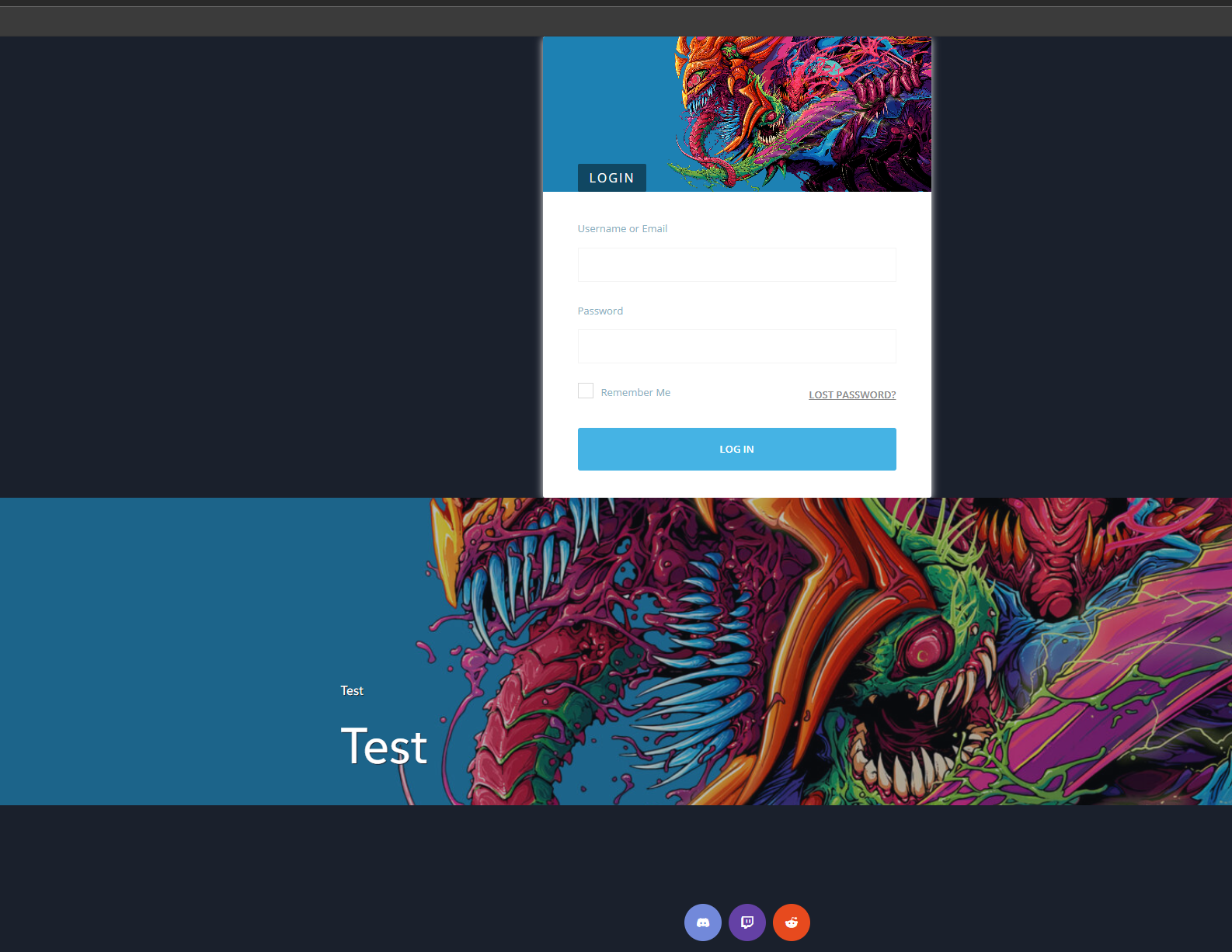
- The shortcodes seems to ignore the page layout they’re on. For example, the login form will add itself to the top of the page with the site header, with my page image below it. That should be below the image and not at the top with the header. See this screen shot:
https://battlehits.net/images/youzify-login-shortcode.png
If you need me to open new threads for those or add any screenshots let me know.
-
This reply was modified 1 year, 1 month ago by
t0ta11ed.
Hi @t0ta11ed
1 You can change the registration page URL by navigating to BuddyPress Settings > URLs tab.
2 Go to Youzify Panel > Membership Settings > General Settings, and make sure the Login Page is correctly set.
3 If the issue still occurs, it might be caused by a conflict between Youzify and your theme or another plugin. Please try deactivating all plugins except Youzify and BuddyPress, and switch to a default WordPress theme. Then, check if the problem still persists.
Best Regards, KaineLabs Team.- When I set the Login page in Youzify Membership Settings it won’t save. I navigate away and come back and its back to ‘Select’.
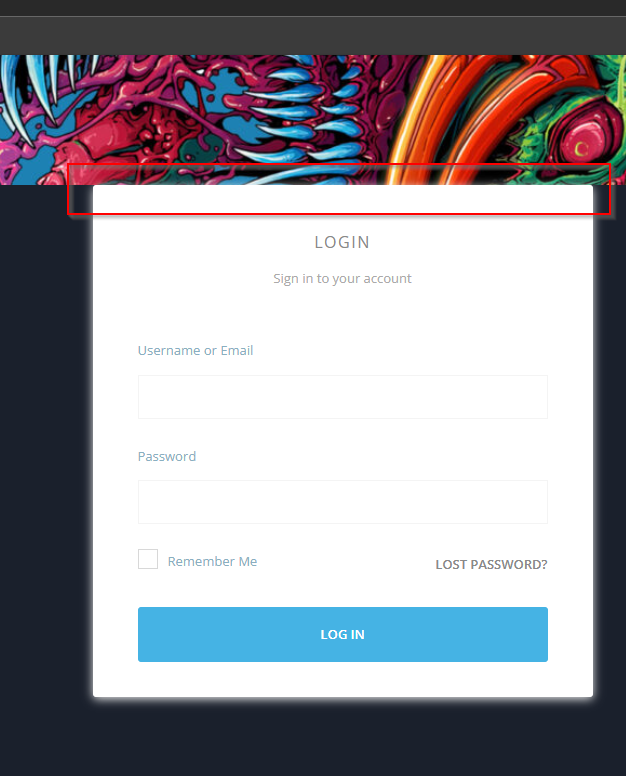
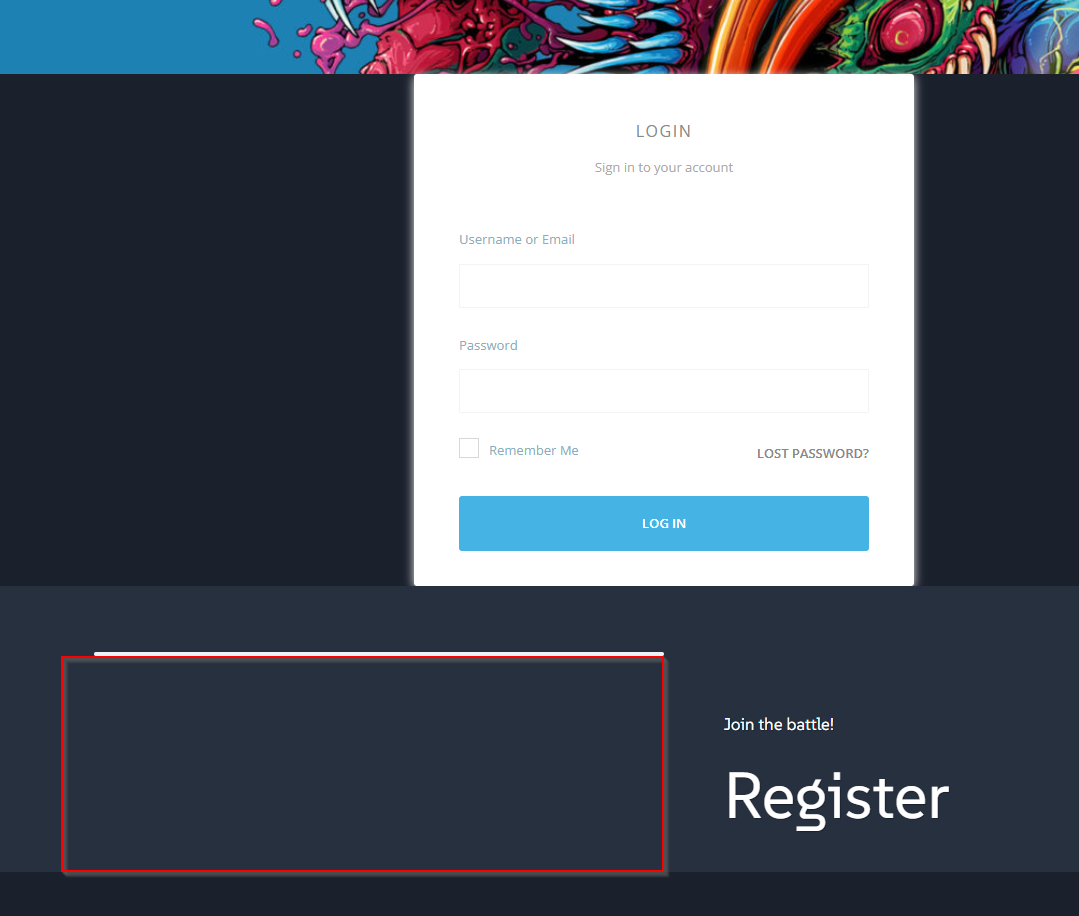
- I’ve managed to fix the login shortcode partly, but it keeps snugging itself right up against the bottom of the header. This happens no matter where I put the shortcode on a page. The register shortcode does not do this.
Here’s some screens:
Parked against header bottom – https://battlehits.net/images/youzify-login-shortcode2.png
Not staying where the shortcode is placed – https://battlehits.net/images/youzify-login-shortcode3.png (Red box is where the shortcode was put)
-
This reply was modified 1 year, 1 month ago by
Hi @t0ta11ed
Please clarify, have you tried try deactivating all plugins except Youzify and BuddyPress, and switch to a default WordPress theme? Then, check if the problem still persists.I’ll give that a try. The registration and login don’t work either, so something is off.
Did some testing, and the theme doesn’t seem to matter. If I add the youzify_register shortcode to a page called ‘register’ with a slug called ‘register’, then BuddyPress will set the registration URL to register-2. I think this is the main problem.
If I remove the custom page and make sure BuddyPress is using /register, I get my header with a Youzify registration form. That does work but doesn’t let me customize anything else on that page. Am I missing something here?
Also, setting the login page in Youzify doesn’t save. It reverts back to – Select.
-
This reply was modified 1 year, 1 month ago by
Hi @t0ta11ed
Can you please share with me your registration form page?
Best Regards, KaineLabs Team.Hiya, Sorry for the delay responding. I’ve got most of my issues resolved and some of it was theme related. I still have a problem with the login page setting not saving though.
Hi @t0ta11ed
Could you please clarify with “with the login page setting not saving though”? Do you mean the Youzify settings can not be saved?
Best Regards, KaineLabs Team.
Yes, I mentioned this before. The Login page setting will not save. It just reverts back to –Select
Hi @t0ta11ed
On your WordPress root folder, could you please edit the wp-config.php and set the value of WP-DEBUG to true. After then, please try save the settings page again. Please share the debug log file here.
Additionally, could you please tell me the Youzify version you are using?
Best Regards, KaineLabs Team.Running Youzify 1.3.5. I’m not going to post the entire log for security reasons, but there are no errors related to Youzify in it when I change the setting. The only thing that is there is a BBPress error. This was happening before BBPress was installed though.
[16-Apr-2025 02:39:06 UTC] PHP Deprecated: Creation of dynamic property BBP_Forums_Component::$activity is deprecated
I’m going to Youzify > Membership Settings > General Settings and changing the Login page to a custom one. It spins like it’s saving, but when I navigate away and come back to the page, it’s no longer set.

The topic ‘Shortcodes Not Working’ is closed to new replies.