Speed Calculation
-
Hi, I want to make another calculator using CFF, Calculation like this:
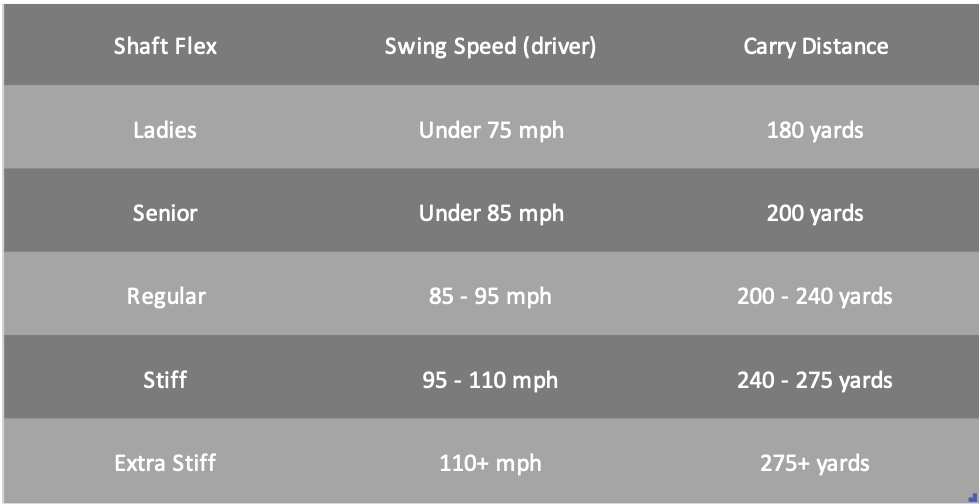
Swing Speed: Under 75 And Distance: 180 Result will be: Ladies (L)
Swing Speed: Under 85 And Distance: 200 Result will be: Senior (A/M)
Swing Speed: 85 to 95 And Distance: 200 to 240 Result will be: Regular (R)
Swing Speed: 95 to 110 And Distance: 240 to 275 Result will be: Stiff (S)
Swing Speed: 110+ And Distance: 275+ Result will be: Extra Stiff (X)Check this image: https://www.halpennygolf.com/Images/BlogImages/shaftflexchart1.png
Ref: http://golf.okrasa.eu/clubs/flex/
How to do this calculation easily?

-
Hello @mira404
Assuming you have two fields, fieldname1 and fieldname2. You can include multiple conditional statements in the equation associated to the calculated field:
(function(){
if(AND(fieldname1<=75, fieldname2 == 180)) return 'Ladies (L)';
if(AND(fieldname1<=85, fieldname2 == 200)) return 'Senior (A/M)';
if(AND(85<fieldname1, fieldname1<=95, 200<fieldname2, fieldname2 <= 240)) return 'Regular (R)';
if(AND(95<fieldname1, fieldname1<=110, 240<fieldname2, fieldname2 <= 275)) return 'Stiff (S)';
if(AND(110<fieldname1, 275<fieldname2)) return 'Extra Stiff (X)';
})()
I’m sorry, but the support service does not cover the implementation of the users’ projects (forms or formulas). If you need someone that implements your project, you can contact us through the plugin website:
https://cff.dwbooster.com/customization
Best regards.
oh ok, sorry for that! ok but just solve this.
If the input value < 100 then the output shows: L
Distance: <100 Result will be: L
Distance: >100 Result will be: A / M
Distance: >130 Result will be: R
Distance: >155 Result will be: S
Distance: >175 Result will be: XSorry again!
Hello @mira404
The order of the conditional statements is relevant.
I’ll try to describe the process with a hypothetical example.
Assuming you have implemented the equation:
(function(){
if(fieldname1<100) return 'L';
if(fieldname1>100) return 'A / M';
if(fieldname1>130) return 'R';
if(fieldname1>155) return 'S';
if(fieldname1>175) return 'X';
})()
The first two rules cover all the possible values. For example, if the value of the fieldname1 is 130, the equation will return
A / Mbecause it is the second conditional statement in the equation, and the number 130 satisfies the condition130>100For this reason, you must include the conditional statements from the more specific cases to more generals:
(function(){
if(fieldname1>175) return 'X';
if(fieldname1>155) return 'S';
if(fieldname1>130) return 'R';
if(fieldname1>100) return 'A / M';
return 'L';
})()
Best regards.
What happened if I use:
Distance range: 30 to 117 = L
Distance range: 118 to 120 = L or A
Distance range: 121 to 131 = A
Distance range: 132 to 135 = A or R
Distance range: 136 to 157 = R
Distance range: 158 to 161 = R or S
Distance range: 162 to 175 = S
Distance range: 176 to 179 = S or X
Distance range: =>180 = XMinimum value 30 and Maximum value 380, I anyone provide <30 to >380 then show ‘Undefined’;
Hello @mira404
You should include a condition that comprares both ranges as the first one:
if(OR(fieldname1<30, 380<fieldname1)) return 'undefined';Best regards.
Can you give me the full condition?
Hello @mira404
Please, if you someone that implements your project, you can contact us through the plugin website. We cannot implement your project through the WordPress forum.
(function(){
if(OR(fieldname1<30, 380<fieldname1)) return 'undefined';
if(fieldname1>175) return 'X';
if(fieldname1>155) return 'S';
if(fieldname1>130) return 'R';
if(fieldname1>100) return 'A / M';
return 'L';
})()
Best regards.
ok next time I will contct through your website. I try but this function not working for below distance range:
Distance range: 30 to 117 = L
Distance range: 118 to 120 = L or A
Distance range: 121 to 131 = A
Distance range: 132 to 135 = A or R
Distance range: 136 to 157 = R
Distance range: 158 to 161 = R or S
Distance range: 162 to 175 = S
Distance range: 176 to 179 = S or X
Distance range: =>180 = XMinimum value 30 and Maximum value 380, I anyone provides <30 to >380 then show ‘Undefined’
Hello @mira404
When you have a question about an equation, please, include your equation code to check it.
Best regards.
In this calculation, I don’t need any equation I just need to enter the input value (example: 132) and output to show the letter (Example: A or R)
Distance range: 30 to 117 = L
Distance range: 118 to 120 = L or A
Distance range: 121 to 131 = A
Distance range: 132 to 135 = A or R
Distance range: 136 to 157 = R
Distance range: 158 to 161 = R or S
Distance range: 162 to 175 = S
Distance range: 176 to 179 = S or X
Distance range: =>180 = XAnd
Min value 30 and Max value 380, I anyone provides <30 to >380 then show ‘Undefined’
Hello @mira404
The solution is the same, you enter a value in a number field and the calculated field returns a letter based on this number by using multiple conditional statements in its equation. That is exactly the same process described in the previous entries.
Best regards.
Ok but it’s not working.
So, If you enter 118 to 120 then the output is L or A but it shows L not only this one also has some more.
Distance range: 30 to 117 = L
Distance range: 118 to 120 = L or A
Distance range: 121 to 131 = A
Distance range: 132 to 135 = A or R
Distance range: 136 to 157 = R
Distance range: 158 to 161 = R or S
Distance range: 162 to 175 = S
Distance range: 176 to 179 = S or X
Distance range: =>180 = XEnter the value & check the output.
Check yourself: https://weekendgolf.co/calculator/golf-shaft-flex-calculator/
Check:
(function(){ if(OR(fieldname10<30, 380<fieldname10)) return 'undefined'; if(fieldname10>175) return 'X'; if(fieldname10>155) return 'S'; if(fieldname10>130) return 'R'; if(fieldname10>100) return 'A / M'; return 'L'; })()-
This reply was modified 4 years ago by
mira404.
Hello @mira404
You did not included the other rules, you are pasting exactly the same equation I sent you.
If you want to check other ranges of values, you must edit the conditions.
You need to compare with the values:
180, 176, 162, 158, 136, 132, 121, 118, and 30. Just in that order.(function(){ if(OR(fieldname10<30, 380<fieldname10)) return 'undefined'; if(fieldname10>180) return 'X'; if(fieldname10>176) return 'S or X'; /* Your other rules here */ })()Best regards.
-
This reply was modified 4 years ago by

The topic ‘Speed Calculation’ is closed to new replies.