Hello brandonhunt,
According to our test server, the Tracking Graphic works correctly in Internet Explorer(check out the screenshot attached). Could you please share a link to your site for us to test and see what the issue is that is causing the Tracking graphic to not show up on the IE. Also, if your IE is not updated, could you make sure to update it to the latest version available and then see if that works correctly.

Best regards,
Here is our website… http://www.mid-americantitle.com/tracking
You can use any of the following order numbers to track: 45155 , 45161 , 45134
Hi Brandon,
We just checked your exact page using Internet Explorer and it’s working fine.

What does it look like for you?
When I try it in IE on get the fallowing.
Image
Hello brandon,
could you please make sure that:
1) You have to the latest version of the ie browser.
2) Could you make sure that javascript is enabled in your browser. This most probably is specific to your browser settings. Please check the following link to enable javascript in your browser: https://www.whatismybrowser.com/guides/how-to-enable-javascript/internet-explorer
Best regards,
I had another customer comment that they were not able to see the tracking graphic on internet explorer. I tried it myself and still am not able to view it. Had other’s test for me with the same results.
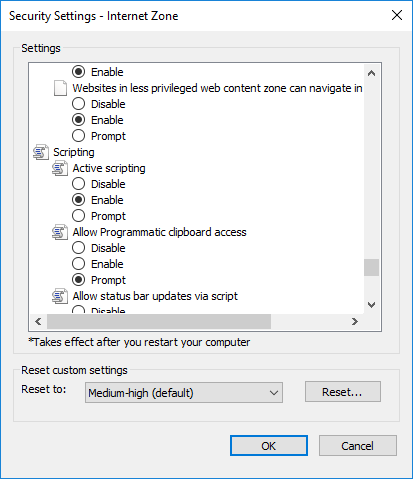
Here is a copy of what the screen looks like, my IE Version, and Java settings.
IE-Version – https://www.mid-americantitle.com/wp-content/uploads/IE-Version.png
Java Settings – https://www.mid-americantitle.com/wp-content/uploads/Java.png
IE Screen – https://www.mid-americantitle.com/wp-content/uploads/tracking-1.png
Hi brandonhunt,
We again tested on IE Version 11.165.17134.0. We aren’t able to replicate the error on our end. Could you let us know whether you see any error in the IE browser console?
Also could you try updating IE to the latest public available version and see if that makes a difference?