PHP code Add to functions.php
$raindrops_tag_cloud_widget_presentation= false;
Thank you
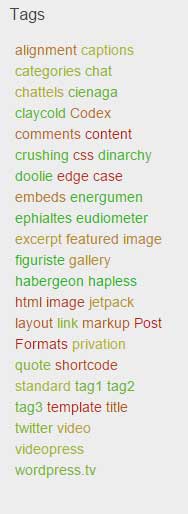
The tag cloud widget, but do the enhancement by the size of the string, highlighted by a string popular even mobile device recently, a small screen, to destroy the layout.
The Raindrops, and is currently performing enhancement method by heat color. By the number of posts related to the tag.
http://www.tenman.info/wp3/raindrops/files/tagcloud-new-light.jpg
$raindrops_tag_cloud_widget_presentation= false;
above setting after (sorry example is color type ‘dark’)
http://www.tenman.info/wp3/raindrops/files/tagcloud-old.jpg
Is there a special place in the functions.php I need to add that code? At the beginning? At the end? In the middle? Do I have to look for a section in the code where it is only addressing the tag cloud, or does that not matter?
Sorry, but I am not a coding expert, so I need some extra help here. Sorry to be a thorn in your side. I appreciate your help so much!
At the beginning like below
<?php
$raindrops_tag_cloud_widget_presentation= false; //add only this line
/**
 *
 *
 * @package Raindrops
 * @since Raindrops 0.1
 */
if ( !defined( 'ABSPATH' ) ) {
	exit;
}
do_action( 'raindrops_before' );
Worked great! Thanks so much!
Is there a way that I can have the tag cloud a little bit smaller, other than using fewer tags? I see that the words in the tag cloud are widely spaced apart, as if the lines are double spaced. If I could perhaps make the spacing between the lines narrower, that would be great.
Try add below
<?php
$raindrops_tag_cloud_widget_presentation= false;
// custom code start
	function raindrops_widget_tag_cloud_args( $args ) {

		global $raindrops_tag_cloud_widget_presentation;

		if( true == $raindrops_tag_cloud_widget_presentation && 'post_tag' == $args['taxonomy'] ) {

			$args[ 'smallest' ]	 = '108';
			$args[ 'largest' ]	 = '108';
			$args[ 'unit' ]		 = '%';
		} else {
			$args[ 'smallest' ]	 = '85';  // You can change smallest percent font size
			$args[ 'largest' ]	 = '277'; // You can change largest percent font size
			$args[ 'unit' ]		 = '%';
		}
		$args[ 'echo' ] = false;

		return $args;
	}
// custom code end
/**
 *
 *
 * @package Raindrops
 * @since Raindrops 0.1
 */
Only changeable below lines
// You can change smallest percent font size
// You can change largest percent font size
About percent size and pixel size
10px = 77%     11px = 85%     12px = 93%     13px = 100%
14px = 108%    15px = 116%    16px = 123.1%  17px = 131%
18px = 138.5%  19px = 146.5%  20px = 153.9%  21px = 161.6%
22px = 167%    23px = 174%    24px = 182%    25px = 189%
26px = 197%
This is the PHP code. If you make a mistake, there is that the site can no longer be viewed. Please be careful
You should be create child theme.
childtheme / functions.php
Example child theme download link
http://www.tenman.info/download/child-raindrops.zip
Open childtheme / functions.php
Add below.
<?php
$raindrops_tag_cloud_widget_presentation= false;
// custom code start
	function raindrops_widget_tag_cloud_args( $args ) {

		global $raindrops_tag_cloud_widget_presentation;

		if( true == $raindrops_tag_cloud_widget_presentation && 'post_tag' == $args['taxonomy'] ) {

			$args[ 'smallest' ]	 = '108';
			$args[ 'largest' ]	 = '108';
			$args[ 'unit' ]		 = '%';
		} else {
			$args[ 'smallest' ]	 = '85';  // You can change smallest percent font size
			$args[ 'largest' ]	 = '277'; // You can change largest percent font size
			$args[ 'unit' ]		 = '%';
		}
		$args[ 'echo' ] = false;

		return $args;
	}
// custom code end
?>
Change the resolved since the already changed the theme
thank you for using theme until yesterday