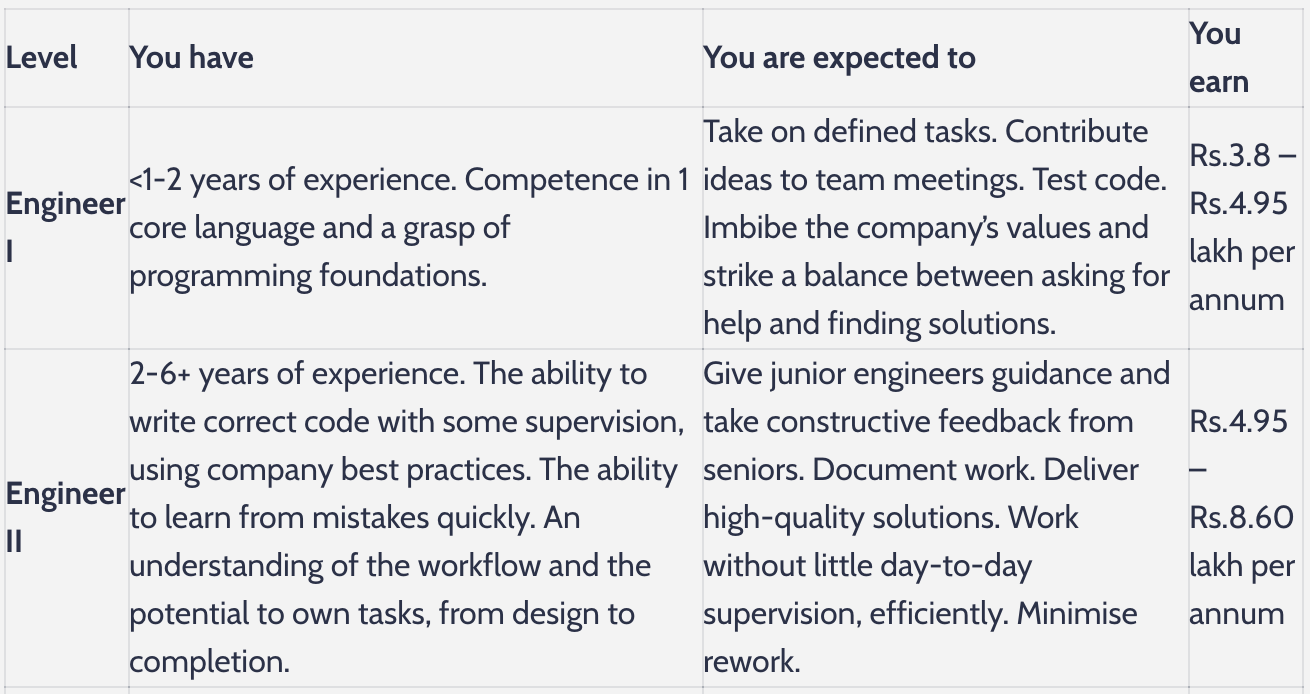
Hi,
thanks for your post, and sorry for the trouble.
To fix this glitch, likely caused by your theme, please add this to the “Custom CSS” textarea on the “Plugin Options” screen of TablePress:
.tablepress {
  table-layout: auto !important;
}
Regards,
Tobias
Hey,
Thanks for the quick response.
I inserted the code and the overlapping is not there anymore.
But the entire table became horizontally scrollable now, like the below link.
https://t500-public-use.s3.ap-south-1.amazonaws.com/wp-image/image+(2).png
Can’t we make it something like this: https://t500-public-use.s3.ap-south-1.amazonaws.com/wp-image/Screenshot+2020-06-15+at+11.15.40+PM.png (This is the image when I am editing the blog in wordpress before publishing.)
Regards,
Satya
Hi,
I’m not really sure why this happens, I assume there’s other CSS causing this. Can you please post a link to the page with the table where this problem happens, so that I can take a direct look? Thanks!
Regards,
Tobias
Hi Tobias,
Thanks for the quick response.
Here you go. Below is the link to the post with tables in it.
Link: https://talent500.co/blog/software-engineer-career-path/
Regards,
Satya
Hi,
thanks for the link!
It looks like your theme has turned line breaks off. To turn them on again, please add this to the “Custom CSS” textarea on the “Plugin Options” screen of TablePress:
.tablepress th,
.tablepress td {
    white-space: normal;
}
Regards,
Tobias
Hi Tobias,
Thanks, it’s working great.
But it’s not reflecting on other tables.
Regards,
Satya
Hi,
do you mean the other tables on that page? Those were not created with TablePress (but with the normal block editor), which is why the code does not apply there.
If you want that, you could use the modified version
table th,
table td {
    white-space: normal;
}
Regards,
Tobias
Hi Tobias,
You are really awesome 😎.
This solved the issue.
Thanks for this.
Regards,
Satya
Hi,
no problem, you are very welcome! 🙂 Good to hear that this helped!
Best wishes,
Tobias
P.S.: In case you haven’t, please rate TablePress here in the plugin directory. Thanks!
Hi,
thanks, I really appreciate it!
Best wishes,
Tobias