The import has stopped
-
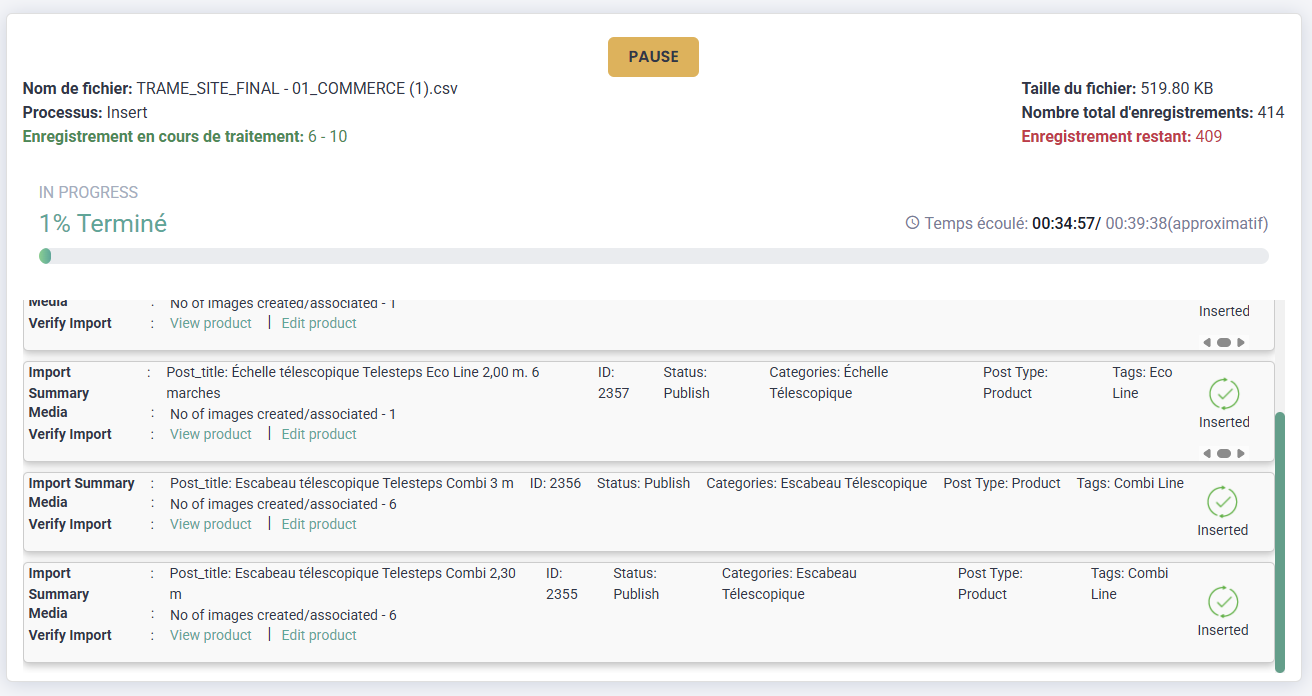
Hello, I’m having trouble importing data. I have a CSV file with over 400 products, but the import process keeps freezing. At first, it would freeze after 5 products; I restarted it, and now it freezes after 10 products. Do you know how to fix this problem?
https://stg.ain-fixations.fr/wp-content/uploads/2026/05/Capture-decran-2026-05-05-143146.png
-
This topic was modified 1 month, 1 week ago by
corentinprivas.
-
This topic was modified 1 month, 1 week ago by
-
Hi @corentinprivas,
Thanks for sharing the details. When an import stops after a few records (like 5 or 10), it can be due to several reasons, like server limits, or timeout settings.
To quickly narrow this down, we recommend trying the steps in our troubleshooting guide, which covers the most common causes and fixes:
https://www.smackcoders.com/documentation/wp-ultimate-csv-importer-pro/troubleshooting-guideIn particular, please check:
- PHP execution time and memory limits
If the issue still persists after trying these, please share the following so we can investigate this more precisely:
- Your CSV file (or a sample, if it contains sensitive data)
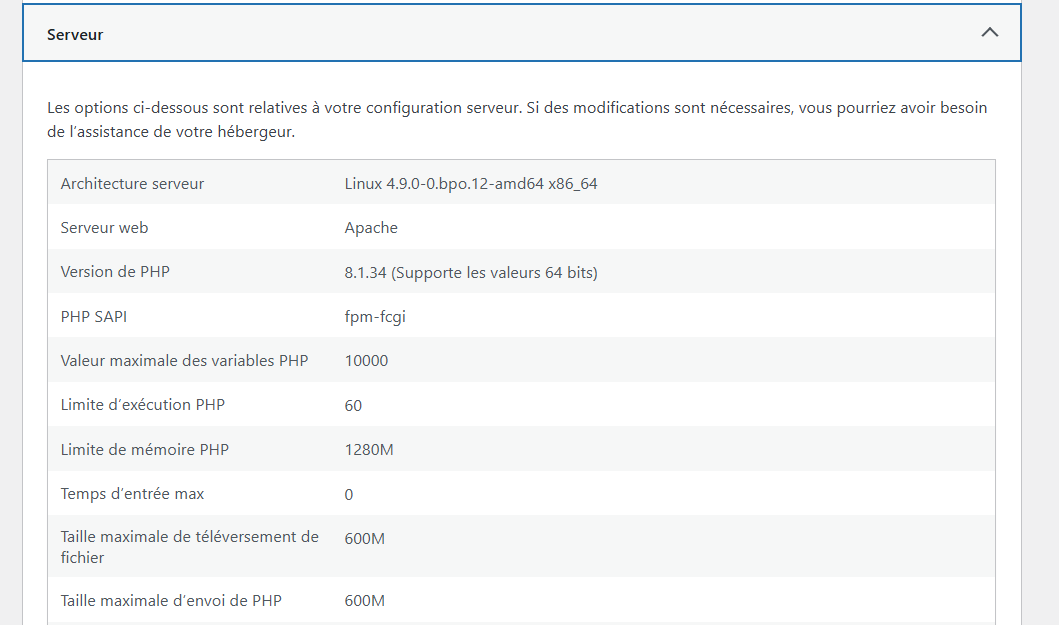
- Environment details (WordPress Dashboard → Tools → Site Health → Info)
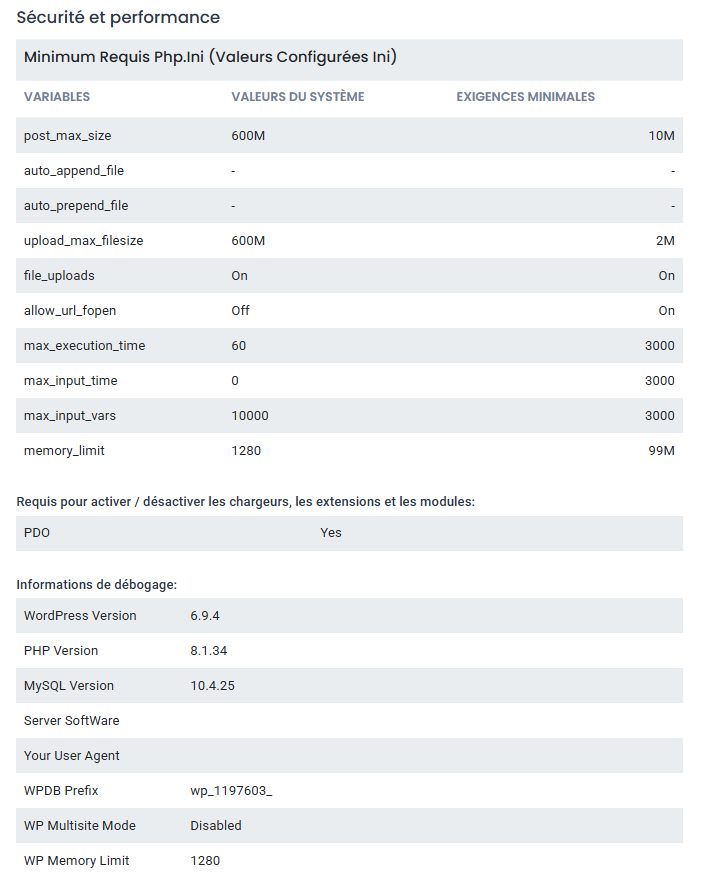
- Screenshot of the “Security” section from the plugin settings
Once we have these, we’ll be able to pinpoint exactly what’s causing the import to stop and help you resolve it quickly.
Hello @premairuthayarajan , I increased the PHP execution time and memory limits to 1280 MB, but I’m still having the same issue.
Here is the file:
https://docs.google.com/spreadsheets/d/1r9IljHrNkzzOIfA1Ax9T4SQPIEzTJD5L7AFynPAwrBI/edit?usp=sharinghttps://stg.ain-fixations.fr/wp-content/uploads/2026/05/Capture-decran-2026-05-06-095049.png
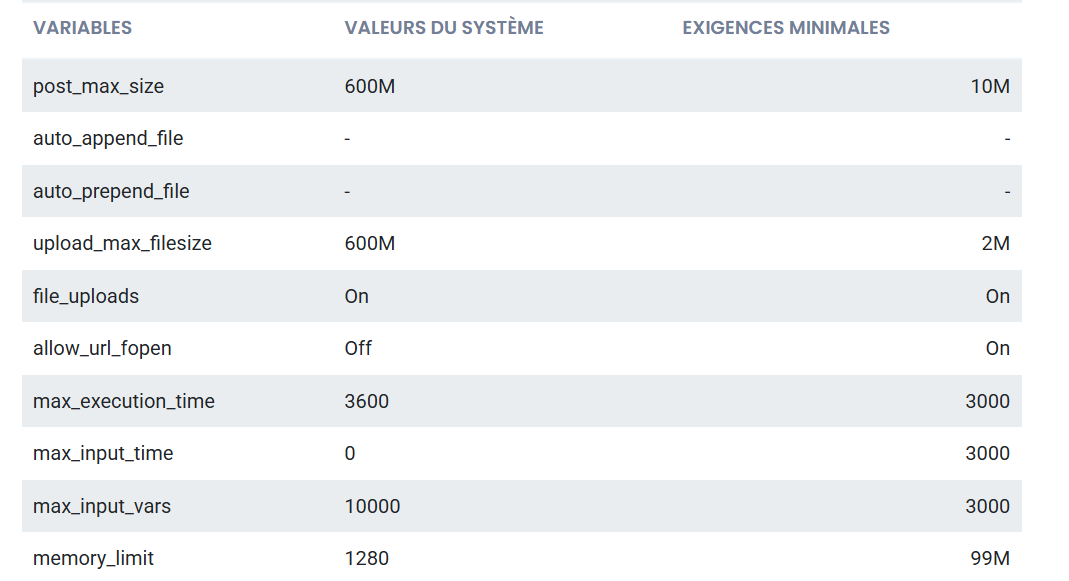
https://stg.ain-fixations.fr/wp-content/uploads/2026/05/Capture-decran-2026-05-06-095220.png
-
This reply was modified 1 month ago by
corentinprivas.
-
This reply was modified 1 month ago by
corentinprivas.
@corentinprivas Thank you for sharing the file and screenshots.
We reviewed the CSV and noticed that it contains a large number of WooCommerce products with remote image URLs. Imports of this size can place additional load on the server during image download and product creation.
To improve handling for this use case, we have further optimized the WooCommerce import process on our side, including:
- Improved remote image download handling
- Better batch execution flow for large imports
- Additional stability optimizations for bulk WooCommerce product imports
We have prepared a fix pack for this issue. Please download and update the plugin using the package below: https://drive.google.com/drive/folders/1tsIVnFxk2c-cXn0FITvLvQQ78kgS2tPg?usp=sharing
Since the import involves many products and external images, we also recommend verifying the following PHP/server settings to ensure the server can process larger batches smoothly:
- max_execution_time = 300 or higher
- max_input_time = 300 or higher
- max_input_vars = 3000
- memory_limit = 1024M or higher
- allow_url_fopen = On
These settings are especially important when importing large WooCommerce datasets with remote images in a single process.
Please try the import again after applying these settings and let us know the result. If the issue still persists, we’ll continue investigating further.
@premairuthayarajan Sorry, but it still doesn’t work https://stg.ain-fixations.fr/wp-content/uploads/2026/05/Capture-decran-2026-05-12-175926.png
@corentinprivas Thank you for your patience. Our developer has tried exactly with your environment set up and finds it working. Can you please reach out to us at [email protected]. Our team will help you resolving this.
@corentinprivas Just following up on this issue.
If you’re still facing the issue, please email us at [email protected] with the error details or screenshots. Our team will help you resolve it.
@premairuthayarajan I contacted you on May 18, and I still haven’t heard back.
Hi @corentinprivas,
We’ve searched our records but couldn’t find any email or contact associated with your previous message from May 18.
Could you please send the email again so we can check it properly and assist you further?
Thank you for your patience.
You must be logged in to reply to this topic.