Hello mareczek87,
This theme contains two layouts for blog post
(i.e
1) 2 Small Posts, Followed by 1 Full
2)Small Image and Excerpt, 2 in a Row) you can select one of the layout for this.
Hope this will helps you.
Thanks.
Ok but why my Thumbnails test 5 or test 78 color box not photo?
may be you haven’t set the featured image for test 5 or test 78
Hi mareczek87.
You should have the featured image set for all of your posts or you’ll end up with what you have right now.
I hope you’ll find this tutorial useful – http://www.wpbeginner.com/beginners-guide/how-to-add-featured-image-or-post-thumbnails-in-wordpress/.
If you have any additional questions, feel free to ask.
Kind regards.
@addweb-solution-pvt-ltd
Where and why I can select one of the layout?
You can select two different types (three in Pro version), based on your preference. Here’s the relevant part of our online documentation – https://help.lyrathemes.com/article/246-display-layouts-formats and here’s the complete online documentation for Kale (Pro) – https://help.lyrathemes.com/collection/181-kale.
Hope this helps.
Kind regards.
In theme Customization -> blog feed -> Post Display Format (With Sidebar). here you can find layout for posts.
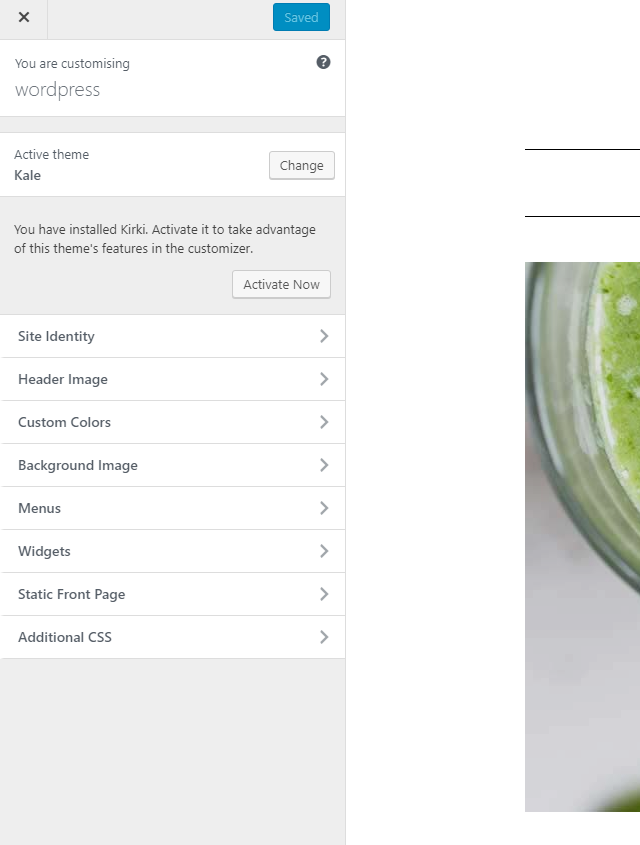
But I don’t have Blog Feed
Screen
Thank you for the screenshot.
You don’t have that option right now but you do have the notice to activate Kirki plugin “to take advantage of this theme’s features in the customizer”.
Please activate it, as instructed, and you’ll get all the missing options.
KInd regards.