Hello @debogueuse,
Please provide us with some screenshots or a short video of the errors you faced step by step.
You can upload your files to one of the following online services:
https://postimages.org
https://loom.com
https://drive.google.com
https://wetransfer.com
https://dropbox.com
Note 1: Sending screenshots from your issues would be helpful for faster support.
Note 2: Perhaps, it’s a cache issue, so please follow the steps explained in this link: https://www.documate.org/automation/what-is-a-hard-refresh-how-to-do-a-hard-refresh-in-any-browser/.
Win: Ctrl+Shift+R
Mac: Shift+Command+R
Note: if you have a cache on the server cache or using the CDN; You need to clear its cache contents or disable them.
Best Regards
Hello Shahin,
Thank you for your quick reply.
To which address should I send you the screenshots with the online services you refer to, please?
Thanks in advance.
Regards
Hello @debogueuse,
You can upload the screenshots on this link:
https://postimages.org/ and share the direct link here.
Best Regards
Hello Shahin,
For you to better understand, I send you the links to the screenshots of my site for each action performed:
1. Page customization screen before changing the title background image :
https://postimg.cc/delete/HF5KR3B7/0bd3fd05
2. Page personalization screen after selection of another background image: the new image is not taken into account :
https://postimg.cc/delete/f6zKCvFs/b8d5bea9
3. After a hard refresh of the page (Ctrl + F5 on Firefox), the modification is still not taken into account :
https://postimg.cc/delete/KWdTvNNY/2ac948ca
4. By loading another page, the new title background image is however taken into account :
https://postimg.cc/delete/JS6Dwc0M/4f497ad6
I also specify that I had cleared all the caches of my site before these manipulations.
I was wondering if the problem was due to the original image being “attached” to the page in WordPress media… What do you think?
Thank you in advance for your help.
Best regards,
Hello @debogueuse,
Thank you for the update,
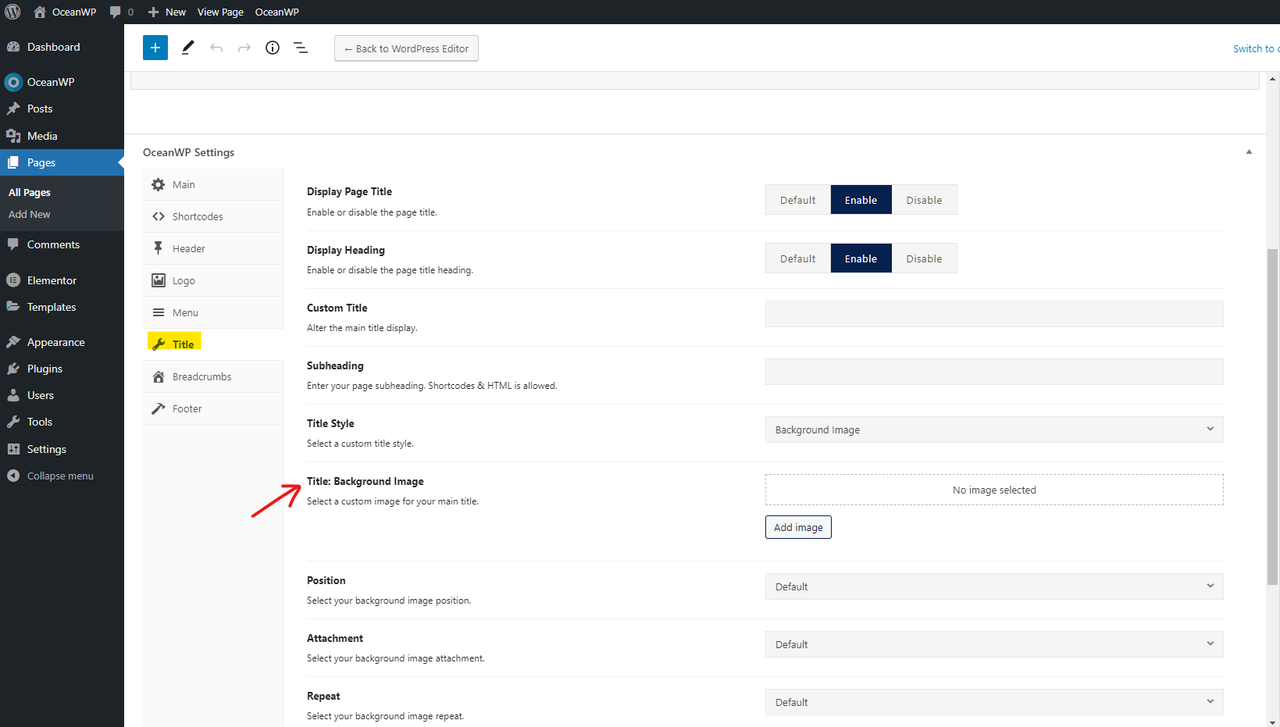
Please navigate to your desired post(s)/page(s) in the back-end(WP Dashboard). Then check the OceanWP settings. It seems you’ve set a custom background image under the page. The customizer will set the background image for all posts/pages, but if you set it in a special post/page, then OceanWP settings will overwrite that and will not change from the customizer. Please check this screenshot: https://i.postimg.cc/vHDJgkx3/image.png.
I hope that helps.
Please let me know if you have any questions about the above solution.
Best Regards
Hello Shahin,
You saw it right!! I don’t remember why, but I had set a background image on the “Contact us” page in the OceanWP settings (the same as the one set in the customizer), which made any change of image from the customizer ineffective… You are definitely very perceptive 🙂
Thanks a lot for your help !
Best regards
You’re most welcome,
I’m glad we could help.